OKEx 101 Season 5
OKExSession 5 – Margin & Leverage
Margin trading is way of trading by borrowing assets from traders or exchanges.
It allows users to use a small amount of initial capital to leverage their positions for maximizing profit on spot trading.
At the moment we support 54 assets in Margin trading including BTC, ETH, LTC, OKB, BCH, BSV, ETC, EOS, XRP, TRX, LINK, SUSHI, UMA, YFI, YFII, DASH, NEO, QTUM, XLM, ADA, ALGO, ANT, ATOM, BAT, BTM, BTT, COMP, CRV, DOGE, DOT, ELF, HBAR, HC, IOST, IOTA, KNC, LEND, MKR, NAS, OMG, ONT, RVN, SNT, SNX, SRM, THETA, VSYS, WAVES, XEM, XMR, XTZ, ZEC, ZIL & ZRX.
Alright, let’s walk through the process of margin trading.
For margin trading, you need to transfer your funds into Margin Account, we will take OKB/USDT margin trading as an example.
📕 Step 1: Log in and choose “Transfer” of Asset lists
Transfer OKB from your “Funding Account” to “Margin Account for spot”
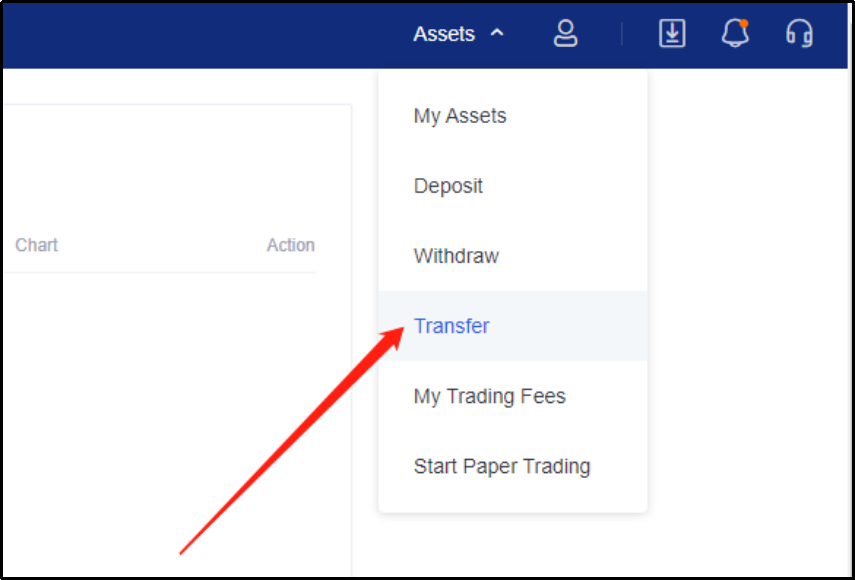
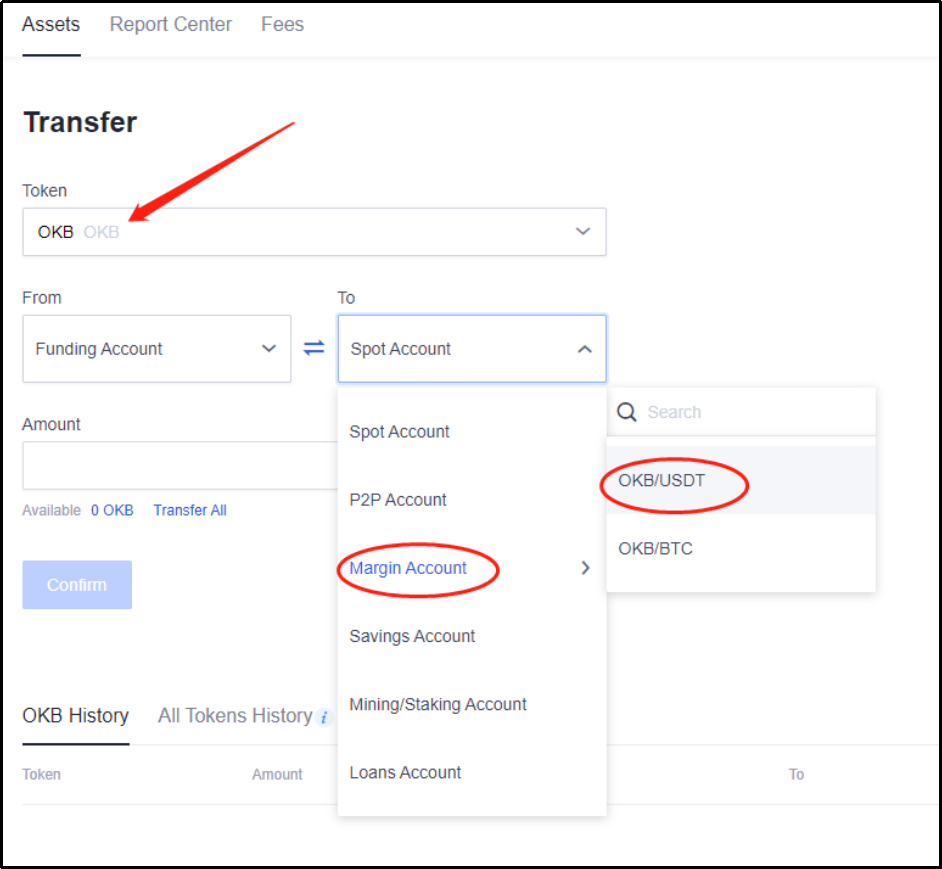
📕 Step 2: Once you have transferred then proceed to Click on “Trade”, and select “Margin trading”
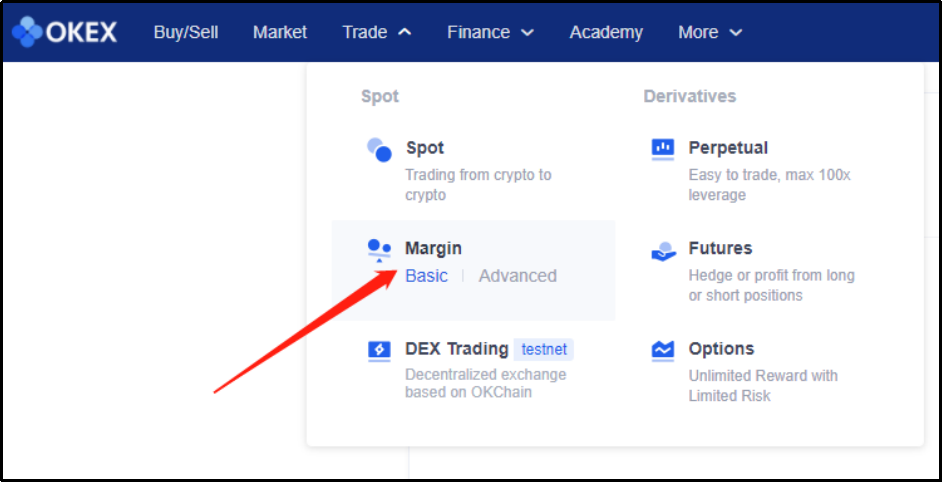
📕 Step 3: Select the times of leverage on the upper right to switch to leveraged mode, In this case ,we will long OKB , so we borrow USDT
Followed by
📕 Step 4: Click on “Borrow” and input the number of USDT you wish to borrow.
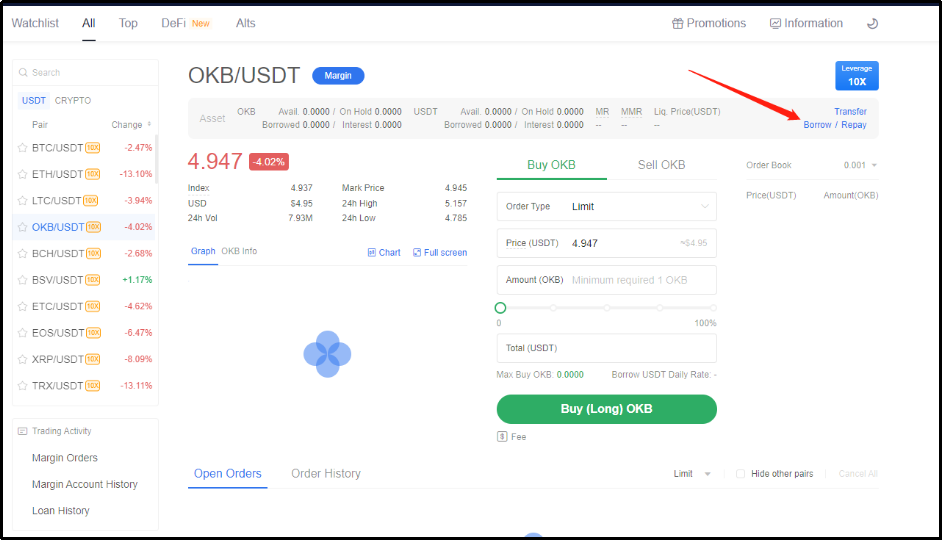
📕 Step 5: Input the price and numbers of OKB, click on “buy (long)”
If you short OKB, you have to borrow OKB as collateral.
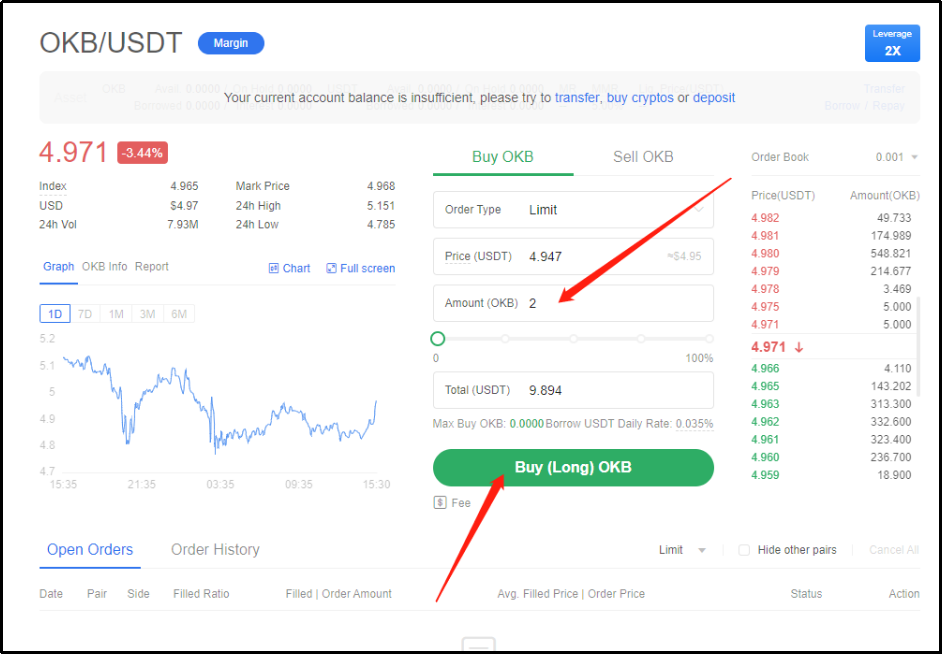
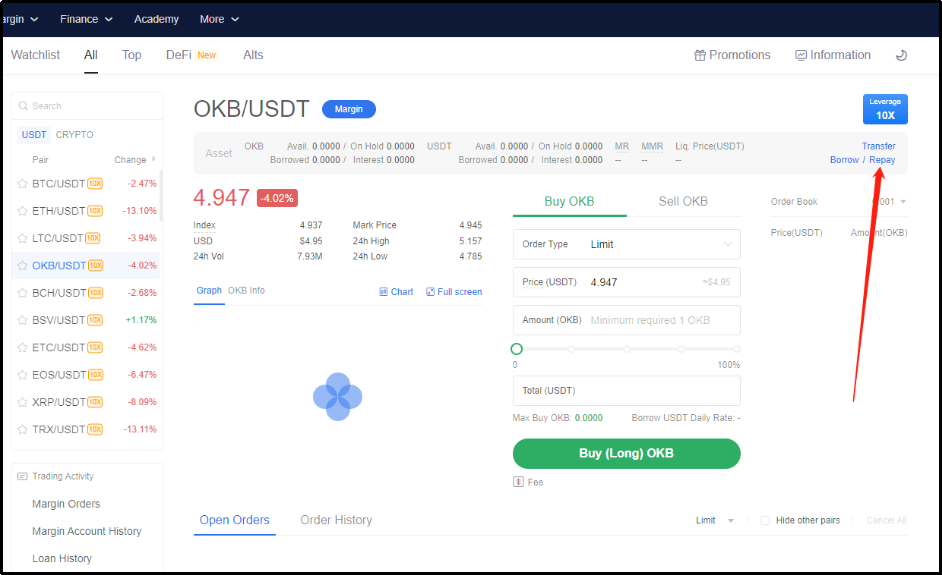
📕 Step 6: Once the position is closed, click on “Repay” on the right, fill in the repayment and submit to repay the borrowing USDT plus interests.
let’s take a look at What is Margin & Leverage?
**What is Margin & Leverage?**
Futures margin is a good-faith deposit, or an amount of capital one needs to post or deposit to control a futures contract.
There are 2 margin modes available in OKEx: cross-margin and fixed margin. For cross-margin mode, the position margin required varies with the price movements. For fixed-margin mode, the position margin remains the same even the price fluctuates.
**What is Leverage?**
Leverage allows traders to enter a position which is worth much more by committing only a little amount of money.
The gains or losses are therefore, greatly magnified. OKEx currently provides choices of 10x and 20x leverages under full liquidation mode, and 1-100x leverages under partial liquidation mode.
When a user holds 5 BTC and trades with a 10x or 20x leverage, he will bear the risks of a 50 BTC or 100 BTC trade. This magnifies the risk for 10x or 20x, but at the same time, it also increased the potential gains for 10x or 20x.
**Can I Add Margin after Opening a Position?**
In fixed margin mode, “auto margin” is disabled by default. User may choose to enable it by clicking the button in futures trading.
When “auto margin” is enabled, our system will transfer funds from the futures account balance to the margin of the contract whenever its margin ratio reaches 10% (10x) / 20% (20x), which is also the initial margin, for full liquidation mode.
For partial liquidation mode, our system will transfer funds from the futures account balance to the margin of the contract whenever its margin ratio is lower than the required maintenance margin ratio.
Then our system will try to recoup the margin ratio to 100% or as many as possible with the funds available in the futures account balance. And it will repeat this process whenever the margin ratio reaches the required maintenance margin ratio again.
However, our system will not add the margin if it won’t help to avoid forced liquidation.
**Can I Add Margin Manually?**
Yes. However, you may only do so in fixed margin mode. Disable “auto margin” and choose the amount of margin you would like to add to manage risk precisely.
Congratulations! You have now successfully completed your OKEx 101 - New User Tutorial Season 1! 🎉🎉