Nusantara Bootanimation Description
@alvrahesta# Deskripsi Bahasa Indonesia
- File yang saya upload merupakan file bootanimasi.
- Bukan Modul Magisk dan Bukan file flashable.
- File 1080px dan 1440px memiliki resolusi dan size yang sama, tetapi memiliki pengaturan yang berbeda.
Note: Backup bootanimation.zip yang asli,
Bisa dengan cara me-rename nya menjadi bootanimation.zip.bak , atau
copy paste di tempat lain.
- Cara pasang secara umum:
- Download bootanimasi sesuai dengan lebar resolusi layar,
misalnya resolusi HP 1080 x 1920, maka pilih "bootanimation for 1080px.zip". - Masuk ke File Manager.
- Rename menjadi "bootanimation.zip".
- Copy Paste dan atau Replace/Timpa ke lokasi bootanimation yang asli.
Android 9 (Pie): root/system/media
Android 10 (Q): root/system/product/media
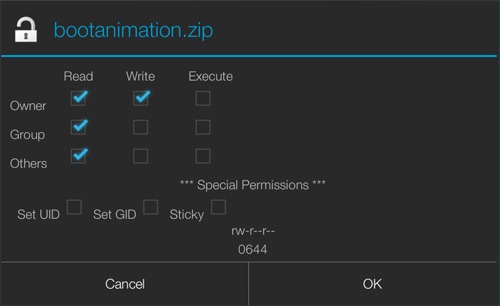
Android 11 (R): root/mnt/product/media - Pastikan Permission file menjadi 0644, seperti gambar berikut.
Metode pemasangan bisa berbeda-beda sesuai perangkat HP masing-masing.
Jika terdapat kendala dapat ditanyakan ke Grup HP kalian.
#CMIIW
# English Description
- The file I uploaded is the bootanimation file.
- It's not a Magisk module and not a flashable file.
- 1080px and 1440px files have the same resolution and size, but have different settings.
Note: Backup original bootanimation.zip,
You can rename it to bootanimation.zip.bak, or
copy paste elsewhere.
- How to install in general:
- Download the boot animation according to the width of the screen resolution,
for example the HP resolution is 1080 x 1920,
then select "bootanimation for 1080px.zip". - Go to File Manager.
- Rename it to "bootanimation.zip".
- Copy Paste and or Replace / Overwrite to the original bootanimation location.
Android 9 (Pie): root/system/media
Android 10 (Q): root/system/product/media
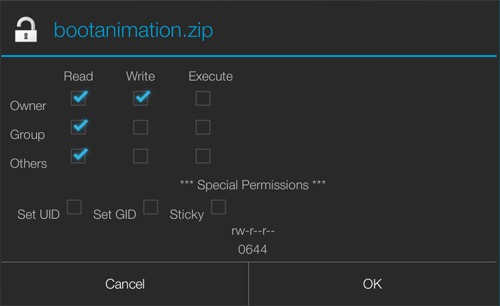
Android 11 (R): root/mnt/product/media - Make sure the Permission file becomes 0644, as shown below.
The installation method may vary according to each device.
If there are problems, you can ask your device group.
#CMIIW