🤖 NEBORTRADE PRO — AI Trading Guide
https://nebortrade.com/ai-tradingIntroducing AI Trading in NEBORTRADE PRO!
Our AI Trading system automatically monitors currency pairs, analyzes market conditions, identifies potential entry points, and executes trades based on predefined rules.
Every trading decision follows a transparent, multi-stage verification process. The AI evaluates market data, checks historical patterns, calculates signal quality, and verifies trading restrictions before placing an order.
Let's explore how it works and how to configure it.
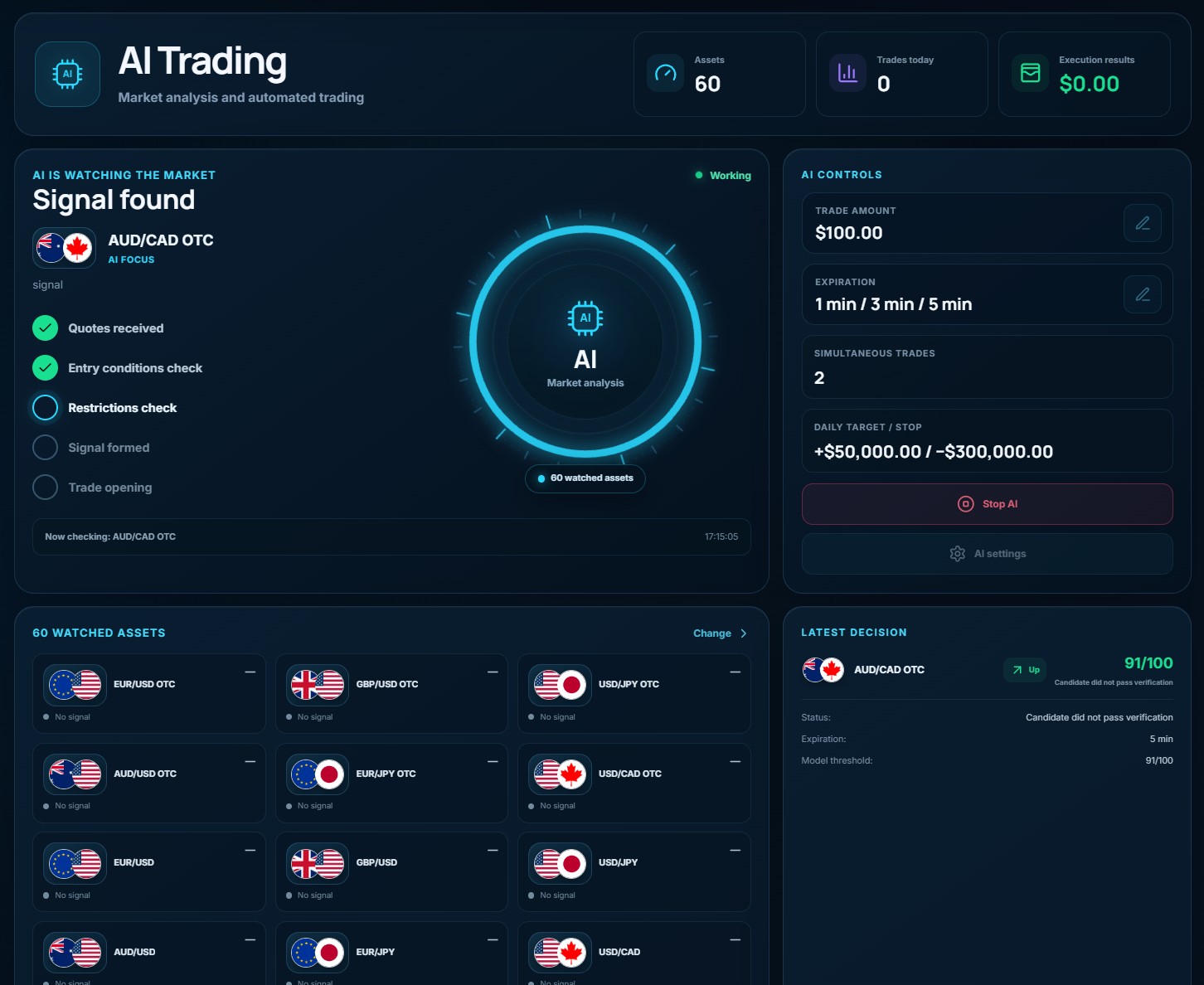
1. AI Trading Dashboard
At the top of the AI Trading page, you'll find three key indicators:
📊 Assets — The number of currency pairs available for AI analysis. The example shows 60 assets.
📈 Trades Today — The total number of trades executed today.
💰 Execution Results — The financial results of completed trades.
These indicators help you monitor AI activity and trading performance.
2. AI Controls — Trading Settings
The AI Controls panel is located on the right side of the dashboard.
Here, you can configure how the AI executes trades.
💵 Trade Amount
Set the amount the AI will use for each trade.
For example, if you enter $10, each new trade will be opened with a $10 investment.
Choose your trade amount carefully based on your account balance and risk tolerance.
⏱ Expiration
Select the expiration times available to the AI:
- 1 minute
- 3 minutes
- 5 minutes
You can allow multiple expiration times simultaneously.
The AI evaluates the permitted options and selects the expiration with the strongest signal score.
📊 Simultaneous Trades
Set the maximum number of trades that can be open at the same time.
For example, if you select 2, the system will not open a third trade while two positions are already active.
🎯 Daily Target / Stop
Configure your daily trading limits.
Take Profit — Your daily profit target.
Stop Loss — Your maximum permitted daily loss threshold.
When a configured limit is reached, the system stops opening new trades according to its trading rules.
These settings do not guarantee an exact maximum loss because previously opened trades may still be active.
▶️ Start AI / Stop AI
Click Start AI to activate automated market analysis and trading.
Once activated, the AI begins scanning your selected currency pairs and searching for suitable trading opportunities.
Click Stop AI to stop the system from opening new trades.
Already opened trades may continue until their expiration.
⚙️ AI Settings
Click AI Settings to configure additional trading parameters, including supported options such as:
- Minimum payout.
- AI Score threshold.
- Allowed expiration times.
- Selected currency pairs.
- Cooldown between trades.
- Maximum number of trades.
- Trading limits and restrictions.
The available settings depend on the current service version.
3. How AI Market Analysis Works
NEBORTRADE PRO uses a multi-stage analytical process to evaluate potential trading opportunities.
Here is exactly how the AI processes market data and determines whether a trade can be opened.
Step 1 — Market Data Collection
The AI scans your selected currency pairs one by one.
For each pair, it retrieves real market quotes and candlestick data through the shared Pocket Option administrative session.
Step 2 — Closed Candle Analysis
The AI analyzes only fully closed 1-minute (M1) candles.
It does not use the currently forming candle because its price and direction may change before closing.
This prevents unfinished candle movements from influencing the analysis.
Each candle is analyzed only once.
Step 3 — Payout Verification
Before performing deeper analysis, the AI checks the current payout for the selected currency pair.
If the payout is below your configured minimum, the pair is immediately skipped.
For example, if your minimum payout is 80%, an asset offering 70% will not qualify.
Step 4 — Multi-Factor Market Analysis
The AI evaluates several market characteristics simultaneously:
📈 Price Movement — Price changes over the last 1, 3, and 5 closed candles.
📊 Trend Direction — Short-term and longer-term market trends.
📉 RSI — Relative Strength Index, used to evaluate price momentum.
📍 Price Range — The current price position relative to recent highs and lows.
🌊 Volatility — The intensity of recent price fluctuations.
🕯 Last Closed Candle — Its size, direction, and characteristics.
⚡ Movement Strength — The strength of the current price movement.
These factors are combined to evaluate the potential direction of the next price movement.
Step 5 — Historical Pattern Validation
Before generating a signal, the AI checks whether similar market conditions have produced successful results in recent historical data.
The validation requires:
- At least 90 closed M1 candles.
- A sufficient number of historical upward and downward movement examples.
- A historical validation result of at least 53%.
If the historical data is insufficient or the pattern fails validation, the AI skips the signal.
Historical performance does not guarantee future results.
Step 6 — AI Score Calculation
After the previous checks, the system calculates an AI Score from 0 to 100.
The score is based on two weighted components:
72% — Model Confidence
The model's confidence in the predicted market direction.
28% — Historical Validation
The historical performance of similar market patterns.
The AI combines these components into a final signal score.
Important: The AI Score is an internal signal-quality metric, not a guaranteed win probability.
Step 7 — AI Score Threshold
You can configure the minimum AI Score required to generate a trading signal.
Examples:
- 60 — Signals with an AI Score of 60 or higher are accepted.
- 72 — Signals must reach at least 72.
- 85 — Only signals scoring 85 or higher qualify.
The default threshold is 72.
A higher threshold applies stricter signal filtering, but does not guarantee better trading results.
Step 8 — Trade Direction and Expiration
Once the signal meets the required threshold, the AI compares the available expiration times.
It selects the option with the strongest evaluation score and determines the trade direction:
🟢 UP — The AI predicts that the price will rise.
🔴 DOWN — The AI predicts that the price will fall.
Step 9 — Final Trade Verification
Even after a valid signal is generated, the AI performs additional checks before opening a trade.
The system verifies:
- Current payout.
- Maximum number of simultaneously open trades.
- No existing open trade on the same currency pair.
- Required cooldown after the previous trade.
- Maximum number of trades.
- Take Profit and Stop Loss limits.
- Sufficient trading account balance.
- Active access to AI Trading.
- No duplicate signal on the same candle.
A trade is opened only when all required conditions are satisfied.
4. Live AI Activity Monitor
The central section of the dashboard displays the AI's current activity.
You can follow the analysis process through five stages:
- Quotes Received — Market data has been retrieved.
- Entry Conditions Check — The AI evaluates the trading setup.
- Restrictions Check — Trading limits and restrictions are verified.
- Signal Formed — A qualifying trading signal has been generated.
- Trade Opening — The system submits the trade for execution.
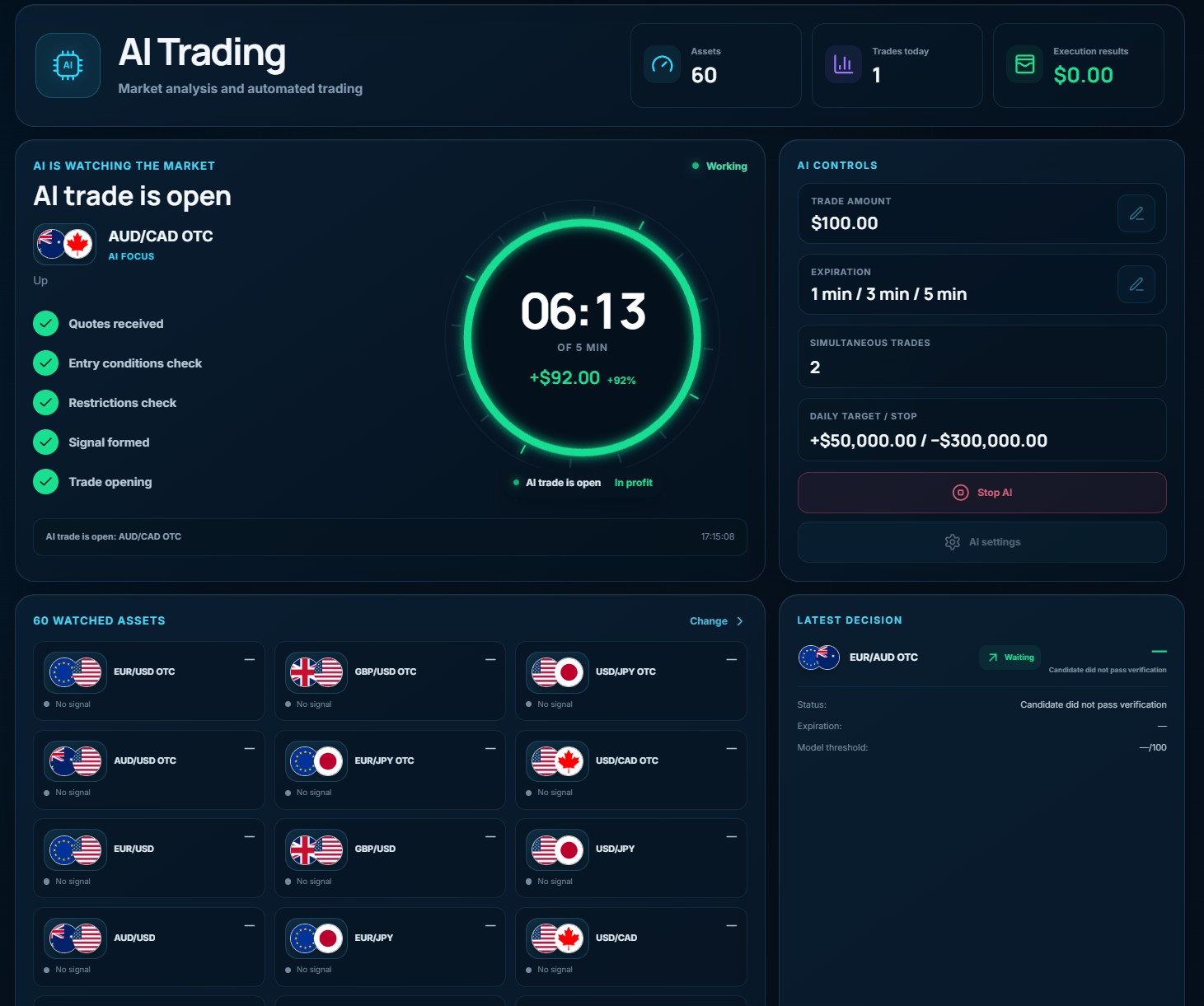
The animated circular indicator displays the current trading or analysis status.
When a trade is active, the interface can display its direction, expiration countdown, and financial information.
Below the monitor, the activity log provides updates about the AI's current actions.
5. Watched Assets
The 60 Watched Assets section displays the currency pairs available for analysis.
Each asset card shows:
- Currency pair.
- Current signal status.
- Available trading information.
Click Change to manage which assets the AI monitors.
If the system has not identified a qualifying opportunity, the asset displays No Signal.
The AI does not need to open a trade on every currency pair. It can skip assets that fail the configured requirements.
6. Latest Decision
The Latest Decision panel provides information about the AI's most recent trading decision.
Depending on the result, it can display:
- Currency pair.
- Trade direction or candidate status.
- Execution status.
- Expiration time.
- Model threshold or score information.
- Completed trade result.
For example, an AI Score of 92/100 means the signal received 92 points under the internal scoring system.
It does not mean the trade has a guaranteed 92% chance of winning.
If the interface displays Candidate did not pass verification, the potential signal did not satisfy the required conditions and was not approved for execution.
7. Important Trading Recommendations
Before activating AI Trading:
- Connect your Pocket Option account.
- Start with a demo account to understand how the system behaves.
- Select the currency pairs you want to monitor.
- Configure your minimum payout and AI Score threshold.
- Choose your trade amount and allowed expiration times.
- Set reasonable daily profit and loss limits.
- Review your settings before clicking Start AI.
AI Trading is an automated analysis and execution tool, not a guaranteed income system.
Even signals that pass every verification stage can result in losses. Market conditions can change unexpectedly, and historical validation does not ensure future profitability.