MyRepoBot - Documentation
RedwerkOn this page, we are collecting mini guides and answers to the most frequently asked questions. If you couldn't find an answer to your question, or experience any issues using MyRepoBot, feel free to reach out to us through myrepobot@redwerk.com
What is MyRepoBot?
MyRepoBot is a Telegram bot that allows you to integrate with your Github, Gitlab or Bitbucket repositories. Manage your Telegram integration using simple commands to retrieve updates in repositories and get reminders about pending pull requests.
How do I get started?
1. Open t.me/my_repobot
2. Click "Start"
3. Enter /connect command
4. Choose the 'Add or edit credentials' option
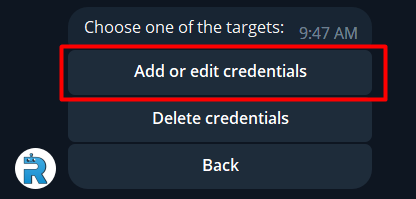
5. Choose your repository provider - Github, Gitlab, or Bitbucket.
6. You must create an access token for the app from your Github/Gitlab/Bitbucket account. Follow the instructions for the selected repo.
Can I use MyRepoBot for self-hosted Github/Gitlab solutions?
No, you only can use MyRepoBot if you use Cloud version of Github or Gitlab. It won't work with self-hosted repos.
Why don't I see all my repositories in the list of repos in MyRepoBot?
The issue may be that you don't see some private repos. You must be the admin of the private repository if you want to receive updates from private repos. Public repos work without restrictions.
Can I use the bot in the Telegram Channel?
No, the bot doesn't support Channels in Telegram, but you can still use it in Telegram Group.
Can I connect several repositories to the bot?
You can simultaneously connect multiple repos (Github, Gitlab, or Bitbucket) types, but you are restricted to using one account for each repo type, so you can't use two Github accounts at the same chat, for example. If you want to use two Github accounts you can create a group chat with the bot and connect the bot to another account there.
What is a reminder in MyRepoBot?
Reminders are scheduled messages that you receive with a set-up frequency about Pull requests that are stuck in the open state for some time. For example, in your project group, you can set up that you want to get a reminder every day at 10 a.m. about PRs that are open for more than 2 days. Doing so can encourage your team to review them and deliver code faster.
Which repo events does MyRepoBot support?
- New branch was pushed
- Changes was pushed to branch
- Changes was FORCE pushed to branch (only for Github and Bitbucket)
- Branch was deleted
- Repository was forked (only for Github and Bitbucket)
- Repository settings was changed (only for Bitbucket)
- Build in progress
- Build successful
- Build failed
- New Issue created
- Issue was updated
- Issue was closed
- New Pull Request/Merge Request
- Pull Request was changed
- Pull Request Approved
- Pull Request Approval removed (only for Gitlab and Bitbucket)
- Pull Request Changes requested (only for Github and Bitbucket)
- Pull Request Change request cancelled (only for Bitbucket)
- Pull Request Merged
- Pull Request Declined
- New comment in the commit
- New comment in the issue
- New comment in Pull Request
- Comment in the Pull Request was deleted (only for Github and Bitbucket)
How to disconnect my account from the bot?
To disconnect your account use /connect > Delete credentials. Your authorization token and all subscriptions and reminders settings will be deleted after disconnection.
Does the bot has localizations?
No, MyRepoBot only has English version.