Monet Issues:
DeanIf You are facing Issues with multi select monet colour, then follow this guide.
This guide is for users who are facing issue that is described here and here
Non Rooted Users:
If You don't have root Access you can fix this issue using A Computer or a laptop.
Go to Settings > About Phone > Tap on build number 7 Times. Developer options will be enabled.
Go into Settings > System > Developer Options and turn on "USB debugging" .
Install Adb and fastboot drivers on pc from here
Open CMD Window in your Computer and laptop, connect your phone to your laptop while the phone is booted in system, type " adb devices " on your cmd window, a pop up will appear on your Phone, allow it.
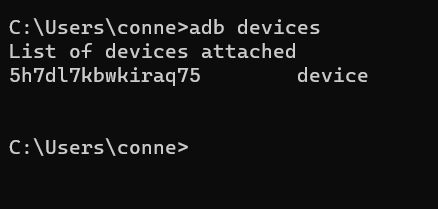
After Typing adb devices if you see a random numbers with letters , it means you are good to go
adb shell "settings delete secure theme_customization_overlay_packages"
Copy the above command and paste it in cmd and hit enter. this should solve your monet issue.
Rooted Users:
Install Termux from playstore, or any terminal emulator.
su -c "settings delete secure theme_customization_overlay_packages"
copy paste this command in your terminal window and hit enter, this should solve your issue.