Metale Tutorial #5: Trade Overview
Metale Protocol
This guide is designed to help everyone understand how and where to trade various types of NFTs and tokens directly on the Metale platform, including all details and supporting tutorials.
Trade on Metale platform
1. Click on Trade and find 3 different sections within the pop-up window:
- Bonding Curve
- NFT Market
- Crypto
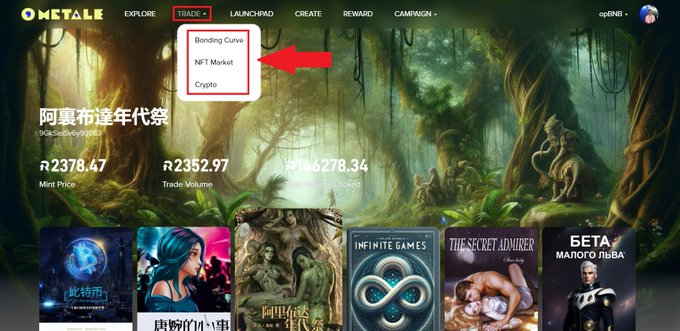
Next, we describe each section separately, along with all the specific features contained within each.
Bonding Curve
In the Bonding Curve section of the Trade page, everyone can view global live statistics for all existing content NFT collections in this economic model. This section is solely for monitoring activities related to Bonding Curve NFTs and does not involve any additional actions. You can easily navigate to any NFT collection or user directly from this page by clicking on them.
There are 3 different subsections:
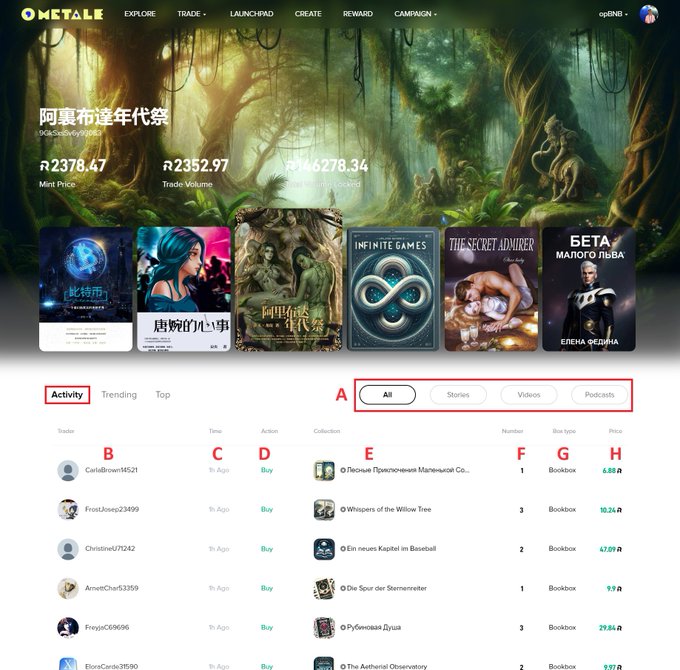
1. Activity
This is the most active subsection within the Bonding Curve section. Every NFT transaction that covers all content collections in this model is listed here every minute, with newer transactions appearing at the top of the list. Below, we explain each of the indicators.
A. Filters: Select different types of content or simply keep "All".
B. Trader: To check the traders account, simply click on the name to open their profile. From there, you can check their created NFT collections, collected NFTs, NFT orders, or Bonding Curve activity.
C. Time: How long ago the trade was made.
D. Action: "Buy" or "Sell" types (on the NFT collection page for Bonding Curve "Buy" represents "Mint" button, "Sell" represents "Sell" button).
E. Collection: Click on the title to open the NFT collection page (Read more in Metale Tutorial #4: Collection Page).
F. Number: The number of NFTs for a particular trade.
G. Box type: Simply distinguish different types of content by their corresponding boxes: Bookbox, Videobox, and Audiobox.
H. Price: Price of a particular trade (depends on the number of NFTs).
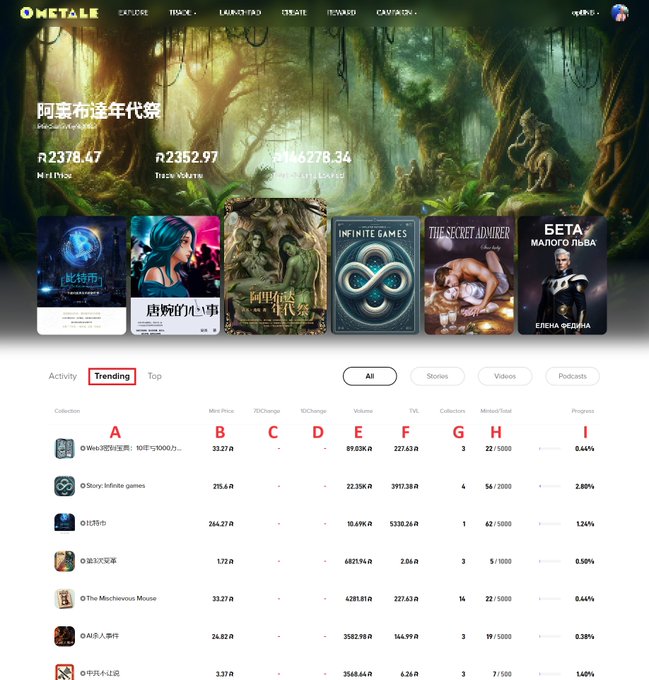
2. Trending
In this subsection, all NFT collections are sorted on the leaderboard by the "Volume" indicator, with the top collection having the highest all-time value at the top of the list.
A. Collection: Click on the title to open the NFT collection page.
B. Mint Price: The current price to mint 1 book/video/audio-box of the NFT collection.
C. 7DChange: The percentage change in the mint price over the last 7 days.
D. 1DChange: The percentage change in the mint price over the last 24 hours.
E. Volume: The overall trading volume of the NFT collection for all time.
F. TVL: Total Volume Locked in the NFT collection now.
G. Collectors: The current number of NFT holders with at least 1 book/video/audio-box minted.
H. Minted/Total: The current number of minted NFTs in the collection/the total NFT supply available in the collection.
I. Progress: The percentage of NFTs that have been minted relative to the total NFT supply of the collection.
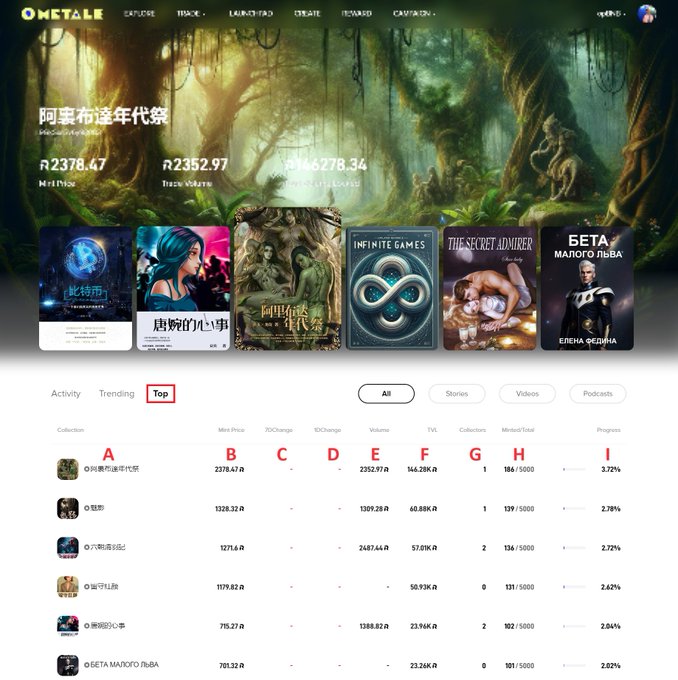
3. Top
In this subsection, all NFT collections are sorted on the leaderboard by the "Mint Price" indicator, with the top collection having the highest all-time mint price at the top of the list.
Since the indicators (A-I) are the same as those for the Trending subsection, there is no need to describe them again. Please check the content above.
NFT Market
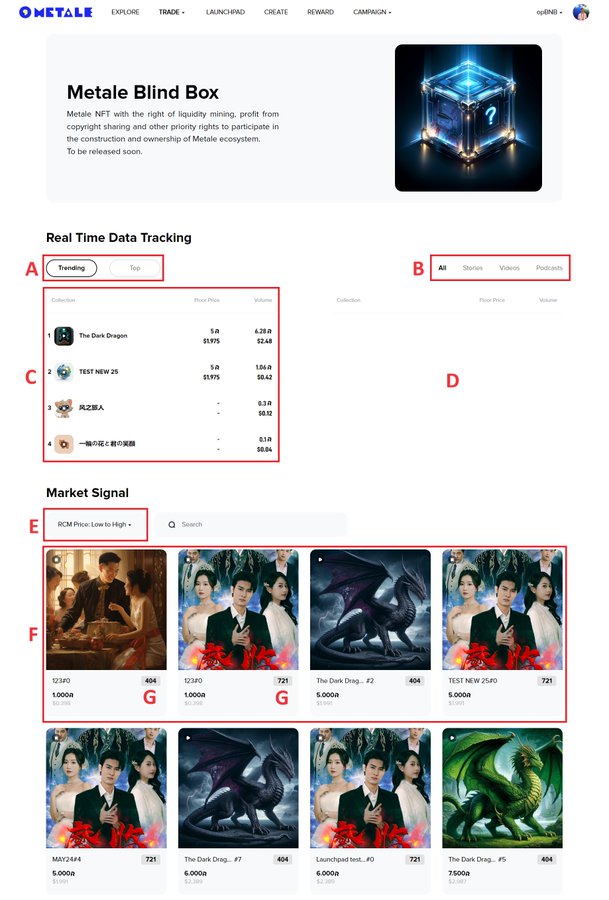
This page serves as the global Metale NFT marketplace for all collections in the 721 and 404 standards. Here, everyone can find any NFT orders and view a leaderboard of the most popular collections. This section implies that any user can discover and trade NFTs with the help of pop-up windows, which are discussed below.
A. Trending/Top: These are the two filters for the global leaderboard of all 721/404 NFT collections on Metale NFT Market. "Trending" sorts top collections by volume, while "Top" sorts them by floor price.
B. Filters: Select different types of content or simply keep "All".
C. Leaderboard (in $RCM): Track the top content collections in real-time by volume or floor price.
D. Leaderboard (in $BNB): The same, but in $BNB.
E. Price filter: Choose different price filters to sort all available NFT orders in the Market Signal section.
F. NFT Orders: Check out all available NFTs here.
G. 404/721: Both NFT standards can be traded like common NFTs, so pay attention to this label.
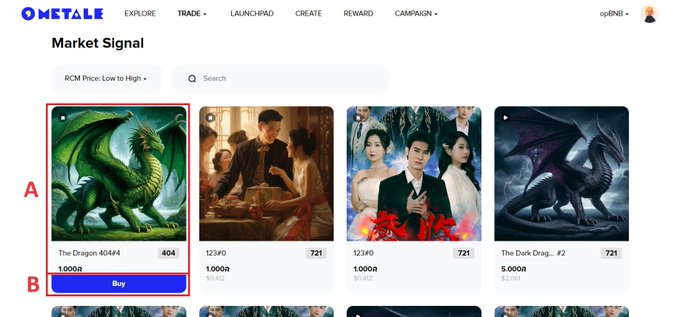
Now, let's look at two variations of pop-up windows for buying an NFT:
A. Unique NFT Page: Click on the cover to open a page for the particular NFT.
B. Buy: Click on this button to open a purchase confirmation window.
Unique NFT Page
After opening this page, you can view all available information about the particular NFT and track its entire trading history.
A. Buy: Click on this button to open a purchase confirmation window.
B. Blockchain: The chain on which the NFT collection (and, obviously, this particular NFT) is deployed.
C. Contract address: The address of the content NFT collection smart contract. You can always check all data of the NFT collection on-chain using different scanners, for example opBNBscan. This is crucial for NFTs in the 404 standard. You can copy this address by clicking on it and paste into tools like dexscreener to track the 404 NFT collection token chart, also trade on any DEX.
D. Arity: Rarity percentage of this unique NFT within the entire content collection. To understand the calculation method, read Metale Tutorial #3: Create Overview.
E. Collection: The title of the content collection, click on it to enter the NFT collection page.
F. Copyright share: The copyright rate assigned to the particular NFT. By default, each NFT has a "1," meaning that if there are 100 NFTs in a collection in total, owning 1 NFT owns you 1% of the copyrights of that collection.
G. Trading History: Check the seller and buyer profiles, deal price, and trade date. This history is specific to this individual NFT.

Purchase Confirmation Window
Click on the "Buy" to open a purchase confirmation window and proceed with the transaction:
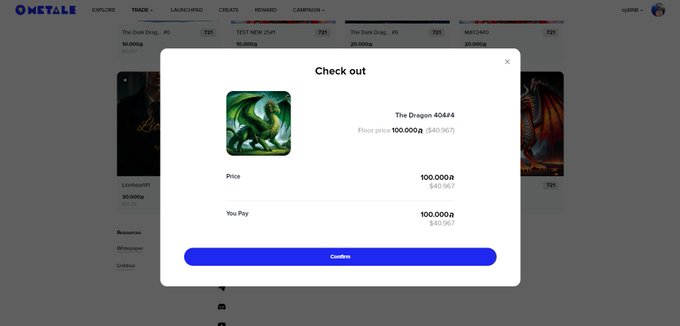
After purchasing an NFT, you can find it in Profile > Collected > NFT. Read more in Metale Tutorial #2: Profile Overview.
Crypto
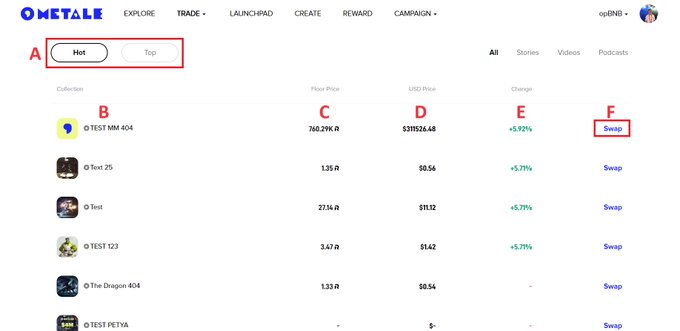
This is the primary trading page for NFT content collections in the 404 standard. From here, everyone can directly trade 404 tokens on DEX using the built-in Metale platform interface, and then monitor the token charts on external platforms like dexscreener or other DEX protocols.
A. Hot/Top: If you're interested in the highest growth percentage of a specific 404 token of the content collection, sort the leaderboard by "Hot." For the top collections by floor price, use "Top."
B. Collection: Click on the title to open the NFT collection page
C. Floor price: The current 404 token price in $RCM,
D. USD Price: The current 404 token price in USD (directly related to $RCM price).
E. Change: Percentage change in the price of a 404 token of the NFT collection.
🌟 F. Swap: Click on "Swap" to access the special interface for trading 404 tokens.
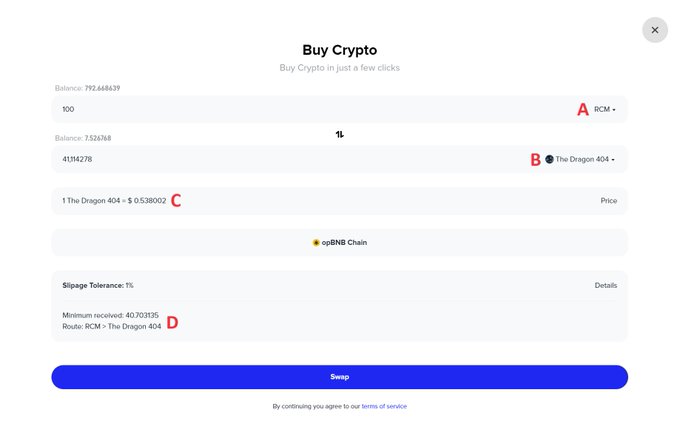
After clicking on "Swap", you are directed to the token trading page of a specific NFT content collection in the 404 standard:
A. $RCM/$BNB: Choose the token you wish to utilize for trading 404 tokens of a specific content collection. Note: If you choose $BNB, it will automatically convert to $RCM for the trade of 404 tokens.
B. 404 token: Choose the 404 token of a particular NFT collection you intend to trade. Utilize the search function for navigation.
C. Current price of one 404 token from the specific NFT collection in USD.
D. Trading route that will be executed upon confirmation of the trade.
About Metale Protocol
A new-era global content distribution protocol that provides on-chain services for content subscription, transparent profit-sharing, and asset transactions.
