MOTHERSLAVE - AUTOMATYZACJA
przychlast ✧ ゚. / ?Metodka opisana przez mojego znajomego, jest na przykładzie NinjaBota, jednak nie ma znaczenia, czy robicie to tym botem, GrowBotem (o którym pisał niechętny), czy jakimkolwiek innym. Stawiacie 15-30 kont slave, przekierowujecie odbiorców na konto główne. Finito! :)
Buy old accounts to be able to perform 500 actions per day.
https://useviral.com/buy-instagram-accounts/?utm_source=buy-instagram-accounts&utm_m edium=blog&utm_campaign=earthweb-instagram
Our goal is for people to know us, for this we must follow them, I like them in their photos. For this we are going to choose models from our niche, I recommend using onlyfinder.com I recommend organizing 1 account with 1 slave account. 3 accounts by proxy simultaneously, then you can rotate the IP and continue working with 3 other accounts. https://stormproxies.com/instagram_proxies.html
Ninjagram
We enter username and password.
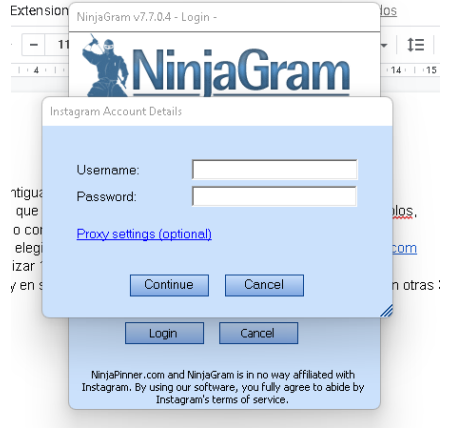
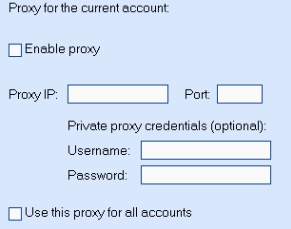
Then we click on proxy settings and add the data of our proxy, do not use the same proxy for more than 3 accounts simultaneously.
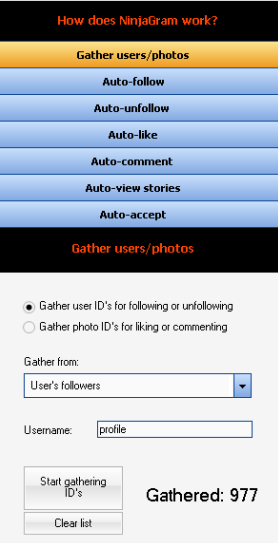
Once inside the program we go to gather user/photos, write the user and select the user's followers and start. 5000 for the whole month will be fine.
Then we go to the Autounfollow tab and configure it as is.S
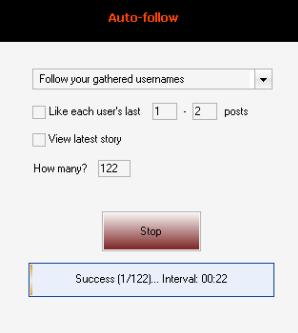
The bot is already working.
Then we open the program again and do the same 2 accounts. Finished the process we go to AutoUnfollow and configure it this way
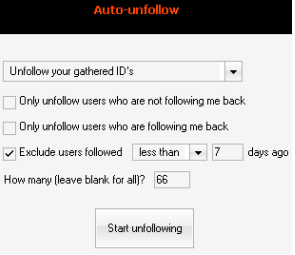
You can do this for each proxy you have and depending on your pc's ram memory. you can also run it on other PCs.
I recommend writing everything down in google spreadsheets. start time, accounts to follow, unfollows.
tutorial: https://youtu.be/Z72eprClRO4
link download: https://drive.google.com/file/d/1izxq9cmku0sLVJftZzJXs5wCfQyse-sH/view?usp=drive sdk
Notatka niechetnego o GrowBocie:
Wersja próbna GrowBota jest dostępna przez 3 dni, ale istnieje sposób na obejście tego ograniczenia.
Instrukcja Instalacji:
1. Pobierzcie GrowBota z tego linka: https://www.mediafire.com/file/7z1w7a7r27ow5bp/growbot-FULL.zip/file
2. Rozpakuj archiwum.
3. Uruchom przeglądarkę Chrome.
4. Przejdź do adresu chrome://extensions.
5. Włącz tryb deweloperski znajdujący się w prawym górnym rogu ekranu.
6. Naciśnij przycisk "Załaduj rozpakowane".
7. Wybierz folder, do którego rozpakowałeś plik rozszerzenia z archiwum.
8. Potwierdź i gotowe.
Nie będę się bardzo mocno rozwodził nad setupem GrowBota, gdyż istnieje wiele poradników na YouTube, które wyjaśniają, jak to zrobić.
Gdy Wasze konta są już gotowe, uruchamiamy Growbota i konfigurujemy wszystko według potrzeb.