MONIspin: Betting
MONIspin AdminTo place a bet just use the /bet command.
The command will take you through a number of steps.
These are outlined below
- Amount - Enter the amount you want to stake.
- Number Selection - select the numbers you want to bet on. This can be either via the displayed keyboard or by manually inputting your own selection. When inputting your own manual selection you have access to a wide range of predefined groups. You can also create you own custom selections.
- Confirmation of Selection - Your selection is displayed for your to confirm.
- Bet type - There are two types of bets, Individual and combined. For individual bets, the bet amount is wagered on all the numbers in the selection. For combined bets the entire selection is treated as one. If your selection does not qualify for a combined bet, this step will be skipped and the bet will automatically be considered as an individual bet.
- Bet Confirmation - The total cost of the bet and the potential winning are display for confirmation. Once confirmed, the bet is vetted and accepted.
A Betslip is issued for every bet accepted. A sample is shown below.
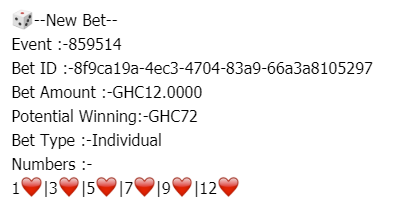
In case of any issues with bets please contact MONIcliq support and quote the Bet ID
Below are a few videos demonstrating how bets are placed