LOGAN
Alexey BorunovThe main purpose of this tool is to speed up the registration of bug reports and other QA Mobile activities. When filling out a form for filing a bug report, the bug report is automatically displayed, copied to the clipboard, and can be used in Jira (or other bug tracking systems).
=============================================
Written in Java 15. The database of this tool contains a list of our devices with system versions, as well as a list of hubs we support. (For the future, may make a list of ID Hubs).
Before using this tool, you need to update Java on your computer to the 15th version. According to these instructions.
To run the tool, you need to write the command in the console (terminal):
java -jar (file path).
Here's an example: java -jar '/home/user/Desktop/LOGAN.jar'
And we will see this screen in the console.
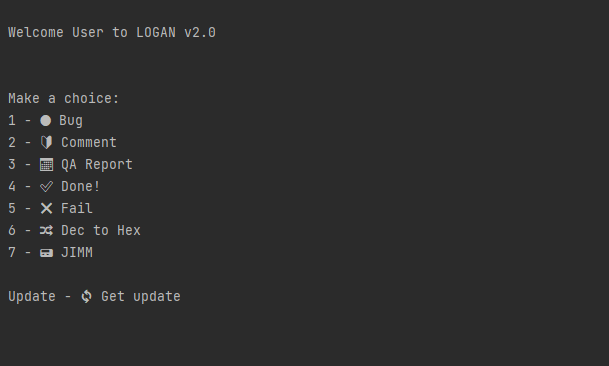
What is responsible for what?
1 - Bug - responsible for filing a bug
2 - Comment - Responsible for the design of the comment
3 - QA Report - (come up with a description)
4 - Done! - To quickly copy this status
5 - Fail - To quickly copy this status
6 - Dec to Hex - To quickly translate the hub / sensor version into HEX and copy directly to the clipboard
7 - JIMM - Fast command generation to add a sensor via JIMM
Update - To quickly download the current version of this tool
=============================================
Bug
When you select this item, we get to the bug registration screen. We answer all the questions of the tool (if it asks in numbers, then in numbers, otherwise we prescribe everything with our hands), and at the end the entire result is automatically copied to the clipboard. And then you can insert this bug report into a bug in Jira.
The format in which the bug report is compiled:
Environment:
Android App version: 5721
Device: Samsung Galaxy A5
Android version: 5.1.1
Server: Stage
How often is repeated: Always
The issue exists in the release app: No
Reproduce on another platform: No
Test Account:
E-mail: name@gmail.com
Password: pass
Hub's name: Name
Preconditions: Precondition
Description: Description of the bug
Steps to Reproduce:
1: Step 1
2: Step 2
3: To stop steps, enter "-"
❌ Actual result: Actual result
✅ Expected Result: Expected Result
Additional Information: Additional info
Timestamp: Log time
System Log: Here we manually add a log to the task
=============================================
Comment
When you select this item, we get to the screen for making a comment. We answer all the questions of the tool (if it asks in numbers, then in numbers, otherwise we prescribe everything with our hands), and at the end the entire result is automatically copied to the clipboard. And then you can insert this bug report into a comment in Jira.
Environment:
Android App version: 2624
Device: Samsung Galaxy A5
Android version: 5.1.1
Hub Type: Type
Server: Stage
Case Test Status: Done! ✅
Description: Description of the task
Additional Information: Additional info
Evidence: We will place evidence under this field. To display this field, put “+“, with “-“ this field will not be copied to the clipboard.
=============================================
QA Report
This parameter copies the following text to the clipboard:
Date📅: 23.10.
Fail❌:
Bug link
Bug link
Done! ✅:
Bug link
Bug link
It takes the current date and fields for fixing open bugs and closed ones. Used for personal recording of completed tasks.
=============================================
Done & Fail
Made for quick copying to the clipboard of such statuses as:
Done! ✅ and Fail❌
=============================================
Commands
reboot - Restart the program. After that, a password request is displayed.
If you made a mistake while entering data, then use “reboot” to quickly restart the program. Without restarting the terminal
last or l - Takes a previously entered version of the app, hub, or hub name.
Made in order not to re-enter versions and names.
back (Not implemented) - Go back one step to correct a previously made choice.
If you made a mistake while entering data, then use “back” to quickly restart the program. Without restarting the terminal.
"-" - To skip a specific step.
You can skip these steps when filling out a comment:
- Description
- Additional Information
- Evidence
You can skip these steps when filing a bug:
- Test Account (when using “-“ to enter E-mail and Password, these values are replaced by default)
- Preconditions
- Additional Information
- Evidence (When using “+“, the field is inserted into the report, for further attachment of the screen)
- Steps
- Timestamp (When using “+“, the field is inserted into the report, for further attachment of logs)
=============================================
Test Logan.jar
https://drive.google.com/file/d/1PLb_KzwGheoDqqCsh0OFqonqC0xQIfq-/view?usp=sharing