Join Procedure | KokoroNetwork
KokoroNetwork
Step 1: Join the official group and accept the rules
In order to use our bot, you must join the official group @KokoroNetworkChat and accept our network rules.
Step 2: Add the bot to your channel
Once you accepted our rules, you have to add the bot to your channel, following this tutorial:
- Open your channel settings (Manage Channel ➞ Administrators ➞ Add Administrator).
- Search "KokoroNetworkBot" (@KokoroNetworkBot).
- Select "Kokoro-Chan", press Ok and tick these permissions:
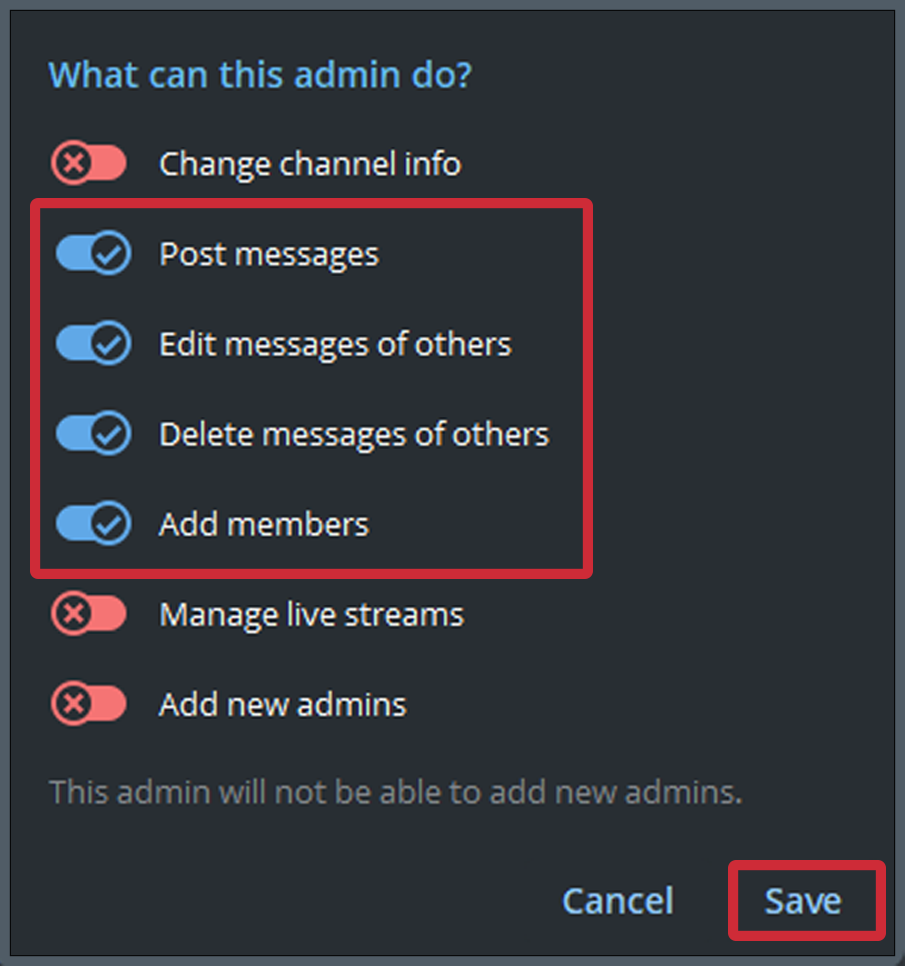
IMPORTANT: Post Messages, Edit Messages of others, Delete Messages of others, Add Members.
- Press Save.
Step 3: Verify your channel
- To Verify your channel forward a message from your channel to @KokoroNetworkBot
- Choose SFW or NSFW
- Wait to get verified!
Step 4: Done
The procedure is now completed. You must wait until our administrators review your request, so DO NOT BLOCK THE BOT!