Java Package
YAJC become Java programmer
Hello everybody 🖐 In this post we will take a look at what Java packages are and why we need them.
Consider a very simple example:
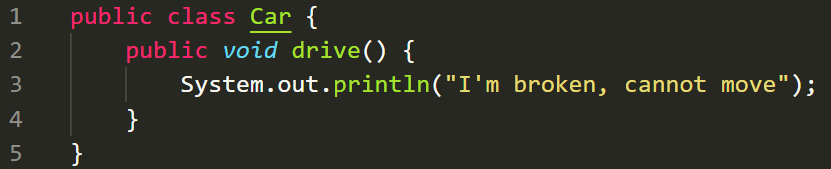
Here we have a class with only one method. It only outputs I'm broken, cannot move text. What if we would like to implement a new class which will be able to move and by some reason we want it to be named as Car as well? We also don't want to remove or rename the existing Car class. You cannot just create an additional source file and put the new Car class there. We are happy there is a workaround: Java packages are here to help us to achieve that.
We can put the new class under ./tme/yajc/car/modern folder and should have the following files tree
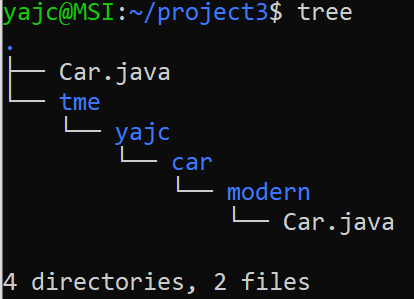
The content of ./tme/yajc/car/modern/Car.java file could be like this
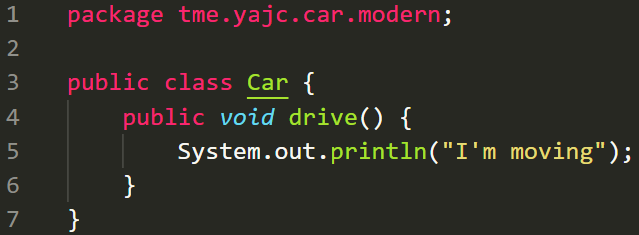
On the 1st line we need to specify a special command: package tme.yajc.car.modern which indicates this class belongs to tme.yajc.car.modern package.
Important note: a class name contains the package name it belongs to. In our example the full name of new Car class is tme.yajc.car.modern.Car Each package can contain many classes, so we can conclude that a Java package groups classes into a namespace. When we don't specify a package Java sets the default one.
Results
Let's see how both classes could be used from one place:
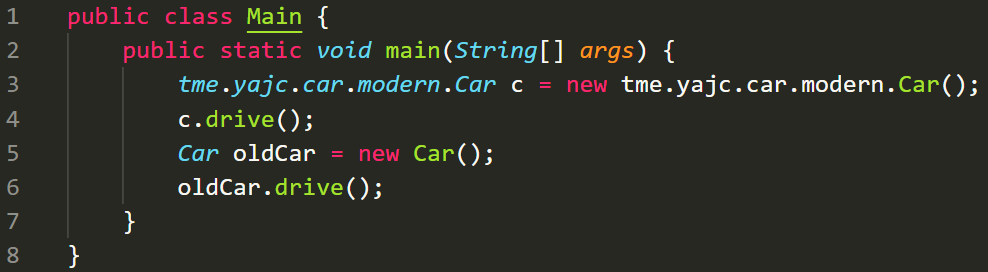
Here we can see that we create two instances (objects) of both classes c - object of the new class and oldCar - object of the existing Car class. When we compile and run these classes one should expect the following output:
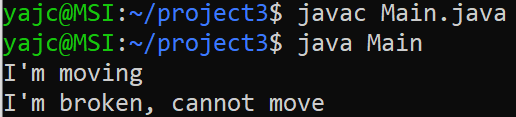
Packages allow us to group classes into logical groups of related classes. It's also an instrument to avoid unwanted intersections between classes which could have the same name (when you develop a real project, usually you use 3rd party libraries which often can have classes with the same names - thank packages they don't conflict 😉)
Import
Specifying the long name of a class could be boring and time consuming. To avoid this routine actions Java gives you an opportunity to import a class. It means you can write import tme.yajc.car.modern.Car just before class definition and use it simply as Car. Unfortunately in our example this will not work. We already have Car class which refers to the existing class with the broken 🚗 I hope you got it that sometimes default packages could bring problems.
Remember: it's a common and good practice to avoid any usage of default package. Make a habit to create a main package in your project before you start creating classes.
Links
Refer to the following links for additional details:
https://en.wikipedia.org/wiki/Java_package
https://docs.oracle.com/javase/tutorial/java/package/index.html