Introduction to Kubernetes
https://aws.plainenglish.io/introduction-to-kubernetes-4ec5589619b3
Evolution of application deployment methods
There have been three main eras in the way applications are deployed:
- Traditional Deployment: In the early days of the Internet, applications were deployed directly on physical machines
Advantages: simple, does not require the participation of other technologies
Disadvantages: resource usage boundaries cannot be defined for applications, it is difficult to allocate computing resources reasonably, and programs are prone to influence
- virtualization deployment: Multiple virtual machines can be run on one physical machine, and each virtual machine is an independent environment
Advantages: The program environment will not affect each other, providing a certain degree of security
Disadvantages: increase the operating system and waste some resources
- containerized deployment: Similar to virtualization, but with a shared operating system
advantage:
It can ensure that each container has its own file system, CPU, memory, process space, etc.
The resources required to run the application are packaged by the container and decoupled from the underlying infrastructure
Containerized applications can be deployed across cloud service providers and Linux operating system distributions
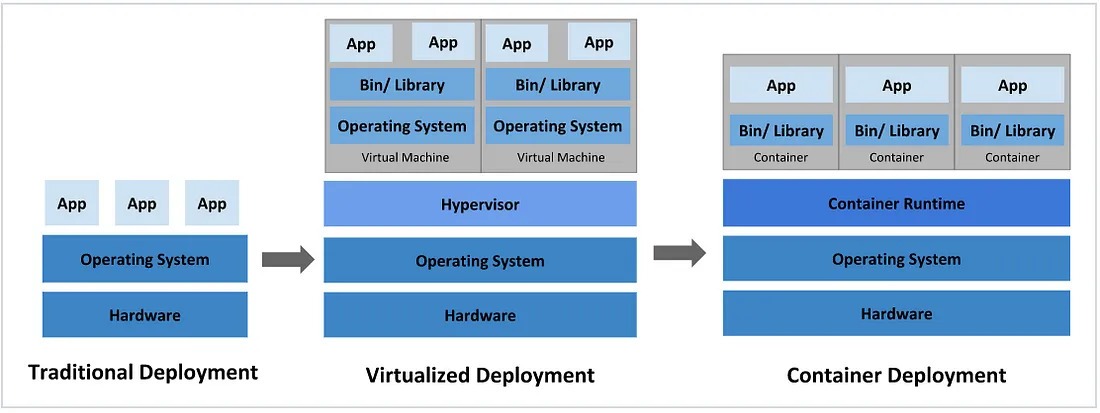
The containerized deployment method brings a lot of conveniences, but there are also some problems, such as:
- If a container is down due to failure, how to start another container immediately to replace the down container
- How to expand the number of containers horizontally when the number of concurrent accesses increases
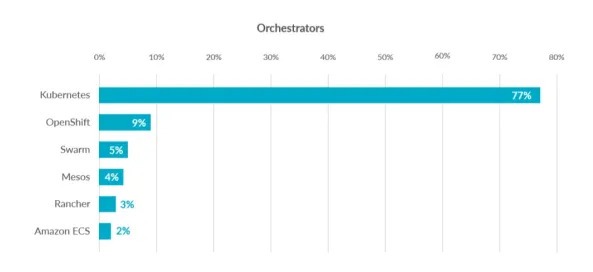
These container management issues are collectively referred to as container orchestration issues. In order to solve these container orchestration problems, some container orchestration software has been produced:
- Swarm: Docker’s own container orchestration tool
- Mesos: A tool for unified resource management and control of Apache, which needs to be used in combination with Marathon
- Kubernetes: Google’s open-source container orchestration tool
Introduction to kubernetes
kubernetes is a brand-new leading distributed architecture solution based on container technology. It is an open-source version of the Borg system, a secret weapon of Google that has been strictly kept confidential for more than ten years. The first version was released in September 2014. In 2015 The first official version was released in July.
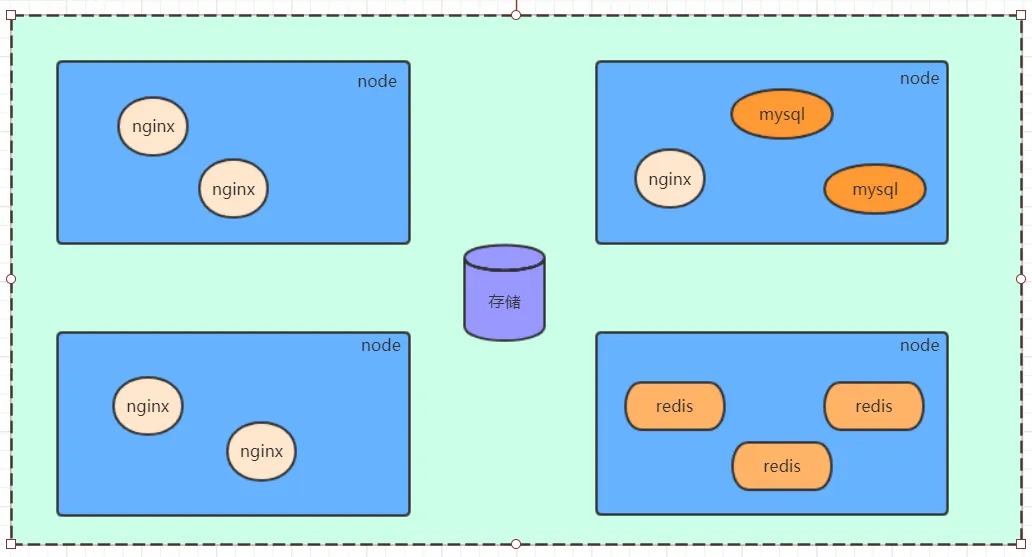
The essence of kubernetes is a group of server clusters, which can run specific programs on each cluster node to manage the containers in the nodes. The purpose is to realize the automation of resource management, which mainly provides the following main functions:
- Self-healing: Once a container crashes, it can quickly start a new container in about 1 second
- Elastic Scaling: The number of containers running in the cluster can be automatically adjusted as needed
- Service Discovery: A service can find the services it depends on through automatic discovery
- Load Balancing: If a service starts multiple containers, it can automatically achieve load balancing of requests
- Version Rollback: If you find a problem with the newly released program version, you can roll back to the original version immediately
- Storage Orchestration: Storage volumes can be automatically created according to the needs of the container itself
kubernetes components
A kubernetes cluster is mainly composed of a control node (master), a working node (node), and different components will be installed on each node.
master: The control plane of the cluster, responsible for cluster decision-making (management)
ApiServer: The only entry point for resource operations, receiving commands entered by users, and providing authentication, authorization, API registration, and discovery mechanisms
Scheduler: Responsible for cluster resource scheduling, scheduling Pods to corresponding node nodes according to predetermined scheduling policies
ControllerManager: Responsible for maintaining the state of the cluster, such as program deployment arrangement, fault detection, automatic expansion, rolling update, etc.
Etcd: Responsible for storing information of various resource objects in the cluster
Node: the data plane of the group, responsible for providing the operating environment (work) for the container
Kubelet: Responsible for maintaining the life cycle of the container, that is, creating, updating, and destroying the container by controlling the docker
KubeProxy : Responsible for providing service discovery and load balancing within the cluster
Docker : responsible for various operations of the container on the node
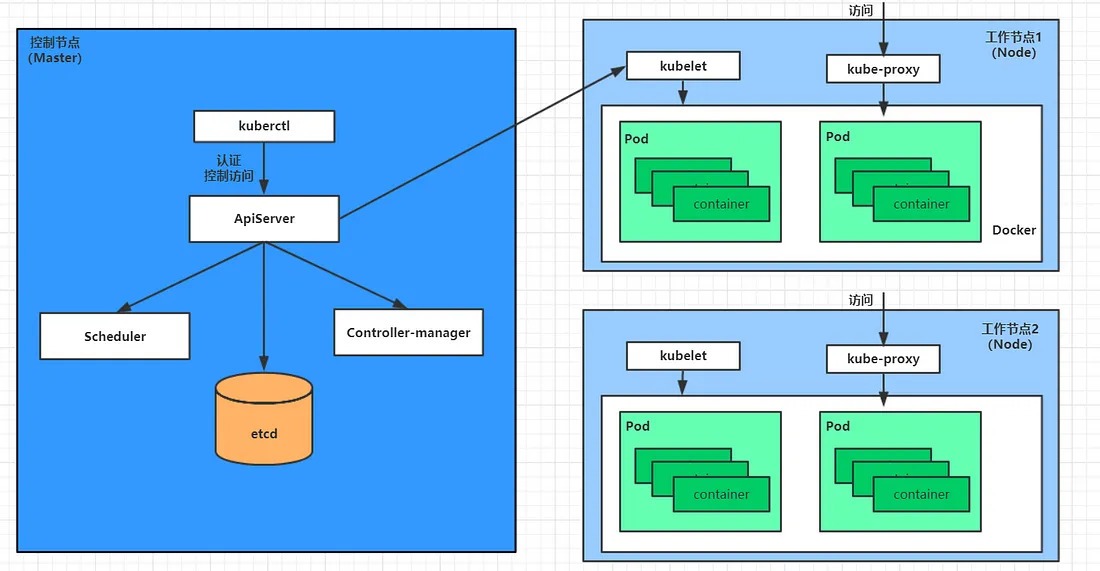
Next, deploy an nginx service to illustrate the calling relationship of each component of the kubernetes system:
- First of all, it must be clear that once the kubernetes environment is started, both the master and the node will store their own information in the etcd database
- An nginx service installation request will first be sent to the apiServer component of the master node
- The apiServer component calls the scheduler component to decide which node the service should be installed on.At this point, it reads the information of each node from etcd, selects it according to a certain algorithm, and informs apiServer of the result
- apiServer calls controller-manager to schedule Node nodes to install nginx services
- When the kubelet receives the command, it notifies docker, which then starts a pod of nginx. The pod is the smallest unit of operation in kubernetes, and the container must run in the pod to this point.
- An nginx service is running, and if you need to access nginx, you need to generate a proxy for the pod to access it via kube-proxy. This way, external users can access the nginx service in the cluster
kubernetes concepts
Master: cluster control node, each cluster needs at least one master node responsible for the control of the cluster
Node: workload nodes, the master assigns containers to these node work nodes, and then the docker on the node is responsible for running the containers
Pod: the smallest control unit of kubernetes, containers are running in pods, there can be 1 or more containers in a pod
Controller: controller, through which to achieve the management of pods, such as start pods, stop pods, scale the number of pods, etc.
Service: A unified entry point for pods to external services, which can be maintained by multiple pods of the same class.
Label: label, used to classify pods, the same class of pods will have the same label
NameSpace: namespace, used to isolate the pod’s runtime environment