Installing the Application 📲
CRYPTO & FarmerStep 1: Download the Axiome Wallet app to your device.
Available in the AppStore:
Download
Available on GooglePlay:
Download
Step 2. Click on the "Register" button on the authorization page.

Step 3. Fill in the fields provided.
1. Come up with your own nickname,
2. Enter your email.
3. Enter your Telegram nickname
4. Enter your inviter's Nickname 01901
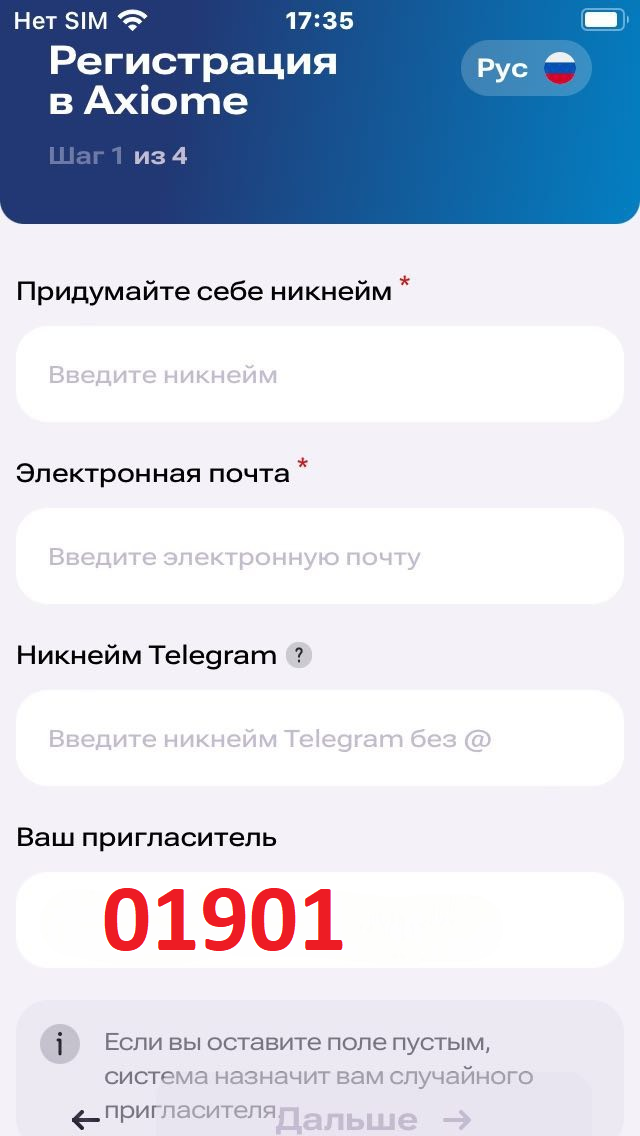
Step 4 . Click Next:
Your seed phrase will be generated for you , which is the access key to your wallet and, as a result, AXM tokens . Be sure to save it in the safest place.

Never share your seed phrase with anyone. Losing it means losing access to your wallet.
Step 5. If you saved the seed phrase, click next
Repeat your seed phrase in the order and sequence in which you saved it in the previous step.

Be careful. Make sure that no one is currently looking at your device screen and seeing your seed phrase.
❗️IMPORTANT - remember that if you lose your Seed Phrase, it will be impossible to restore access to your wallet. Do not lose your Seed Phrase and do not show it to anyone.
Step 6. Create a PIN code to log into your account and confirm it. Then activate Touch or Face-ID if necessary.

Congratulations. Registration is complete!
In the Axiome Wallet settings, you can also copy and save your seed phrase again .
🔣Recommendation to rewrite your Seed Phrase in a notebook with a pen and also
save to flash drive.
🔜 Even if your Phone is broken or lost, you can always restore access to your Wallet using the Seed Phrase if you keep it carefully.
Subscribe to the CRYPTO & Farmer channel and get the most up-to-date information.