Instander Features
NickMain goal of this article is to provide list of features and explanation to them.
Last update: 27/11/2020 (Instander 9.1)
Main features
Improved quality of the media
Instander has various tweaks to improve upload quality of media, this includes: Stories, Reels, IGTV Videos and Photos in the Feed.
Always updated
Instander is regularly updated to latest Instagram base with new features.
OTA updates
Update Instander over-the-air directly in app.
Disable video's autoplay
This feature allows you to disable autoplaying videos in feed to avoid extra data consumption.
Do not mark messages as read in Direct
Read messages in Direct without anyone knowing.
Instander Menu
Instander Menu allows you to download and preview media, share or copy direct link to the media. You can access it by tapping three-dot menu next to the post.
Developer settings
Long press Home icon in Navigation Bar to activate this feature.
WARNING: Use at your own risk! You can break the app accidentally. Don't submit bug reports if you broke something using Developer settings.

Media downloading
You can download media by pressing "Download" button to left from "Archive" button or by using 3-dot menu and choosing "Instander Menu".
You can download Photos, Videos, IGTV Videos, Reels and Stories.
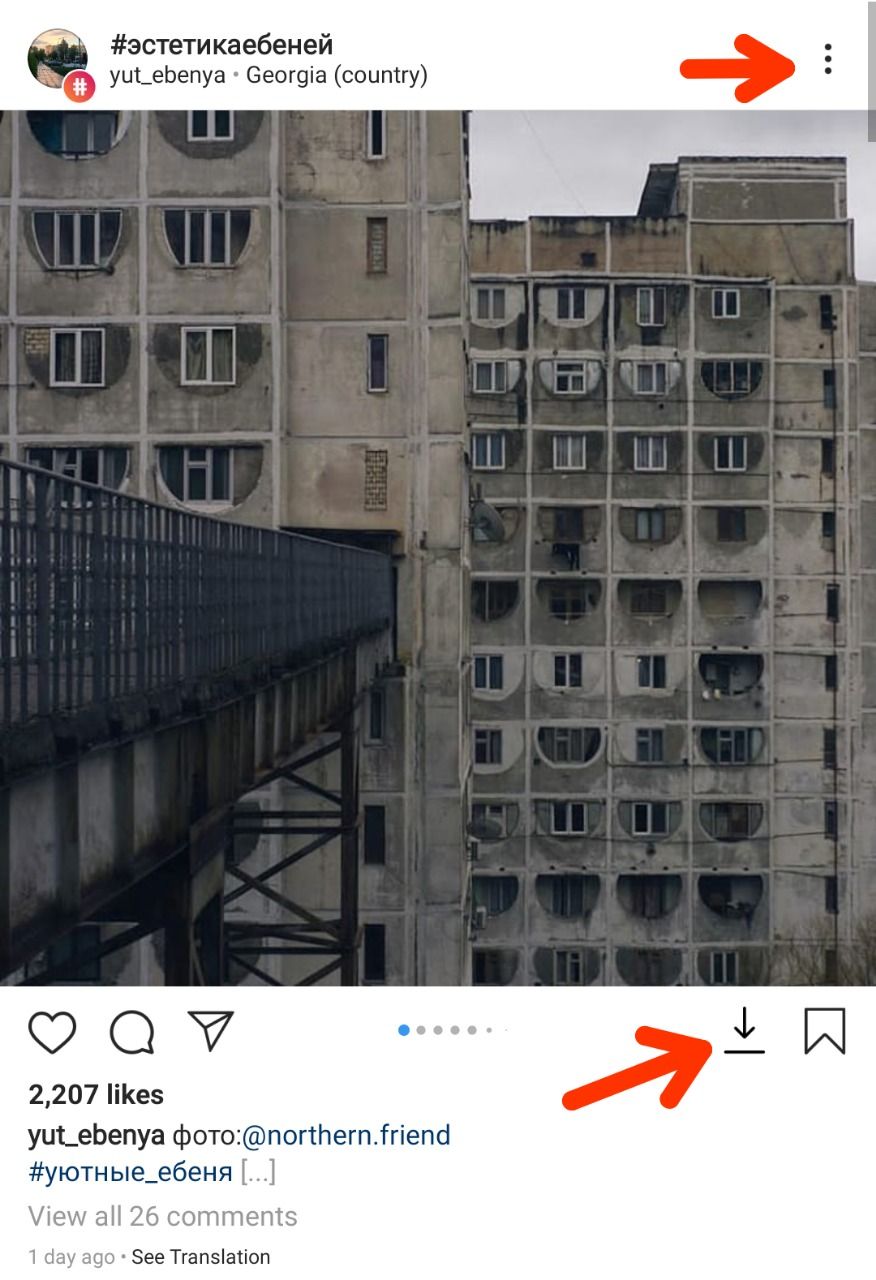
Downloading expiring media
You can download expiring media in Direct by long tapping expiring media bubble.
Ads-free
Ads in Feed and in the Stories are removed.
Disable navigation by swipe
Disable swiping from left to right to open camera or from left to right to open Direct.
Start videos directly with sound
Videos will not be muted while playing in the Feed.
Do not mark Stories as Seen
Story author will not be able to see that you viewed his story.
Do not mark messages as Read in Direct
Messages, that you receive, will not be marked as Read.
Hide typing status in Direct
Your status "username typing..." will not be showed in Direct.
Zoom photos by long-tap
Long-tap on photo in the Feed and zoom it by pinch.
Rewind videos
Long-tap on video in the Feed to rewind it.
Miscellaneous features
- Disable in-app browser
- Disable double-tap to like
- Disable "Suggested friends" in Feed
- Disable analytics
- Hide liked posts
- Copy user's bio
- View profile picture in HQ (long-tap on profile picture)
- Download profile picture by long-tap while it's open
- Listen music in the Stories
- Notification for completed downloads
- Split media downloads by username
- Don't crop Stories
- Fullscreen Stories
- Copy comments and post description