INSTALLING XIAOMI DEVICE DRVIERS
PixelExperience PocoF11.Switch off your phone and boot it into fastboot by powering on phone and keeping Vol Down pressed until fastboot mode appears with Mi Bunny Logo.Connect phone via cable to PC. (tip: While booting from powered off holding 1.Vol Up- Recovery, 2.Vol Down-fastboot).
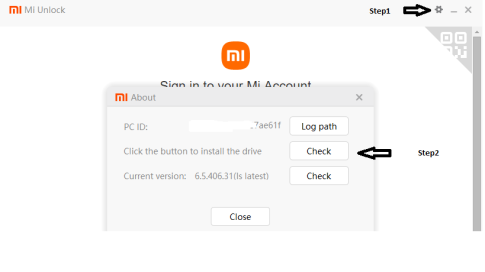
2. On PC Download MiUnlockTool. Extract the zip and run “driver_install.exe” and open “miflash_unlock.exe” . If it prompts a newer version is available, download it , extract and again open “miflash_unlock.exe” of that zip’s extracted folder. On Top right click Settings icon. Check Current Version. and Click Check button for driver installation. It will ask to reconnect USB. If done correctly will show driver installed. Just in Case, run driver install again.