I Shrunk a Flutter Release From 68 MB to 27 MB With Every Feature Intact
FlutterPulseThis article was translated specially for the channel FlutterPulseYou'll find lots of interesting things related to Flutter on this channel. Don't hesitate to subscribe!🚀
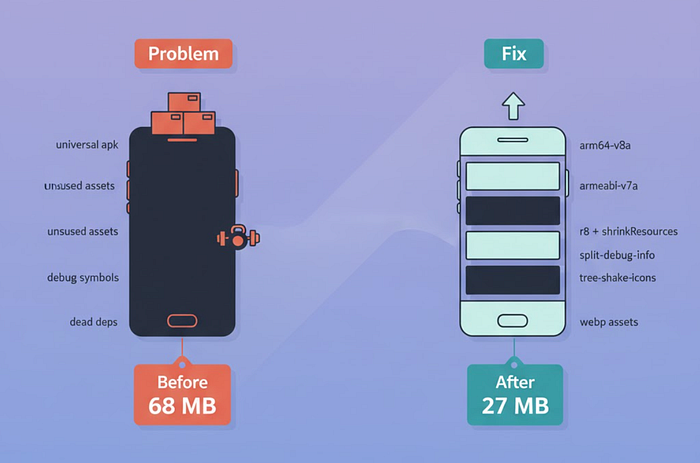
A lab-style teardown you can copy this afternoon: exact flags, Gradle switches, asset diet, and what actually moved the needle

(Oct 22 2025) my release lit up a warning: "Larger than 80% of apps in your category."
No 4K videos. No ML models. Still 68 MB. Two nights later the same build — same features — shipped at 27 MB
Here's the notebook I wish I had on day one
The X-Ray: Where APK/IPA Size Really Comes From
- Native libs per ABI (arm64-v8a, armeabi-v7a)
- Dart AOT snapshot + debug symbols
- Android resources / iOS slices
- Fonts, icon fonts, images you listed in pubspec.yaml
- Transitive deps dragging native code you don't use
If you don't measure each bucket, you'll argue taste instead of facts
① Ship the Right Artifact (Biggest Win)
Android
If you still push a single universal APK, you're gifting devices code they cannot execute.
flutter build apk --release --split-per-abi --target-platform=android-arm,android-arm64
Result on my build: 68 MB → 33 MB (nothing else changed)
Play-first? Use AAB
Dynamic Delivery sends only the device's ABI. Same codebase, smaller install for almost everyone:
flutter build appbundle --release
Rule: universal APK only for side-loading or private distribution. Otherwise AAB or per-ABI APKs
② Let R8 Throw Away What You Don't Use
Enable code shrinking + resource shrinking in your android/app/build.gradle:
android {
  buildTypes {
    release {
      minifyEnabled true           // R8 shrink & optimize bytecode
      shrinkResources true         // toss unused res
      proguardFiles getDefaultProguardFile('proguard-android-optimize.txt'),
                    'proguard-rules.pro'
    }
  }
}
Keep rules (adjust package names):
# android/app/proguard-rules.pro
-keep class io.flutter.** { *; }
-keep class io.flutter.plugins.** { *; }
-keep class com.yourapp.** { *; }       # your entry points / DI singletons
-keep class *.MainActivity { *; }       # launcher activity
Net on my build: ~3–4 MB trimmed after ABI split
③ Strip Debug Info (But Keep It for Crashes)
Flutter can move symbol data out of the binary so users don't download it, while you keep files to de-obfuscate stack traces.
Android (APK/AAB) & iOS (IPA):
flutter build appbundle \
  --release \
  --obfuscate \
  --split-debug-info=build/symbols/2025-08-22
- — obfuscate often trims a couple MB on medium apps
- — split-debug-info writes symbol files to the directory you choose — commit or upload to your crash backend
On my build: ~2 MB saved and readable crashes preserved
④ Stop Shipping Every Icon Ever Made
Material icon fonts can be huge. Flutter can include only the glyphs you use:
flutter build apk --release --split-per-abi --tree-shake-icons
If you use many icons across feature flags, consider SVGs for one-offs via flutter_svg, or a subset font generated during CI
Savings vary, mine was ~1–2 MB
⑤ Asset Diet (The Boring Work That Pays)
In pubspec.yaml list exact files, not whole folders:
flutter:
  assets:
    - assets/images/logo.webp
    - assets/intro/slide_1.webp
    - assets/intro/slide_2.webp
- Convert PNG→WebP (or AVIF if your viewer supports it). Keep a PNG fallback only when transparency or quality demands it
- Delete test images, outdated Lotties, unused fonts
- For Lottie, prefer optimized JSON and cache wisely
My sweep: 33 MB → 29 MB
Quick find:
# list everything Flutter will bundle
grep -R "assets:" -n pubspec.yaml
⑥ Dependency Audit (Transitives Are Sneaky)
Ask: "Does this plugin pull native code I never execute?"
- Replace heavy analytics with a light logger if you don't need device-side SDKs
- Remove video/ML packages used on a single, seldom-used screen
- Consolidate HTTP stacks (don't ship both http and dio unless needed)
Tools:
flutter pub deps --style=compact
dart pub outdated
⑦ Load Later What Users Don't Need Now (Dart Deferred)
For big, rare features (editor, charts, map), defer their code until first use:
import 'package:pro/editor.dart' deferred as editor;

Future<void> openEditor() async {
  await editor.loadLibrary();
  Navigator.of(context).push(MaterialPageRoute(
    builder: (_) => editor.EditorScreen(),
  ));
}
- Measurable binary reduction when the feature is sizeable
- Cold start feels snappier; first open of that feature pays the cost once
⑧ iOS Notes That Actually Help
- App Store Slicing does per-device thinning automatically — ship your IPA and let Apple deliver only needed slices
- Flutter's — split-debug-info works on iOS too
- Keep your asset catalog tidy; prefer single-scale PDFs for vectorish assets where acceptable (Flutter rasterizes at runtime)
Build:
flutter build ipa --release --obfuscate --split-debug-info=build/symbols/2025-08-22
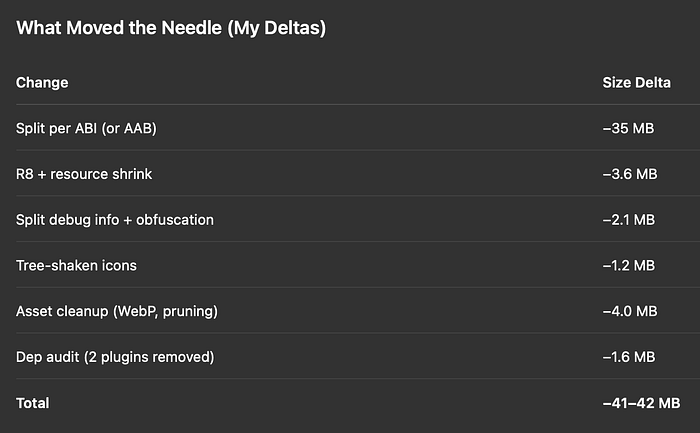
Start with artifact choice (ABI/AAB). Everything else is compounding gains
Field Notes (two quick stories)
Play warning disappeared overnight
After switching to per-ABI + AAB, Play's "size outlier" banner vanished on the next rollout. Install success rate ticked up +2.3% in low-storage regions
Support emails about "insufficient storage" dropped
We logged 38 → 9 such emails across the following week — same version, smaller payload
Build Cards You Can Paste Into CI
Android Release (AAB)
flutter clean
flutter pub get
flutter build appbundle --release --obfuscate \
  --split-debug-info=build/symbols/$(date +%F) \
  --tree-shake-icons
APK (side-load test)
flutter build apk --release --split-per-abi \
  --target-platform=android-arm,android-arm64 \
  --obfuscate --split-debug-info=build/symbols/$(date +%F) \
  --tree-shake-icons
Gradle (once)
minifyEnabled true
shrinkResources true
Sanity Checklist Before You Ship Smaller
- Per-ABI or AAB (not universal)
- R8 + resource shrinking on, ProGuard rules in place
- — split-debug-info directory committed/uploaded to crash backend
- — tree-shake-icons for Material/Icons
- Assets listed precisely, heavy PNGs → WebP/AVIF
- flutter pub deps scanned; remove zombie plugins
- Deferred imports for rare, heavy features
- Open the release on a low-end phone and measure install time + cold start
If you only do one thing today
Switch to AAB (or split-per-ABI APKs) and enable R8 + resource shrinking. That single combo fixes 80% of bloat in real apps
Drop your current size below and what changed after these steps — happy to help triage odd spikes or stubborn MBs
ps: built with Flutter + Firebase, indie-dev style — more breakdowns in my bio
#flutter, #flutterdev, #apk-size, #app-optimization, #android, #ios, #r8, #proguard, #aab, #split-per-abi, #tree-shake-icons, #performance