📘 How to use the currency calculator via Inline command
Crypto OfficeIn Crypto Office you can quickly convert currency rates directly in a Telegram chat - without opening the menu or searching for quotes on exchanges.
All rates are automatically pulled from the source you set in the settings.
💱 Supported fiat currencies
For each fiat currency, different abbreviations and spellings can be used.
All available input options accepted by the calculator are shown in brackets below.
AED (AED, A) — UAE (dirham)
BRL (BRL, B) — Brazil (Brazilian real)
CAD (CAD) - Canada (Canadian dollar)
CHF (CHF, C) — Switzerland (Swiss franc)
CLP (CLP, P) — Chile (Chilean peso)
CNY (CNY) — China (yuan)
EUR (EUR, E) — Eurozone countries
GBP (GBP, F) — United Kingdom (pound sterling)
ILS (ILS, I) — Israel (new Israeli shekel)
INR (INR, I) — India (Indian rupee)
JPY (JPY) — Japan (Japanese yen)
KWD (KWD, K) — Kuwait (Kuwaiti dinar)
KZT (KZT, K) — Kazakhstan (Kazakhstani tenge)
NGN (NGN, N) — Nigeria (Nigerian naira)
PLN (PLN, P) — Poland (zloty)
QAR (QAR, Q) — Qatar (Qatari riyal)
RUB (RUB, R) — Russia (ruble)
SAR (SAR, S) — Saudi Arabia (Saudi riyal)
THB (THB, T) — Thailand (baht)
TRY (TRY, L) — Turkey (Turkish lira)
UAH (UAH, U) — Ukraine (hryvnia)
USD (USD, DOL, U, D) — USA (US dollar)
UZS (UZS, М) — Uzbekistan (Uzbekistani som)
ZAR (ZAR, Z) — South Africa (South African rand)
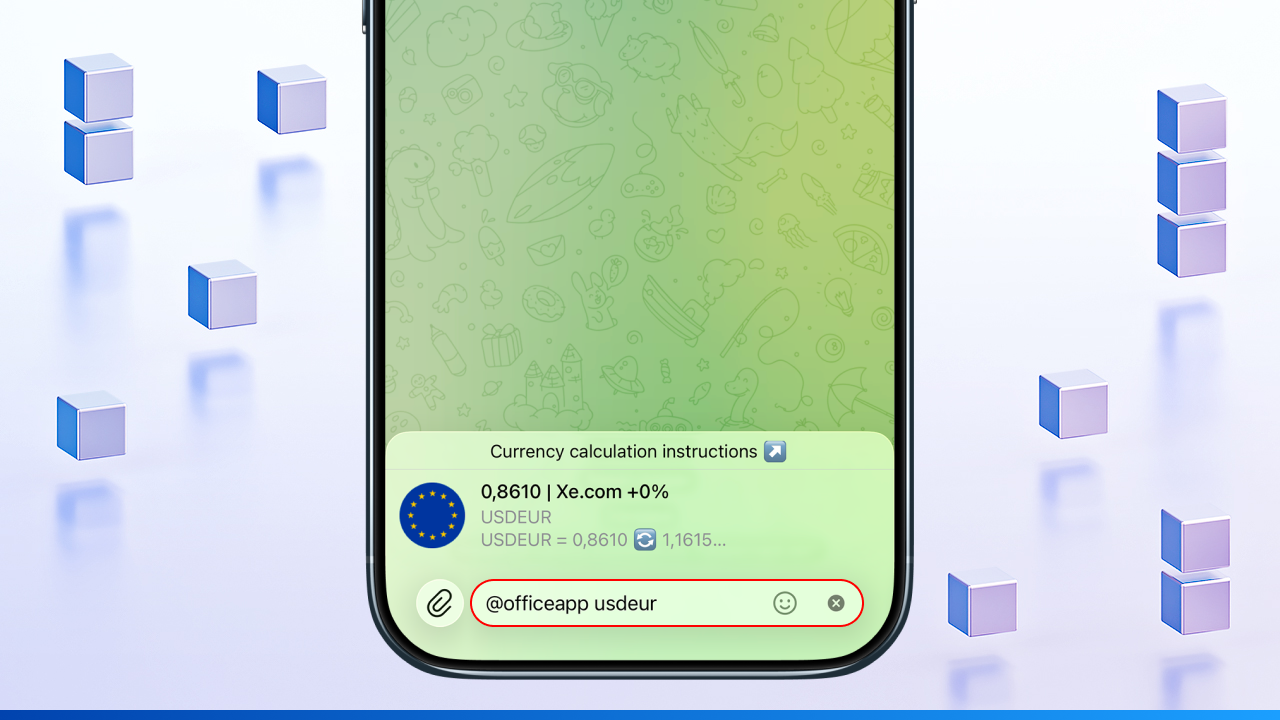
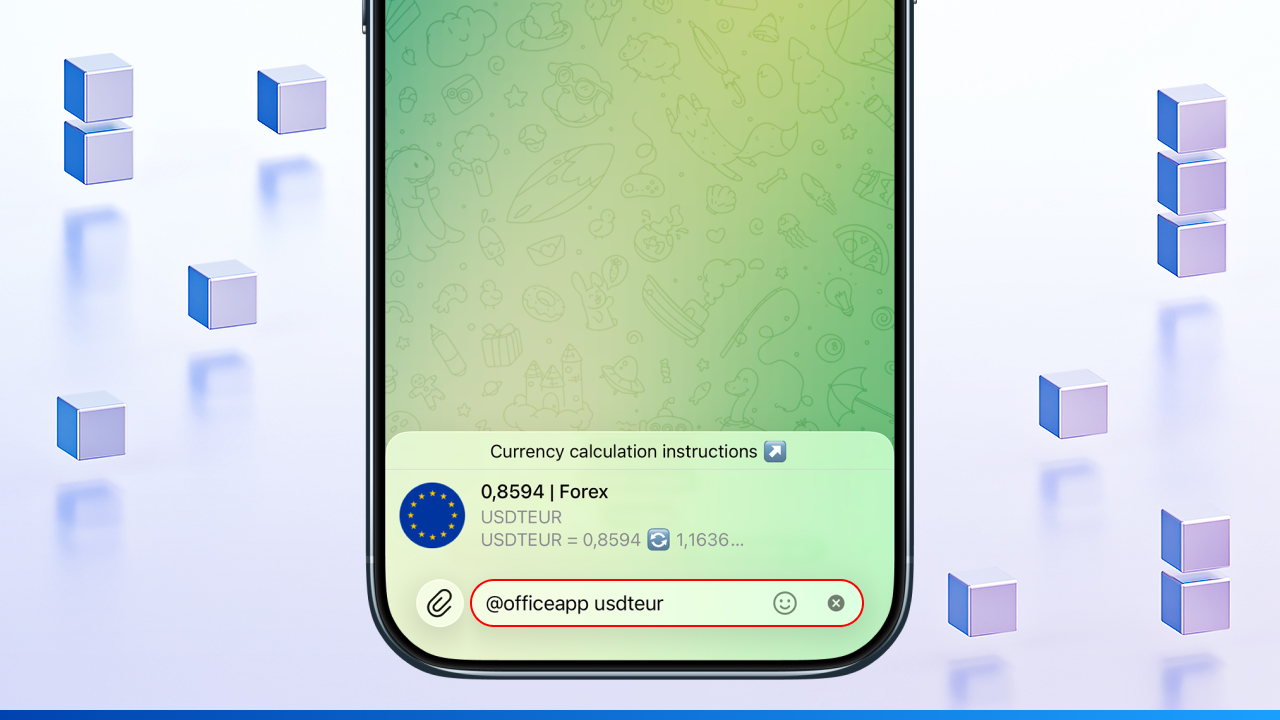
Calculation is available for both USD → fiat currency and USDT → fiat currency pairs.
💱 Supported cryptocurrencies
Standard ticker symbols are used for cryptocurrencies. All available input options accepted by the calculator are shown in brackets below. For cryptocurrencies, the rate is always calculated against USDT.
TRX — TRON
BNB — Binance Coin
ETH — Ethereum
BTC — Bitcoin
SOL (SOL) — Solana
📌 General rules for using the calculator
These rules help you enter commands in the calculator correctly. They apply universally to both fiat currencies and cryptocurrency pairs.
The calculator supports two types of operations:
— fiat operations - for traditional currencies (USD, EUR, RUB, etc.
— cryptocurrency operations - for BTC, ETH, TRX and other coins. The calculator uses rates via USDT for these.
🔹 Type 1: Fiat operation
If XE.com is set as the rate source in settings, the result card is displayed as follows:
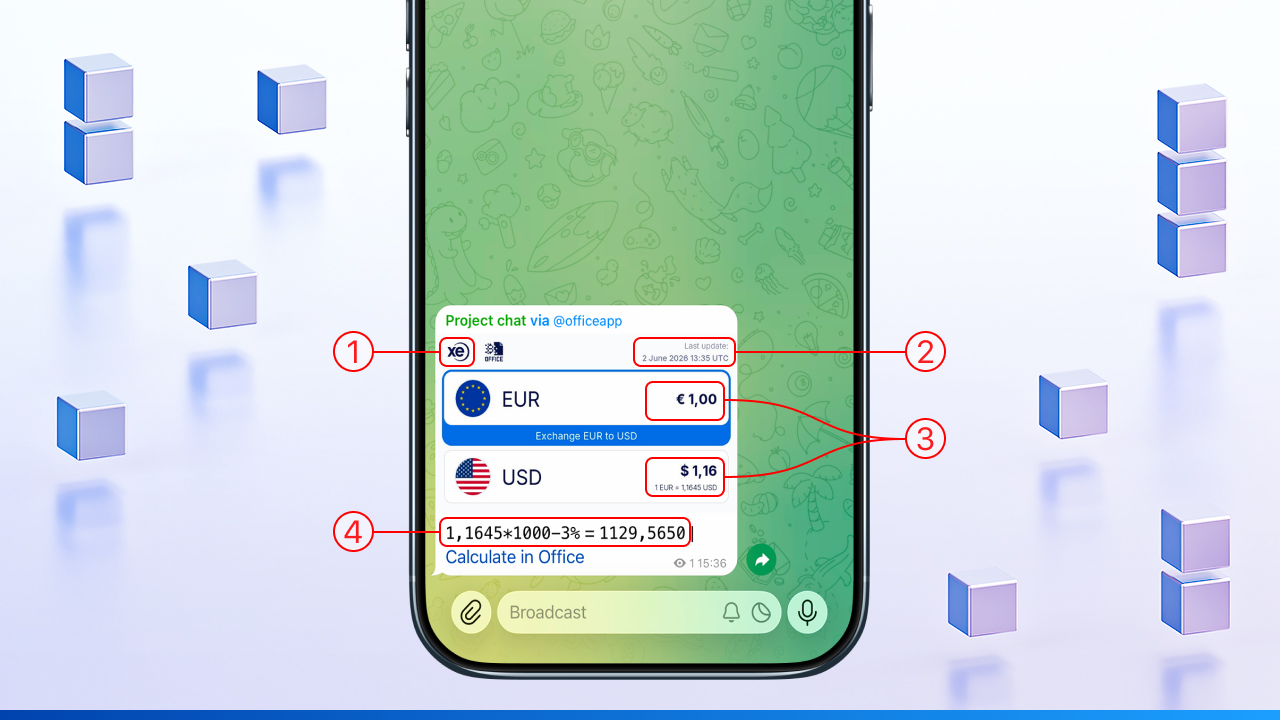
1️⃣ Rate source (XE logo)
shows that the current rate is pulled from the XE service
2️⃣ Date and time of update (top right corner)
shows when the rate was last updated: June 2 2026, 13:35 UTC
3️⃣ Fiat currencies and their values
• EUR €1.00 — base currency (euro)
• USD $1.16 — target currency (US dollar)
• Label "1 EUR = 1.1645 USD" — exchange rate at the time of calculation
4️⃣ Formula and result (bottom row)
Entered command: @officeapp ed*1000-3%
Displayed in the card: 1.1645*1000−3% = 1129,5650
• 1,1645 → EUR → USD rate
• *1000 → exchange amount (1000 EUR)
• -3% → 3% fee deducted
• = 1129,5650 → result: how many USD you get after the fee
🔹 Type 2: Cryptocurrency operation
For cryptocurrencies, the card may look different than for fiat currencies. If the selected source (e.g. XE.com) does not support cryptocurrencies, the calculator shows the result in text format: the formula and the converted result.

Entered command: @officeapp btc-1000-3%
Result displayed (text line): 67153,87−1000−3% = 66183,87
Breakdown of elements:
• 67153,87 → BTC rate in USDT
• -1000 → fixed amount: 1000 deducted
• -3% → 3% fee deducted
• = 66183,87 → final value in USDT after deduction and fee
🔹 Currency abbreviations
The calculator accepts various input formats: from simple abbreviations to formulas with numbers, percentages, and brackets.
The key rule is to use valid currency abbreviations from the list above.
Both uppercase and lowercase letters are accepted - just make sure the abbreviation lengths match.
🔹 Signs and arithmetic
The calculator supports various ways of entering signs in expressions:
— the multiplication sign can be entered as × or *
— the division sign can be entered as ÷ or /
— arithmetic operations support: +, -
— decimal separators: both ,and .are accepted
🔹 Formulas and percentages
The calculator supports formulas and percentages in expressions:
— brackets ( ) for grouping operations
— percentages: -3%, +10%
— numbers, currency pairs, and arithmetic can be combined
— percentages are accepted both as X% and as0.XX
📌 Example:
• 100*5% = 100*0.05 = 5
• 100/5% = 100/0.05 = 2000
In this example, five percent can be written in two formats: 5% or 0.05 (both are equivalent and accepted by the calculator).
📌 Additional example:
• 100*15% = 100*0.15 = 15
• 100/15% = 100/0.15 ≈ 666.67
In this example, fifteen percent can be written in two formats: 15% or 0.15 (both are equivalent and accepted by the calculator).
🔹 Exchange rate settings
The calculator automatically pulls rates from the selected source.
Detailed instructions for configuring exchange rate sources:
— How to choose a currency rate source
— How to set a "Mixed" rate source
— How to add a universal percentage for all chats from the "Settings" section
✅ Examples of valid fiat operations
Below are the most common ways to use the calculator for fiat currencies. You will see how to enter commands correctly - from simple conversions to formulas with percentages and arithmetic.
1️⃣ Simple currency conversion
In an inline command, the abbreviations of both currencies must be the same length. That is, if one currency is represented by three letters, the other must also be three letters.
For example:
The inline command @officeapp aedr is not valid (AED → RUB) because the abbreviation lengths differ.
👉 Valid examples using matching-length abbreviations:
@officeapp aedcny (AED → CNY)
@officeapp CNYGBP (CNY → GBP)
@officeapp еr (EUR → RUB)
@officeapp fr (GBP → RUB)
@officeapp rubdol (RUB → USD)
@officeapp thbeur (THB → EUR)
@officeapp dr (USD → RUB)
➡️ After entering the command, tap the formula that appears above the input field to perform the calculation.
2️⃣ Fixed amount with fee deduction
This format is used when you need to convert a specific amount and immediately account for a fee.
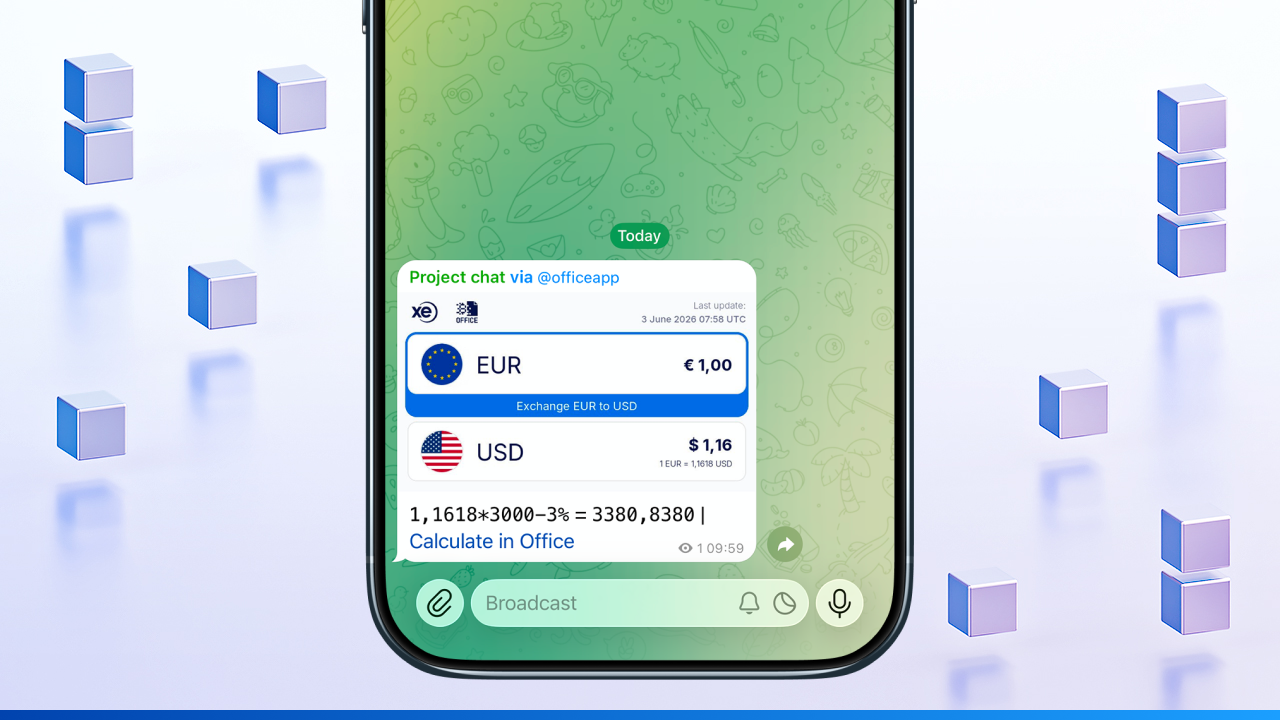
@officeapp ed×3000-3% (EUR → USD)
• ed → abbreviation for the EUR/USD pair
• ×3000 → exchange amount: 3000 EUR
• -3% → deduct 3% fee from the amount
➡️ After entering the command, tap the formula that appears above the input field to perform the calculation.
📌 The calculator will show how many USD you get when exchanging 3000 EUR minus a 3% fee.
3️⃣ Conversion with added amount
This format is used when you need to convert one currency to another and add an extra value to the result.
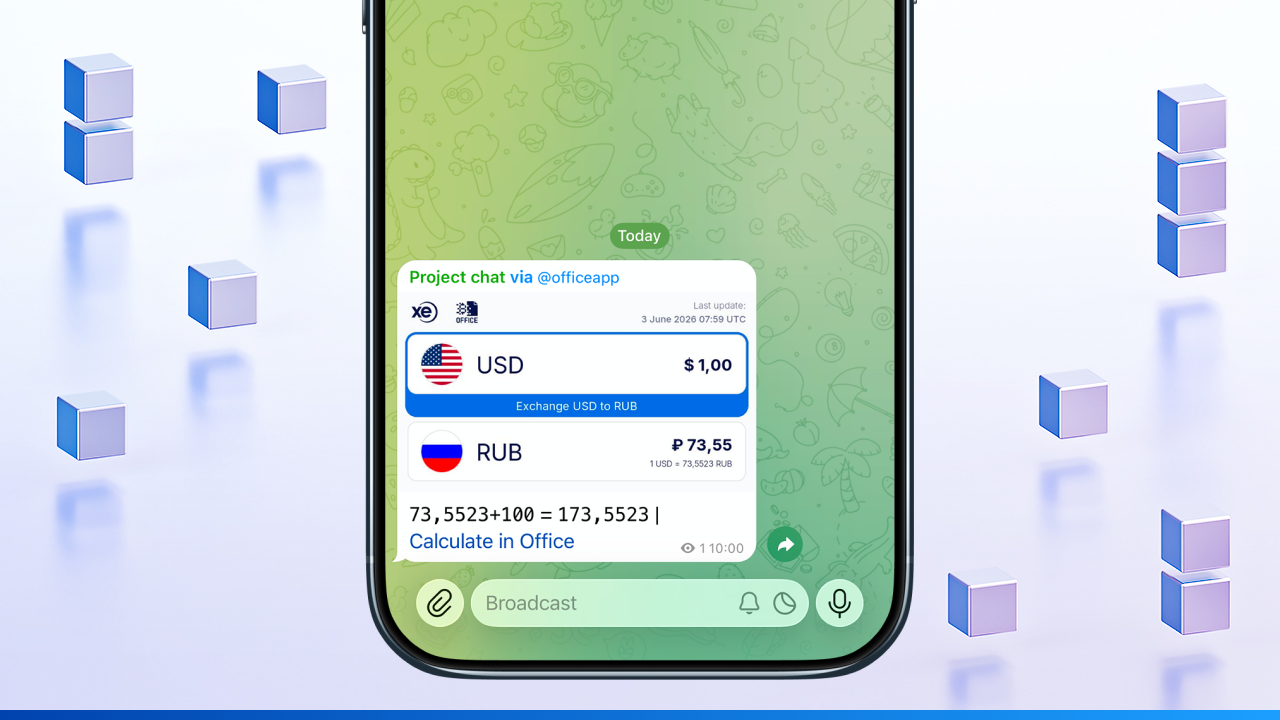
@officeapp dr+100 (USD → RUB)
• dr → abbreviation for the USD → RUB currency pair
• +100 → 100 units are added to the conversion result
➡️ After entering the command, tap the formula that appears above the input field to perform the calculation.
📌 The calculator will show how many RUB you get when converting USD → RUB with 100 added to the result.
4️⃣ Formula with arithmetic and percentages
This format is used when you need to calculate not just a single amount, but with arithmetic operations and percentages applied.
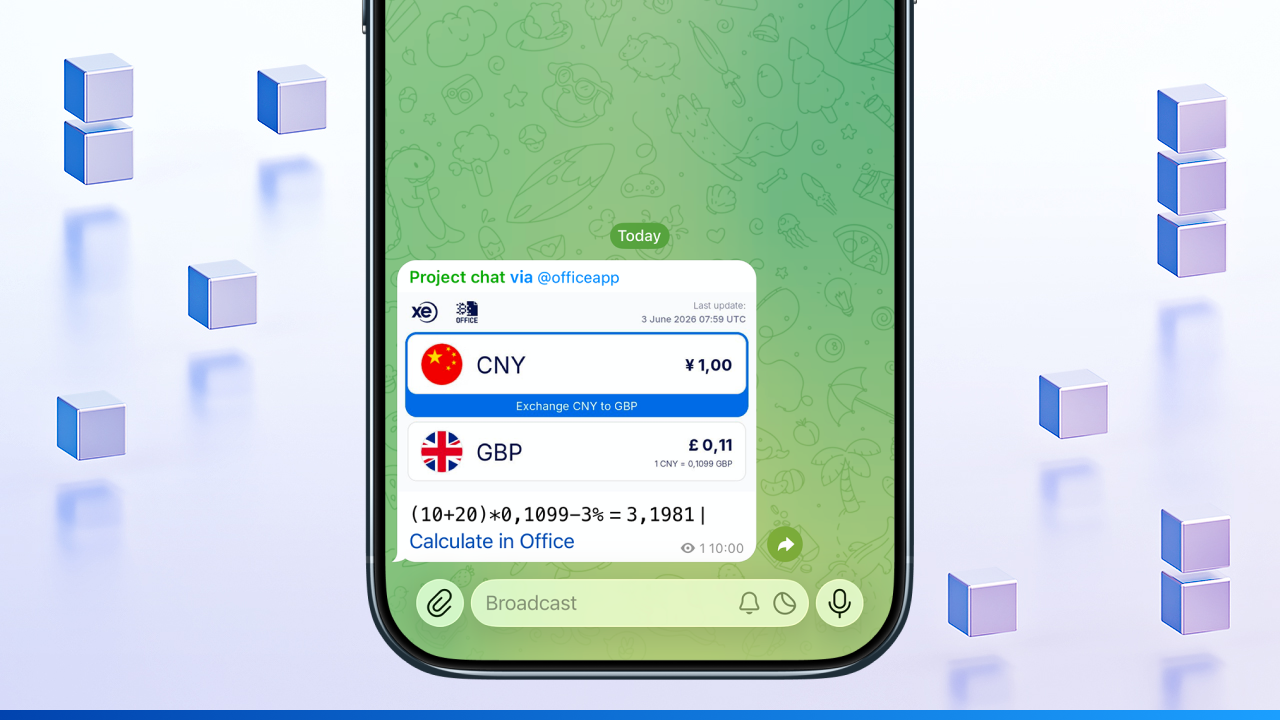
@officeapp (10+20)×cnybp-3% (CNY → GBP)
• (10+20) → arithmetic operation: numbers are added first
• ×cnygbp → the result is multiplied by the CNY to GBP exchange rate
• -3% → deduct 3% fee from the amount
➡️ After entering the command, tap the formula that appears above the input field to perform the calculation.
📌 The calculator will work out how many GBP you get when converting the amount defined by (10+20) using the CNY → GBP rate, minus a 3% fee.
5️⃣ Expression with multiple operations
This format is used when you need to calculate a final amount based on a base number, multiple arithmetic steps, and a currency conversion with a fee.
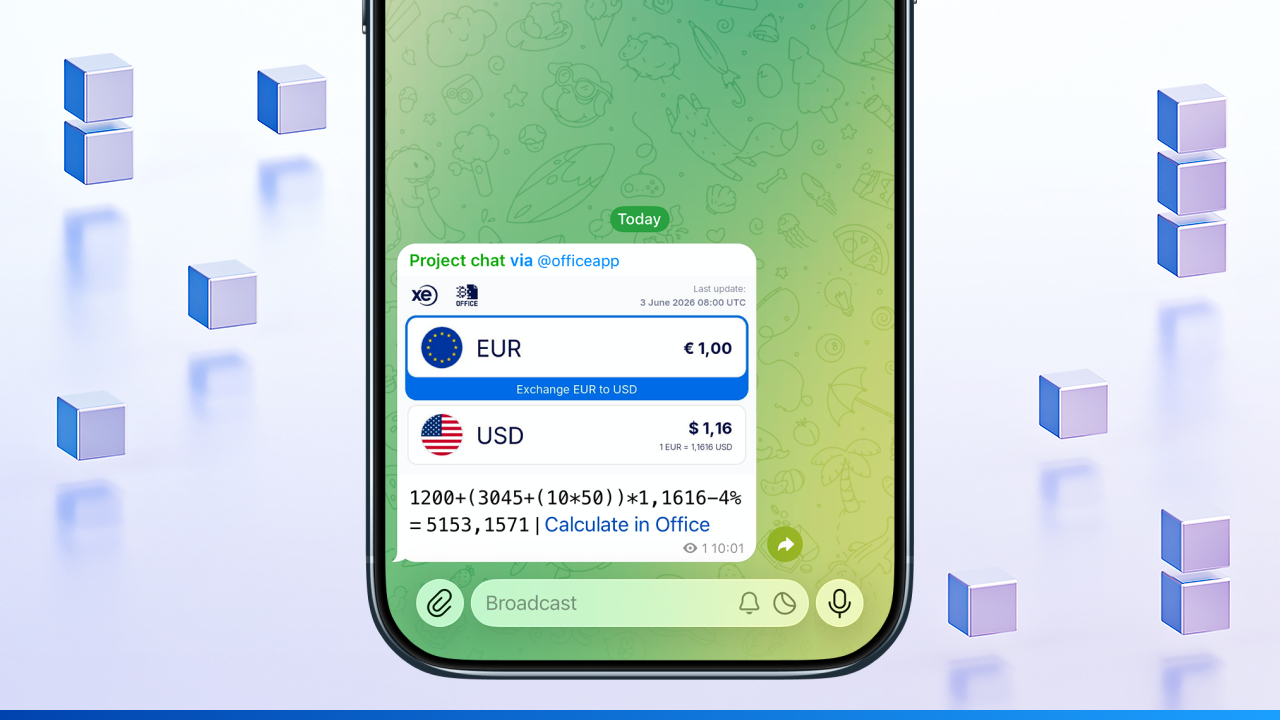
@officeapp 1200+(3045+(10*50))*ed-4% (EUR → USD)
• 1200 → base amount
• (3045+(10*50)) → arithmetic expression: first multiply 10×50, then add to 3045
• ×ед → convert the result at the EUR → USD rate
• -4% → deduct 4% fee
➡️ After entering the command, tap the formula that appears above the input field to perform the calculation.
📌 The calculator will work out how many USD you get when converting 1200 + (3045+(10×50)) EUR to USD with a 4% fee.
✅ Examples of valid cryptocurrency operations
The Crypto Office calculator supports various expression formats for cryptocurrencies. You can work with fixed amounts, percentages, markups, and complex formulas.
📌 Important: for cryptocurrencies the calculator uses rates via USDT.
For example:
— eth → ETH/USDT
— trx → TRX/USDT
— eth/trx → отношение курса ETH/USDT к TRX/USDT
1️⃣ Fixed crypto amount with fee
This format is used when you need to specify an exact amount of cryptocurrency and immediately apply a fee.
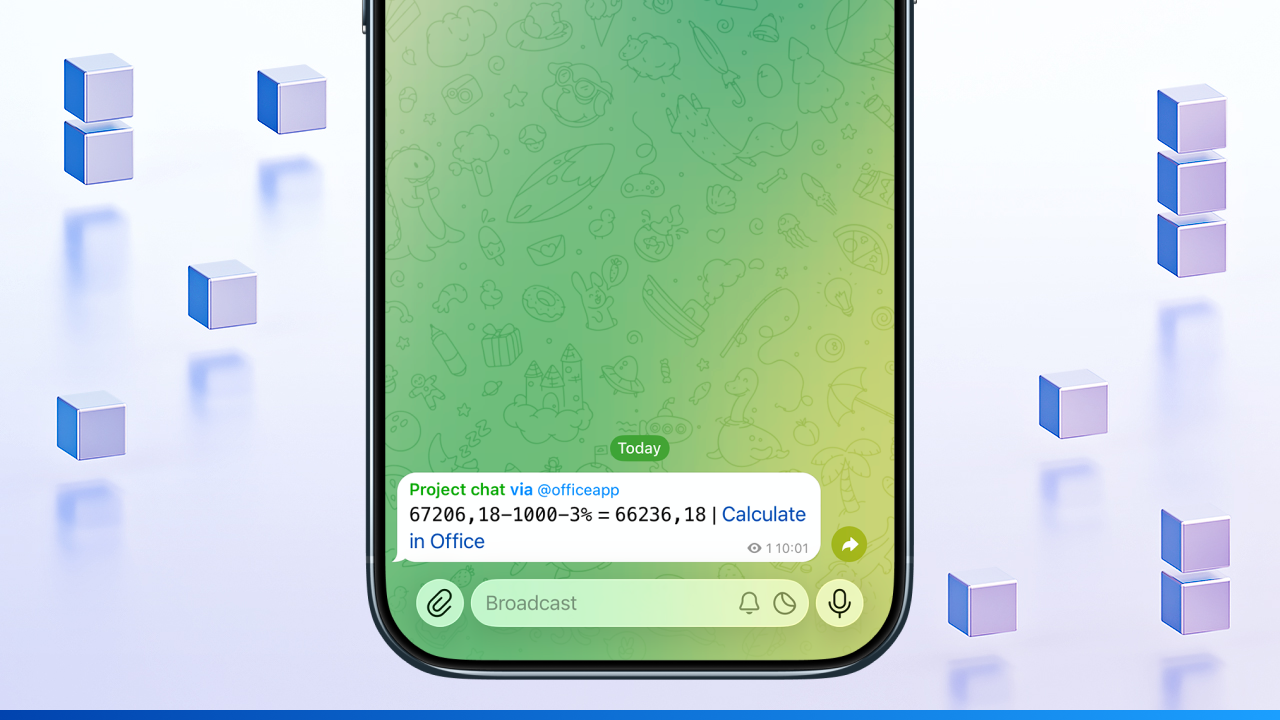
@officeapp btc-1000-3% (BTC → USD)
• btc → abbreviation for Bitcoin
• -1000 → deduct fixed amount: 1000
• -3% → deduct 3% fee from the amount
➡️ After entering the command, tap the formula that appears above the input field to perform the calculation.
📌 The calculator will show how many USDT you get when exchanging 1000 BTC minus a 3% fee.
2️⃣ Crypto pair conversion with markup
This format is used to convert one cryptocurrency to another with a percentage markup added.

@officeapp btc/eth+10% (BTC → ETH)
• btc/eth → ratio of the BTC/USDT rate to the ETH/USDT rate
• +10% → add 10% to the result
➡️ After entering the command, tap the formula that appears above the input field to perform the calculation.
📌 The calculator will show the BTC to ETH conversion rate with a 10% markup.
3️⃣ Expression with arithmetic and crypto conversion
This format is used when you need to include arithmetic operations in the calculation and convert the result to a cryptocurrency.
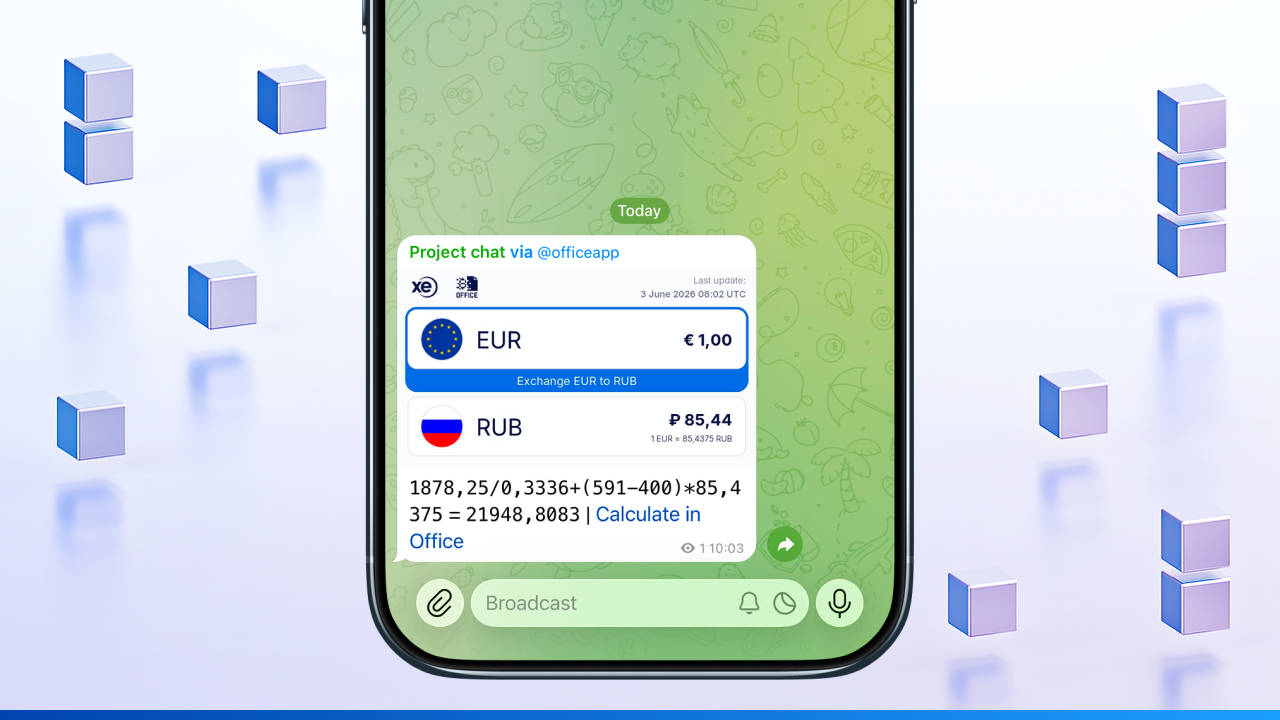
@officeapp eth/trx+(591-400)*er (ETH → TRX, EUR → RUB)
• eth/trx → ratio of the ETH/USDT rate to the TRX/USDT rate
• (591-400) → аarithmetic operation: subtract 400 from 591
• *er → the result is multiplied by the EUR → RUB rate
• + → the result is added to the base ETH → TRX conversion
➡️ After entering the command, tap the formula that appears above the input field to perform the calculation.
📌 The calculator will work out the ETH to TRX conversion with the result of (591-400)*курс EUR→RUB.
4️⃣ Additional formats
The calculator also supports:
— plain expression (without percentage)
— with a visible percentage
— with a hidden percentage
— individual rate with markup
— universal percentage for all chats from the "Settings" section
More about these formats: How to add a percentage to a currency expression
🔘 Hide calculation details
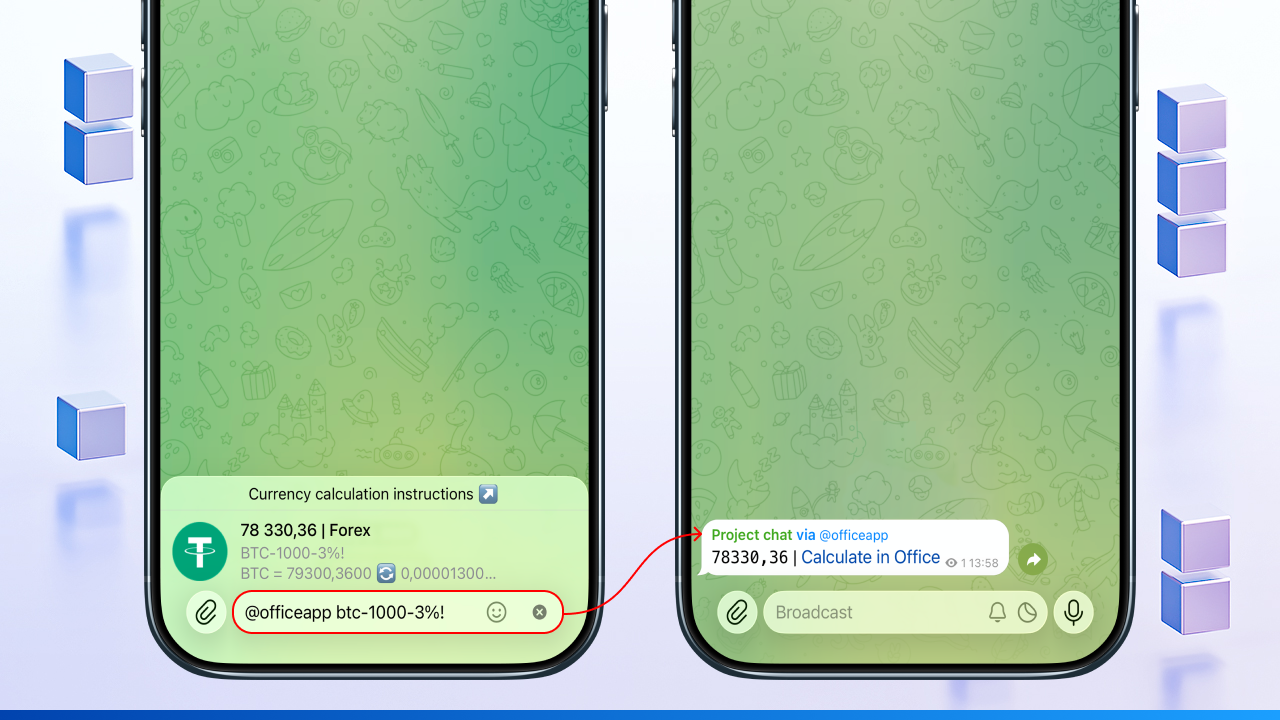
By default, the calculator sends detailed data to the chat: the formula, applied exchange rates, and deductions.
If you want to send only the final total, add the ! symbol at the very end of your command.
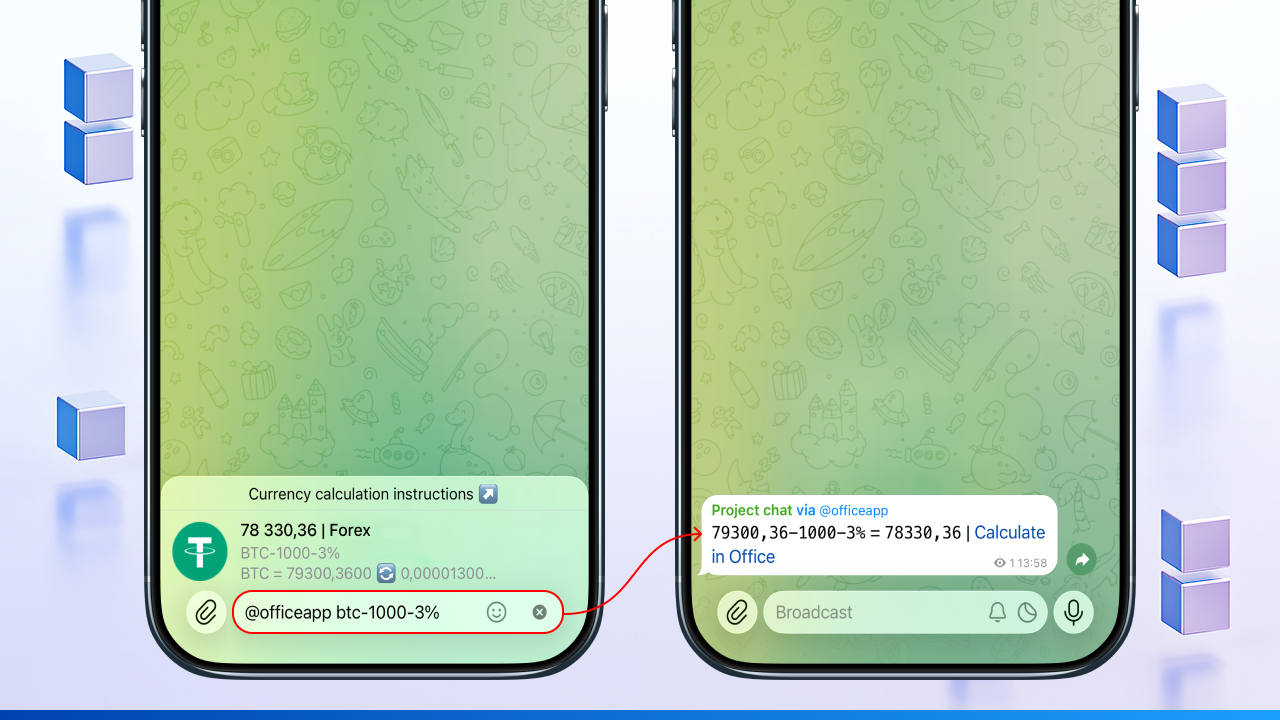
Standard mode:
Command: @officeapp btc-1000-3%
Result: 79300,36 - 1000 - 3% = 78330,36
Hidden mode:
Command: @officeapp btc-1000-3%!
Result: 78330,36
📌 When is this useful?
This mode is essential for client-facing work. You can include your own markup or a custom rate in the formula (e.g., @officeapp eu*1000+5%!), but your recipient will only see the final price. All internal calculations remain hidden.
➕ How to add a custom formula
Create your own calculation algorithm tailored to your business needs to expand the capabilities of the standard calculator.
Mini-App & web version 📱
1️⃣ tap "Accounting"
2️⃣ select "Calculator"
3️⃣ tap the "+" button
4️⃣ set the parameters:
• name: a short label
• formula: a mathematical expression
5️⃣ tap "Save"
🧮 How to apply a formula
Use quick inline commands in any chat or group to instantly perform calculations using your saved templates.
Telegram Bot 🤖
1️⃣ open the desired chat or group
2️⃣ enter the inline command in the following format: @officeapp [formula_name]
📊 Calculation preview before sending
For easy verification before sending, the bot immediately displays all the necessary information in the panel above the chat.
As an example - converting EUR to RUB multiplied by 1000:
@officeapp er*1000
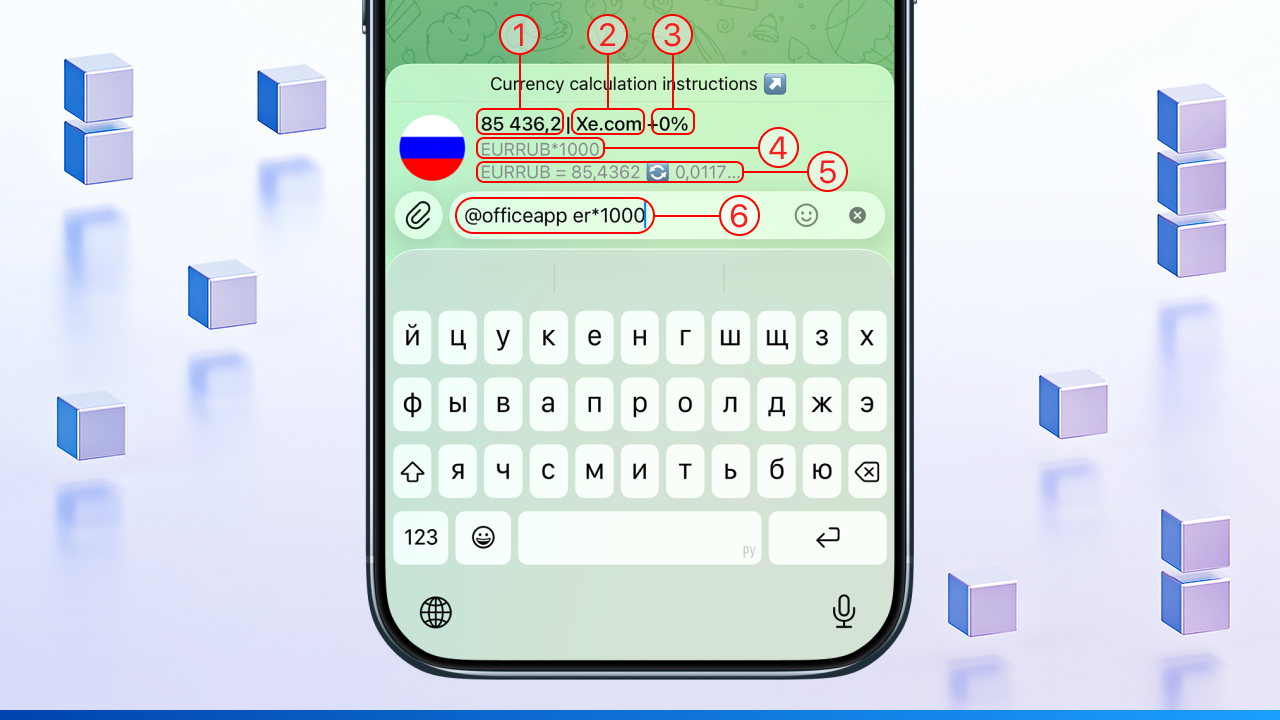
Breakdown of the screenshot elements by number:
1️⃣ Final amount obtained from the expression
85 436,2
2️⃣ Rate source
Xe.com
3️⃣ Markup / Fee amount
the percentage added to the source's mid-market rate (0% in this case).
4️⃣ Standardised expression
what the user entered in the command line (currency abbreviations) has been converted by the calculator into the correct format
5️⃣ Current exchange rate
1 EUR = 85,4362 RUB
6️⃣ Inline command
the inline command @officeapp er*1000 entered by the user in the chat
💡 Smart conversion: the calculator performs conversion even when the source selected in your settings does not support the requested currency pair. For example, if Forex is selected but doesn't include the BRL/USD pair, the bot will automatically fetch the current rate from another available source and specify it in the response.
⚙️ Other guides in "Calculator":
[Currency calculator] • [USDT-to-fiat calculations] • [Hidden percentage in currency settlements]