Lighter Google Play Services (by @AndroidHubOfficial)
@AndroidHubOfficialGoogle Play Services occupy too much ram or drain quickly the battery? Follow this guide and you will solve both! Heavly recommended on devices with 2 or less gb of ram
• Prerequisites: Magisk installed
INSTRUCTIONS
-- Download and install My Android Tools Pro
-- Grant root access
-- Go in "Service" > "System" as showed below
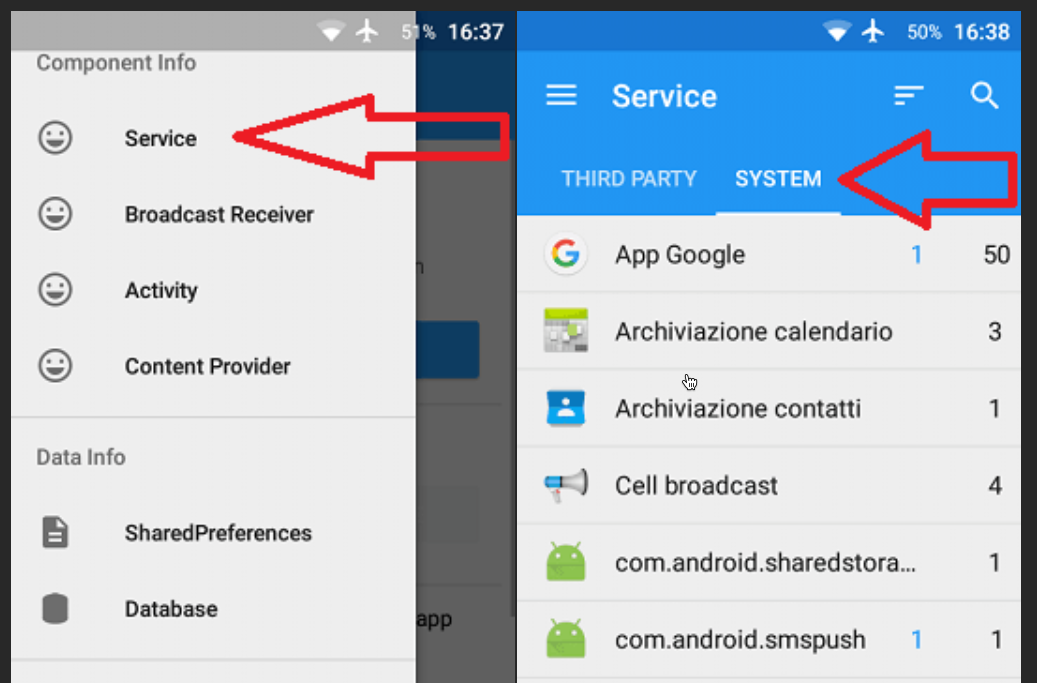
-- Scroll down and tap on Google Play Services
-- Now you can see all activated (blue) and disabled (red) GMS services
-- Tap on the 3 stripes on top-right and select the serives below:
- AdRequestBrokerService
- AdvertisingIdNotificationService
- AdvertisingIdService
- AnalyticsIntentService
- AnalyticsService (two services to disable)
- AnalyticsUploadIntentService
- AppMeasurementService
- CarIntentService
- CarService
- CastMediaRouteProviderService
- CheckInService (two services to disable)
- FusedLocationService
- FusedProviderService
- ConfigService (two services to disable)
- ContextManagerService
- DeviceConnectionAsyncService
- DeviceConnectionServiceBroker
- DispatchingService
- FitBleBroker (can only be deactivated if you don't use Google Fit)
FitCleanupService
FitConfigBroker
FitHistoryBroker
FitInternalBroker
FitProxyBroker
FitRecordingBroker
FitSensorsBroker
FitSessionsBroker
FitnessSyncAdapterService
- GeocodeService
- GeofenceLogsService
- GeofenceProviderService (service for the geo-localization and triangulation of points of interest)
- GmsCoreStatsService
- GoogleHttpService
- GoogleLocationManagerService (service for localization via the network)
- IndexWorkerService
- OneTimeInitializerService
- PlayLogBrokerService
- PlayLogIntentService
- PlayLogMonitorIntervalService
- PlayLogReportingService
- PlaylogService
- SystemUpdateService
- User PresenceService
- WatchdogService
- WearableControlService (can only be deactivated if you don't use wearables) WearableService
-- Tapping on the arrow on the top-right and you will disable them
-- Now go in "Broadcast Receiver" > "System" and tap on Google Play Services as showed below
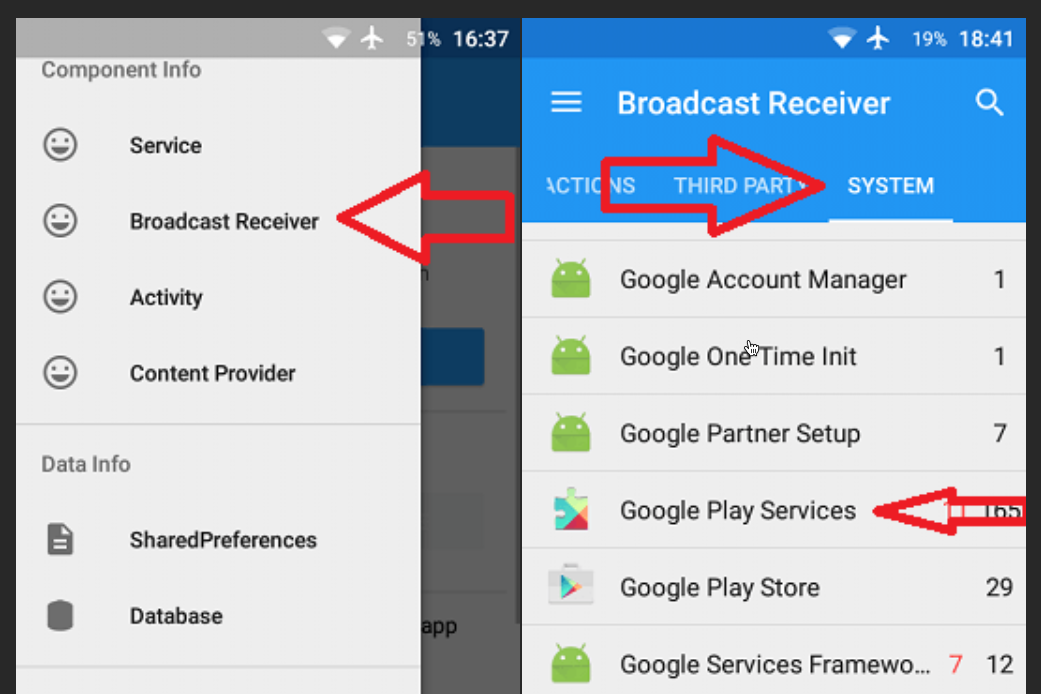
-- Now you can see all activated (blue) and disabled (red) GMS broadcast services
-- Tap again on the 3 stripes on top-right and select the broadcast serives below:
- AccountsChangedReceiver (four services to disable)
- AnalyticsSamplerReceiver
- CheckinService$ImposeReceiver
- FitDisconnectedReceiver (can only be deactivated if you don't use Google Fit)
- FitnessInitReceiver
- GServicesChangedReceiver (four services to disable)
- SystemUpdateService$ActiveReceiver (you could find it already disabled)
- SystemUpdateService$Receiver
- WereableSyncServiceReceiver (can only be deactivated if you don't use wearables)
-- Tapping again on the arrow on the top-right and you will disable them
-- Done! Now you have approximately other 300 mb of ram free and less battery drain caused from useless services enabled!
⚠️ ADVERTISMENT ⚠️
IF YOU WANT TO RESTORE THESE SERVICES, YOU HAVE TO DO IN REVERSE ALL THE PROCEDURE!
#Guides #root
Join @AndroidHubOfficial