How to invite friends to METATRONICS
Metatronics WorldRegistration in METATRONICS is available only via a referral code.
This means that every user enters the system through a recommendation and becomes part of the community.
If you want to invite friends and share access to the system, you’ll need your personal referral code.
You can find it directly in the app.
How to find and share your referral code
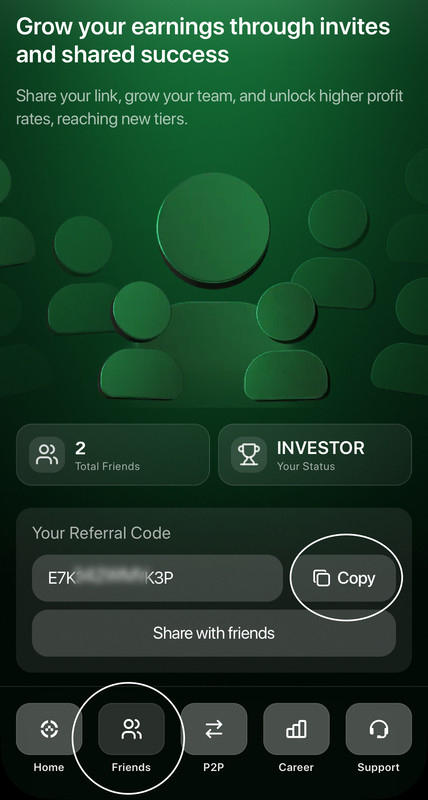
To locate your referral code in the app, follow these steps:
1️⃣ On the app’s home screen, tap the “Friends” tab.
2️⃣ In the “Your Referral Code” section, tap “Copy” or select “Share with Friends” to instantly send the code via a convenient method.
After that, your friend will be able to enter the code during registration and create a METATRONICS account.
What else you can see in this section
In the same “Friends” section, you can:
— see your current status in the system (for example, Investor);
— view the number of friends you’ve invited;
— track the growth of your network;
— monitor your progress in the career section within the system.
This section helps you keep track of your structure’s development and understand how the referral system works within your account.