How to host a .eth tonsite ?
1312.ton- Prerequisites
Server requirements:
- Public IP Address - Your server must have a white/public IP
- UDP Port Open - Inbound and outbound UDP traffic
- Web Server - Apache, Nginx, or any HTTP server running on localhost
- Linux Recommended - Ubuntu 20.04+ or Debian 11+
- Purchase a .eth domain at ens.app
- Without a domain, your site is accessible via raw ADNL address (
*.adnl)
Quick start
The easiest way to host a TON Site is using tonutils-reverse-proxy
- Download the proxy:
wget https://github.com/tonutils/reverse-proxy/releases/latest/download/tonutils-reverse-proxy-linux-amd64
chmod +x tonutils-reverse-proxy-linux-amd64
2. Start your web server:
Make sure your website is running on http://127.0.0.1:80.
3. Run the proxy:
chmod +x tonutils-reverse-proxy-linux-amd64
your adnl address will be shown in the terminal, copy it.

Open the UDP port shown in config.json after first startup.
Keep config.json safe. If you delete it, the proxy may generate a new ADNL address and your ENS contenthash will need to be updated.
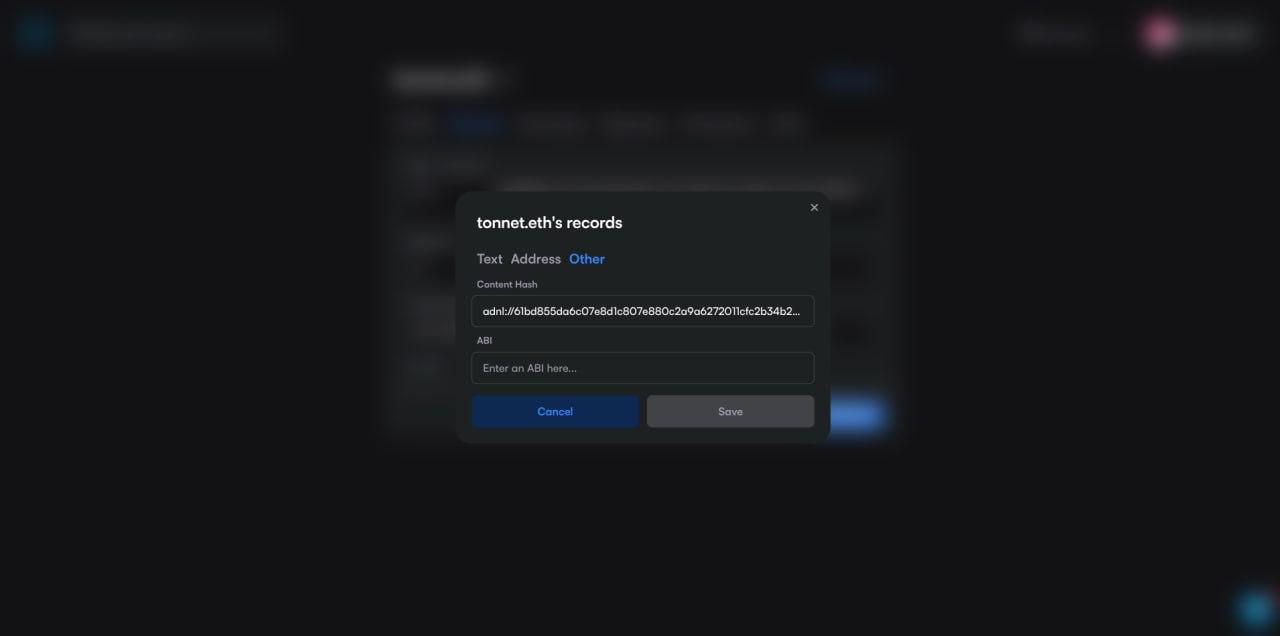
4. Add adnl contenthash record
Go to ENS App (ens.app), find your domain's records (My Names>Records) and paste adnl://<hex_address> in the generic Content Hash field.
for example :
adnl://61bd855da6c07e8d1c807e880c2a9a6272011cfc2b34b2e9de32cd37ff6f4ae5
5. Verify your tonsite:
Access your site through a TON gateway:
https://tonnet.eth.resistance.dog
Success! Your TON Site is now live! Keep the proxy running to serve requests.