How to bring back the old separate Wi-Fi and Mobile Data QS-tiles on Android 12 (by @AndroidHubOfficial)
@AndroidHubOfficial- Prerequisites: A computer with any OS, Android 12 (obv) installed on the phone with USB debug activated
INSTRUCTIONS
-- Enable USB debug in developer options if disabled
-- Download Android SDK Platform Tools zip on the computer and estract it
-- Move the extracted folder in you primay disk (e.g. C:/ for Windows)
-- Double click on "adb.exe"
-- Connect the phone to the pc using a cable
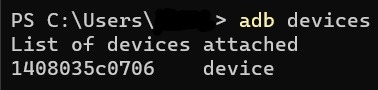
-- Open terminal (for Windows use Windows Terminal or PowerShell) and write adb devices and run it, after check if your phone is connected (image below)
-- Now copy-paste this command adb shell settings put secure sysui_qs_tiles “wifi,cell,$(settings get secure sysui_qs_tiles)” and run it
-- Reboot your phone
-- Done! Now you have again separate Wi-Fi and Mobile Data QS-tiles!
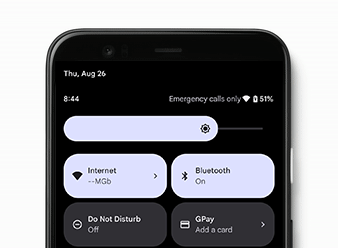
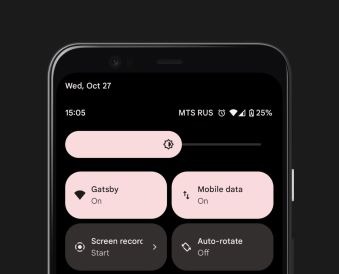
Note
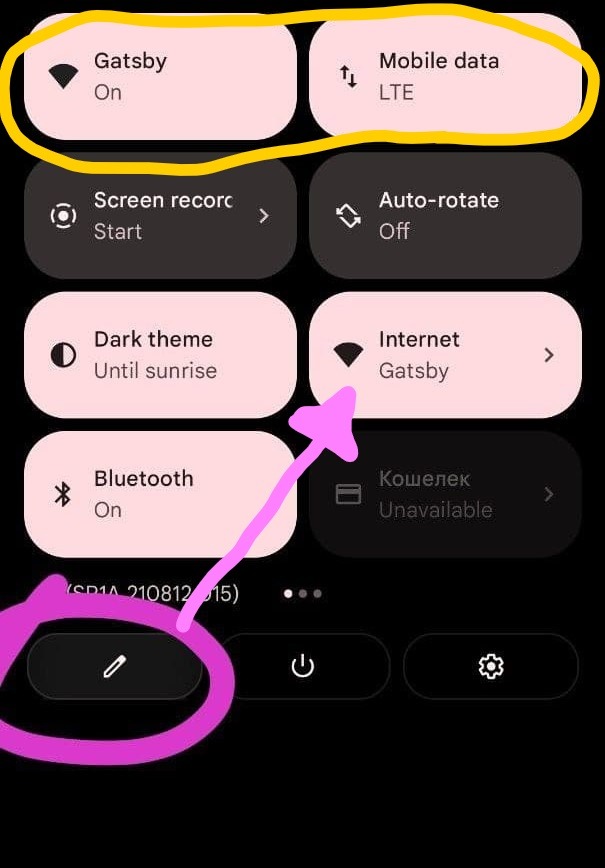
If you want the stock QS again, just remove Wi-Fi and Mobile Data ones and add from the menu the stock one (it isn't removed with the adb command, it's hided and Wi-Fi and Mobile Data are added)
#Guide #Android12Stuff #noroot
Join @AndroidHubOfficial