How to Unlock Bootloader of Your Mi Device!
Arnav Puranik (@arnavpuranik)Wanna Unlock the bootloader of your Mi Device? Here's how!
Pre-requisites
-- A PC/Laptop Running Windows
-- ADB Drivers
-- Your Mi Device
-- Your Mi Account (should be signed in on your Mi Device for 168 hours [one week] minimum)
-- Patience!
Instructions
Step 1
ON Your PC/Laptop
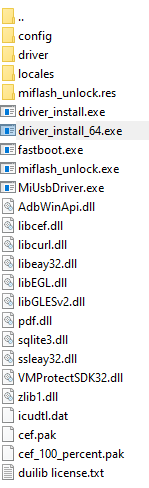
-- Start by downloading Mi Unlock Tool Zip Which we Have Provided and Extract it
ON Your Mi Device
-- Reboot your device in Fastboot Mode (Generally Vol Down Key + Power Button) and connect it to your PC
Step 2
-- Run driver_install or driver_install_64 any one of them (One is 32 Bit and other is 64 Bit)
-- Also Run MiUsbDriver
Make Sure to Run These Files as Administrator
Step 3
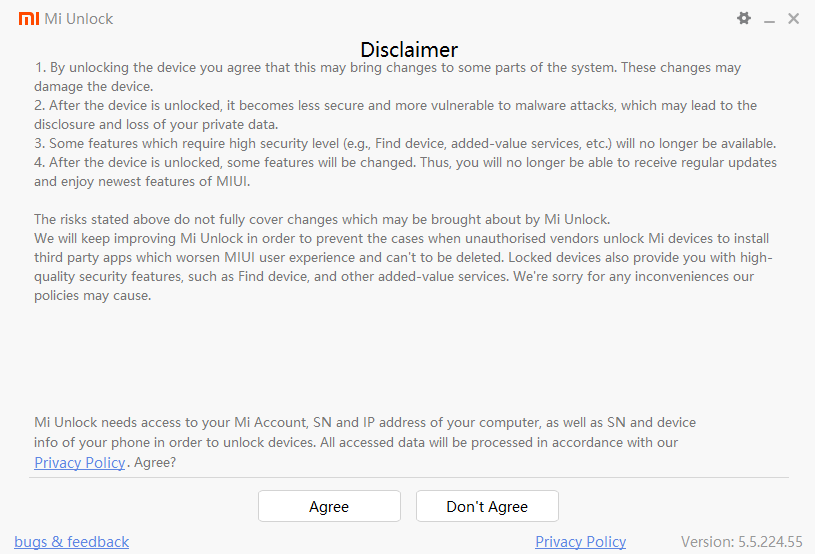
-- You will be greeted to this screen, click on Agree and Sign into your Mi Account
Step 4
-- Let it Detect your Device and once it Detects your Device, click on the Unlock and the process will Start and your Device will be unlocked!
Voila! You've Successfully Unlocked your Mi Device!
Notes
-- If in the Process, it gets stuck somewhere like example on 65% do the following
• Wait for some time and check, if it shows some error, move on to the next step
• If Still not unlocked, Reboot again to Fastboot Mode and Try again
• If still not unlocked, try USB Fix which I provided and Reboot your PC/Laptop and try again
• If still not unlocked, Reinstall The ADB Drivers and Try again
• If still not unlocked, try again in a few days, maybe your Mi Account isn't approved from their End!
• Even after this, If It Doesn't unlock, try on a Different PC/Laptop
-- NEVER Try to Unlock Mi Device from Un-official Tools, it won't work! No Matter how much you try, you can't bypass 7 days limit! Wait for it instead!
-- Don't unplug device in between the unlock process unless there's an error! If you try to unplug, your device will Hard Brick!
Hope it Helped you! Happy Unlocking!
Thanks!