How to Subscribe to the Neurowick Signal
FXCornerCopy every trade automatically to your account — step by step, no experience needed.
⭐ Best Option: RoboForex Copy-Trading
For the most accurate trade synchronization — lowest latency, best execution — we recommend opening a RoboForex MT5 ECN account and subscribing through their built-in copy-trading platform.
Step 1: Open a RoboForex MT5 ECN Account
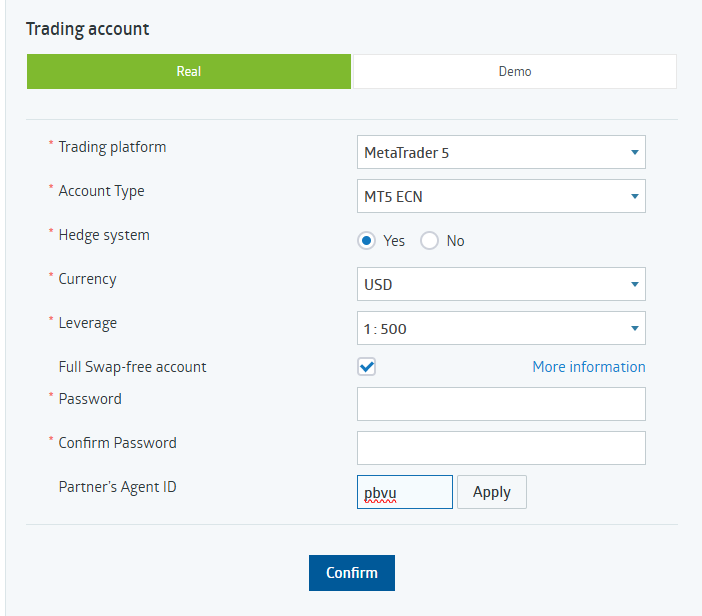
Register at RoboForex using our partner link and open a Real MT5 ECN account. Make sure to enter Partner Agent ID pbvu when registering so your account is correctly linked.
→ Open RoboForex Account (Partner ID: pbvu)Step 2: Configure Your Account Settings
During registration, use these exact settings for best performance: MetaTrader 5, MT5 ECN, Hedge System: Yes, Currency: USD, Leverage: 1:500, Full Swap-free: Checked, Partner Agent ID: pbvu.
Step 3: Subscribe via RoboForex Copy-Trading
Once your account is funded, go to the RoboForex copy-trading page and subscribe to the Neurowick signal:
→ Subscribe to Neurowick on RoboForex Copy-TradingStep 4: Configure Copy Settings
In the subscription dialog, use these settings for optimal copying: Method: Proportional (scales trades to your account size), Coefficient: 1, Round down the copied trade volume: Checked.
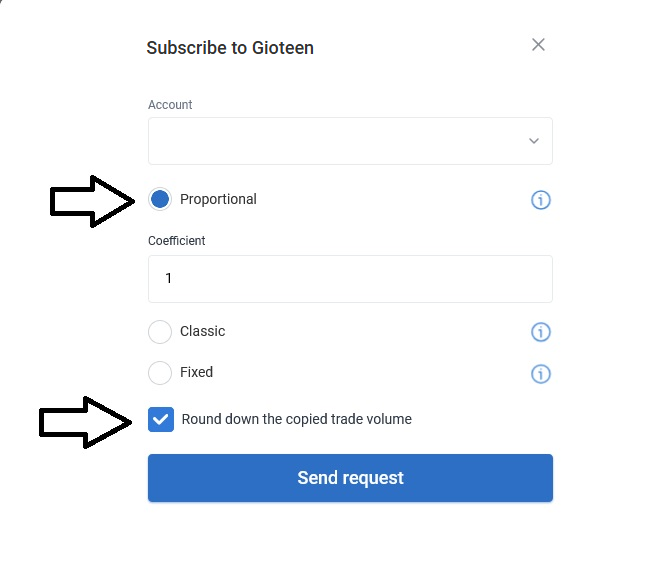
⚡ Why Proportional? Proportional mode scales the trade volume to match your account size. If the signal opens 0.10 lots on a ,000 account and you have ,000, you will automatically receive 0.02 lots — perfect risk-adjusted copying.
Alternative: Any MT5 Broker via MQL5
If you already have an MT5 account with a different broker, you can subscribe to the Neurowick signal through the MQL5 signals marketplace. This works with any MT5-compatible broker, but execution speed may vary depending on your broker.
→ Subscribe on MQL5 SignalsTrack every trade, profit, and position live on our signal dashboard:
📈 View Live Neurowick Dashboard