How to Start via Binance | tirlu.com
1. How to register on Binance and verify your account.
To register and create an account in binance, you must go to https://accounts.binance.com/en/login
In the website, Click REGISTER NOW and SELECT where do you live and enter your current location of residence.

Register using your email or mobile phone. Also create your password.

Enter your email/mobile and password. Select check on these boxes to agree on Binance’s Terms and Condition. Click CREATE ACCOUNT.

2. To Verify your account:
When you created your account, On PROFILE ICON on the top right corner of your homepage, look for DASHBOARD.
Click VERIFY.

Select ENTERPRISE VERIFICATION and click Verify.

Upload necessary verification requirements (Valid ID, documents, etc.) and click Begin verification.
3. How to buy USDT.
To Buy USDT using GCASH for your Payment method, here’s how:
On your homepage, Click ORDERS and select P2P Order to start Peer to Peer Transaction.

Choose EXPRESS.

Click BUY and put your desired amount that you would like to buy for a USDT. And click BUY WITH 0 FEE.

Confirm your Purchase by clicking the CONFIRM PURCHASE.

After confirming the seller will contact you and show their details.
You have to make sure everything is correct to avoid conflicts.

To Confirm your purchase, click Transferred, Notify Seller.

4. USING GCASH:
In the homescreen, click SEND MONEY.
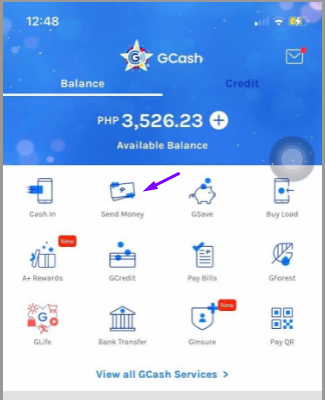
Select EXPRESS SEND.
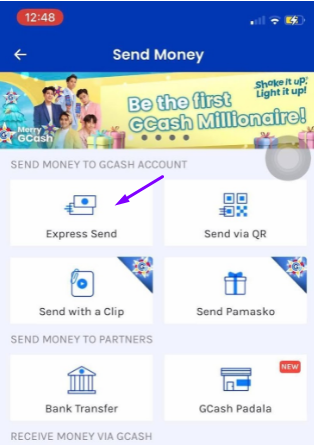
Enter seller’s GCASH number here and put the Amount you are required to Send. (Make sure everything is correct)

Screenshot the receipt for a proof. And send it to the seller.

Once the transaction is completed seller will accept the payment and send it to your funding balance.

5. How to change USDT to LTC.
Choose classic in the dropdown menu of Trade.

Search for LTC and select LTC/USDT.

Choose MARKET and insert the amount of your desired LTC according to the available value of your USDT.

It will reflect in your FIAT AND SPOT wallet in 2 minutes or less.

6. TRADING IN TIRLU.
First you must go to this website: https://tirlu.com/
6.1. Put your desired amount of LTC. You will see the equivalent of your LTC as it will earn a profit percentage. Type your paypal email address to receive your funds. Click START EXCHANGE.
Reminder: Double check your Paypal email address so you will not be in a problem.

EXAMPLE:

After that, the necessary information will appear and the will be your reference to transfer your LTC as you have to send the amount of LTC posted.

6.2. TO SEND YOUR LTC TO TIRLU.
Go to Wallet > Fiat and Spot and click Withdraw

Send the required amount to the LTC Address written on Tirlu’s platform.

When you already put the LTC Address, Select LTC Litecoin in NETWORK. Select desired amount according to your Tirlu required exchange amount. Click WITHDRAW and wait for it to reflect on your paypal.
Reminder: Take note of your Payment ID in Tirlu as this will become your Reference number in checking the status of your transaction.
6.3. In order to check the status of your transaction, enter your Payment ID into the special form on the website and click Check My Transaction.

The system will show you the status of your transaction:

7. Once you already received your funds to your Paypal, you can now withdraw your funds to your Gcash.
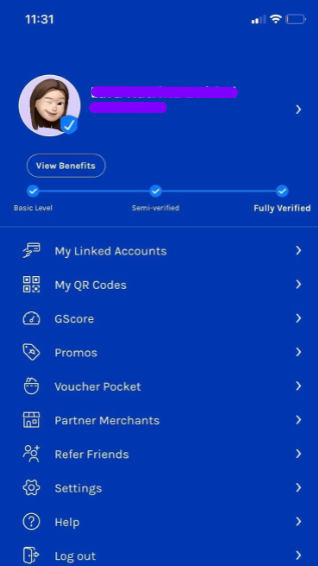
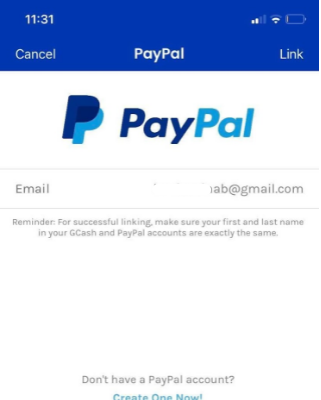
Go to Profile > My Linked Accounts.
Select Paypal.
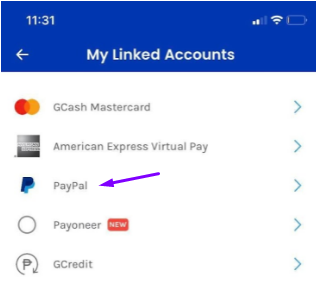
Type your Paypal email address and the click ‘Link’.
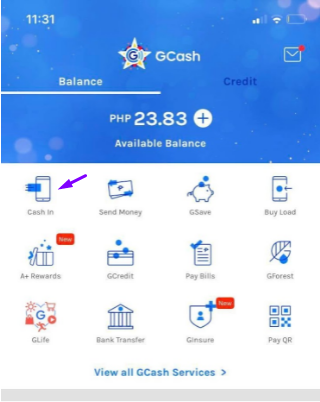
Select Cash in.
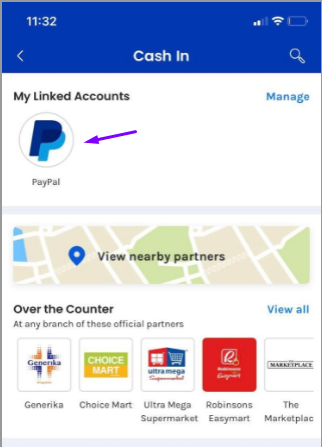
Click Paypal.
Enter the number of funds you would like to withdraw.

A text message on your registered Gcash mobile number will be sent to you immediately regarding on your Paypal withdraw.
As you already know, we can use GCASH to buy USDT through the Binance website.
8. Great, now you know everything, and you can try to leave an order at - https://tirlu.com/
If you have any questions or you don't understand something, we're always here for you - ask@tirlu.com