How to: Stake Aleph Zero Mainnet
Validatrium.comHello Aleph Zero community, Validatrium created a step-by-step tutorial on Staking process at Aleph Zero Mainnet.
Important note: as we are dealing with Mainnet, please go through the entire tutorial and make sure that you understand each step! Also read Additional information section.
Here are the steps:
- Add Polkadot extension & register Aleph Zero Mainnet wallet
- Transfer Aleph Zero Mainnet tokens
- Stake/nominate Aleph Zero Mainnet tokens
- Additional information
Add Polkadot extension & register Aleph Zero Mainnet wallet
Add Polkadot{.js} extension to your google chrome (pic 1)

Navigate to Aleph Zero Mainnet, activate Polkadot extension, reload page and press button "Yes, allow this application access" (pic 2)

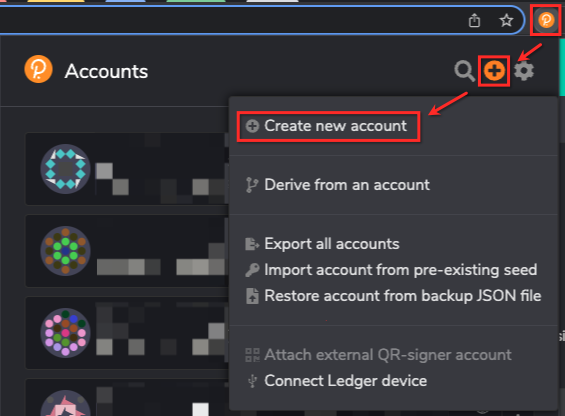
Once access is provided, Polkadot extension icon ->"+" ->"Create new account" (pic 3)
Copy mnemonic seed (12 words) and store them in safe place, check box at the bottom and proceed to the next step (pic 4)
IMPORTANT NOTE: never provide your mnemonic seed to anyone, as it will grant access to your wallet.

Fill out the fields, make sure to set Network: Aleph Zero (NOT "Aleph Zero Testnet")
Name for your account, set a password and press button "Add the account with the generated seed" (pic 5)

You have successfully created Aleph Zero native wallet!
Make sure that you have saved your mnemonic seed! and progress further the tutorial to transfer Aleph Zero tokens.
Transfer Aleph Zero Mainnet tokens
You need to hold Aleph Zero Mainnet tokens in order to transfer it to your new native Azero wallet.
Currently you will be able to acquire tokens on MEXC Global or Gate.io
Navigate to Polkadot{.js} extension, locate your wallet and copy wallet ID (pic 6)

Use your new native Aleph Zero wallet ID to transfer tokens by inserting it into withdrawal section at MEXC Global or Gate.io
Important: read Additional info section for minimum delegation amount
Stake/nominate Aleph Zero Mainnet tokens
Progress to Aleph Zero Mainnet explorer
Navigate to Settings -> Metadata and upgrade Metadata if available (pic 7); if your Metadata is upgraded to the latest version, you will see message "No Upgradable Extensions"

Navigate to Network -> Staking -> Account actions -> +Nominator (pic 8, pic 9)
NOTE: advise waiting till nominator button loads, it may take some time.


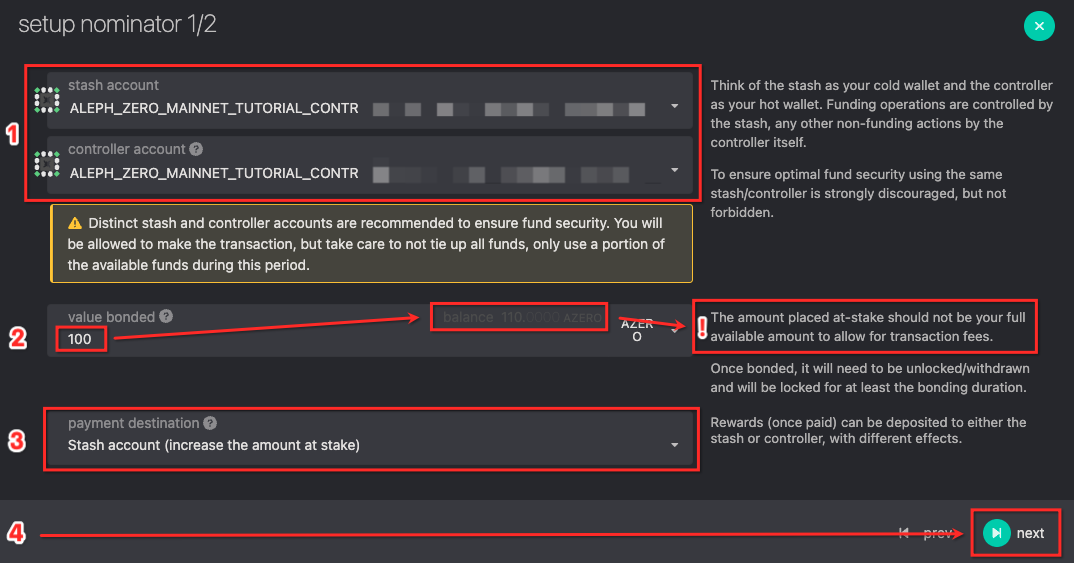
Setup nominator (pic 10)
- Choose your wallet for "stash account" and "controller account" (we strongly recommend to use separate accounts for Mainnet)
- Set value bonded, minimum amount is 100 Aleph Zero tokens +commission (!!! do not bond all tokens, leave some balance for transaction fees)
- Choose preferred payment destination
- Press "Next"
Pick nominator (pic 11):
- Pick one of 10 available nominators & click to move it from "candidate accounts" to "nominated accounts"
- Once you have picked the nominated account - press button "Bond & Nominate"

Authorise transaction (pic 12)
- Check that correct wallet is used for this transaction
- Press "Sign and Submit" button to complete transaction

Confirm transaction with Polkadot{.js} extension (pic 13)
- Check that correct wallet is used for this transaction
- Enter password from this wallet
- Press "Sign the transaction" button

Congratulations, you have successfully staked/nominated your Aleph Zero Mainnet tokens!
Additional information
Minimal validator stake: 25 000 AZEROs
Minimal nominator stake: 100 AZEROs
Unbonding period: 14 eras (days)
Rewards calculation: Each era (24hrs) rewards are split accordingly (90% to nominators and validators; 10% to treasury)
________________________________
Tutorial created by Validatrium.com
For additional info feel free to join official Aleph Zero community channels:
Telegram
Discord
Twitter