How to Remove Unused CSS in WordPress Website?
WordPress is a mixture of backend programming and front-end web designing principles that together contribute to the website’s appearance and functionality. CSS is a brilliant style sheet language that takes care of the visual appearance of your website and handles the formatting of the relative HTML files. However, the unused Cascading Style Sheets (CSS) file in your WordPress website can create certain issues for your website performance at times.
When applied, the CSS code loads on your web pages every time the users open it, even if there’s no use of it. Hence, you need to remove unused CSS in WordPress or any other sort of website you’re running.
No one is supposed to carry an unused CSS file on their WordPress database because of the performance compromisation. As your website grows, its database grows side by and you have to decide on a better web hosting support to protect your website performance. Speed is a notable factor in website performance and you have to maintain it for a good user experience on your website. When you remove unused CSS in WordPress you contribute to the website speed and optimize your existing website server support.
Besides, you're also required to remove unused CSS WordPress plugins associated with your website. These plugins also help you add various styling stuff to your web pages that become un-useful after a specific period. Unwanted plugins can also affect your website database and degrade your website performance.
In this post, we’re going to have a detailed discussion regarding unused CSS and how you’re supposed to get rid of it on your WordPress website. If you’re not able to figure out unused CSS in your WordPress website you can consult SFWP Experts and optimize your WordPress website performance. We’re an Award-Winning Custom WordPress Website Design Company providing potential web designing services around the world!
What is Unused CSS & How It Reaches Your WordPress Database?
Unused CSS is a style sheet file available in the “style.css file” format, that consists of a styling code associated with your WordPress theme or plugin. The website owners & designers usually don’t require these style codes and files but consequently, face problems in their website performance. Because these are unused CSS files and affect your website hosting support in the long run. As a result, you have to remove unused CSS in WordPress to raise the loading speed of your web pages.

When you download a particular WordPress theme or install a specific WordPress plugin to your website, these unused CSS files reach your database automatically. Likewise, your website server becomes overstuffed and slow to perform. However, if you’ve got dedicated hosting support, you’re not likely going to face a website performance issue as such. But for new website builders, it is crucial to remove unused CSS in WordPress for dedicated website speed and performance.
Apart from the WordPress themes and plugins, you can face more unused CSS files coming through web fonts, web icons, and web layouts that you add to your WordPress website from time to time. To overcome all these unused CSS issues you can contact SFWP Experts and share your concern with our skilled WordPress web design professionals. Our Custom Coded WordPress Website Designing Company is ready to help you with your website building goals & objectives!
How to Remove Unused CSS in your WordPress Website?
WordPress plugins are one of the leading contributors of unused CSS on your WordPress website, however, some WordPress plugins can also help you get rid of these CSS files on your website. These plugins not only help you remove unused CSS in WordPress but also help you save a lot of time finding these CSS files one by one. You might have got a large database to clean up on your WordPress website carrying such unwanted files and codes. There are 2 renowned WordPress Plugins we can discuss in this context:
- WP Rocket
- Asset Cleanup
You can also use these plugins to remove unused CSS in WordPress plugins that you’ve installed in the database. So let’s explore the CSS removal process through both of these plugins one by one:
WP Rocket
The first plugin on the list is known to be an expert in website loading speed and performance. You can use it to remove any render-blocking CSS files related to your web pages. However, we suggest you go through your website functionality and web page speed test prior to using this plugin. Moreover, you should also specify which WordPress plugins are creating problems for your website performance before applying the WP Rocket plugin.

WP Rocket is a perfect unused CSS removal tool for beginners. Here are the steps you need to follow to remove unwanted CSS through WP Rocket:
- Install and activate the WP Rocket plugin in your WordPress application
- After that, you can go to the “Settings” option on your WordPress dashboard
- Now go to the “WP Rocket” page and approach the “File Optimization” tab
- Scroll down and visit the CSS files section where you’re supposed to find the “Optimize CSS Delivery” option
- You have to tick mark this option on the left corner
- Go to the “Save Changes” button and click it to let WP Rocket create some important CSS files for your website posts and pages.
That’s it. You can now use the Google Pagespeed Insights to check the existing loading speed of your website pages.
Asset Cleanup
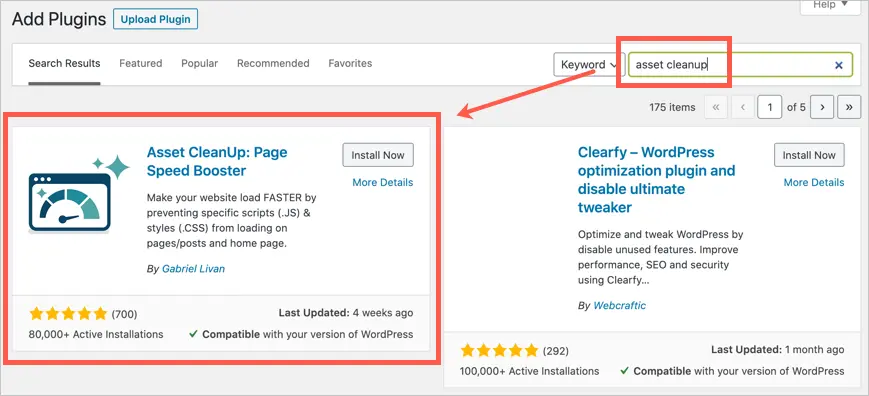
The next plugin on the list is a bit complicated to use in the beginning but has got more advanced features to remove unused CSS in WordPress websites. It is a powerful tool that lets you remove unwanted CSS from any of your web pages instantly. You can follow the enlisted steps to get started with this WordPress plugin:
- First, you have to install and activate the Asset Cleanup plugin on your website
- Reach out to the separate “Asset Cleanup” Option available on your WordPress dashboard
- After that, you find the settings option in the dropdown menu under “Asset Cleanup”
- Go to the “Test Mode” tab and enable the option to get access to different settings you want to apply and test as admit further
- Now go back to “Asset Cleanup” and reach out to the CSS/JS Manager Page
- Here you can upload your unused CSS files page by page
- The tool triggers your homepage first and then show you results for other web pages you’ve uploaded
- You can now figure out the files and assets you don’t need on your website and simply unload it from the plugin
So, that’s how you can easily remove unused CSS that’s affecting your WordPress website speed and performance. Before using these plugins you must ensure if your website loading speed is truly creating issues for your web designing campaign. CSS is a styling sheet file that also takes care of the aesthetic overview of your WordPress website.
Conclusion
To remove unused CSS in WordPress you must make your mind about the uselessness of the corresponding CSS for your website appearance. You should consult your web designing team or reach out to custom web designing companies providing unmatched solutions for your website building requirements. You can contact SFWPExperts and approach our Award Winning WordPress Web Designing Company to share your doubts and queries right away. We’re happy to help you!!
Read More Articles:
How to Check Website Accessibility Using Different Methods?
How to Create an Effective B2B Website Design?
5 Best WordPress Themes to Use in 2021
Contact Details:
213-277-9177
la@sfwpexperts.com
Visit Reference Profile Websites: