How To Participate in the Sol Pump
https://t.me/SolMemeSignalsIn this tutorial, we will guide you step by step on how to participate in the PUMP!
STEP ONE / SET UP YOUR WALLET
So, first of all, you have to download/setup a Solflare or Phantom wallet.
(You could use many other wallets, for example, Exodus, but these two work better for us in terms of speed and user experience.)
We are using Solflare.
STEP TWO / TOP UP YOUR WALLET
Now, in order to participate in the PUMP and buy coins, you have to have SOL in your wallet. You can transfer it from Binance, for example, or top up from your credit card (in certain countries).
❓How to send SOL to Solfrare wallet
❓How to send SOL to Phantom wallet
STEP THREE / START OF THE PUMP
So, now we are pretty much done with all the side work, and will proceed to the PUMP process on Raydium or Jupiter swap.
On the given DATE and TIME, we will post a contract address (CA) and charts to track the price.
❓How to swap on Raydium (Desktop)
❓How to swap on Raydium (Mobile)
❓How to swap on Jupiter (Desktop)
❓How to swap on Jupiter (Mobile)
❗️IMPORTANT❗️
Due to high volume, the SWAP process may take some time or even fail.
To prevent these problems, we recommend you to set slippage to 30% (higher than fees + price impact).
Trade small amounts at multiple times if your transactions don't go through.
STEP 3.1 / ADDITIONAL FASTER WAYS TO PARTICIPATE ON THE PUMP (using bots)
In the previous steps, we looked at traditional methods of participating in pumps such as Jupiter and Raydium.
However, due to the heavy load on these services, they are not always the fastest way for buying and selling coins.
That's why now we will suggest two bots (BonkBot and TrojanBot) that can be used directly from Telegram for quick buying and selling of coins, allowing you to be among the first to enter the pump and receive a profit
LINKS TO BOTS:
❗️BonkBot - LINK
❗️TrojanBot - LINK
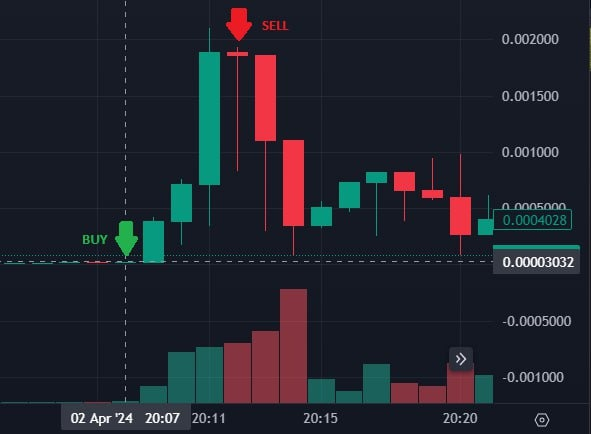
FINAL STEP / TAKE PROFIT
You bought a coin.
Be patient, whoever sells first will make the most profit.
You can swap your tokens back to SOL and then transfer it to wherever you need.
Thanks for attention. Hope this will help. If you still have questions - you know where to write - admin
🚀GOOD LUCK!