How To DL
t.me/thugsdumpTutorial to download effectively from drive, acefile, klop, sharer, openload, verystream, extract.me (+ errors) [By THUGS]
1. Always Download without drive login or through incognito window - coz it will create resumable and long lasting link. [How ? - Check any Drive Video Below]
2. Generating link via drive sharing sites like acefile,klop simply puts the file in your drive (from which the link was generated which has a max. capacity of 15GB) so, when this 15GB is filled, you are unable to generate more links as your drive is full (gives errors in acefile,klop). Now, what you have to do is delete those files from your drive and after that go to drive's trash and clear that too. Now you will be able to generate.
related links -
3. How to Download from Klop (drive.klop.me)
If you get error 401 in klop, logout and login again in klop or delete files from drive and clear trash .
4. How to Download from Acefile (acefile.co)
if it shows 404 error, don't worry the file is there.
what you have to do is open the link through any vpn (Turbo,Browsec, Avira Phantom Vpn,etc) with location india or singapore or sometimes US also (try different locations till it works), a small example on how to open (video) -
5. How to Download from Sharer (sharer.pw)
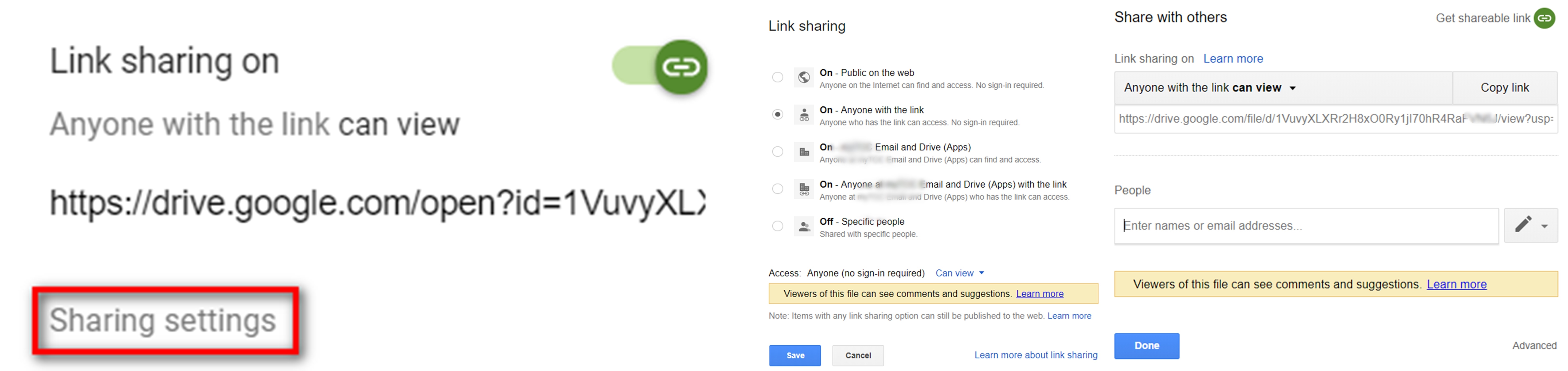
Note - To download through incognito from the drive link generated from sharer.pw you have to set the permission of the file to anyone with the link can view, by going to drive.google.com
In any case, to share a drive link to someone or to download it through incognito the permission of the file should be set to anyone with the link can view.
6. Sometimes while directly downloading from drive it will show quota exceeded.
example...
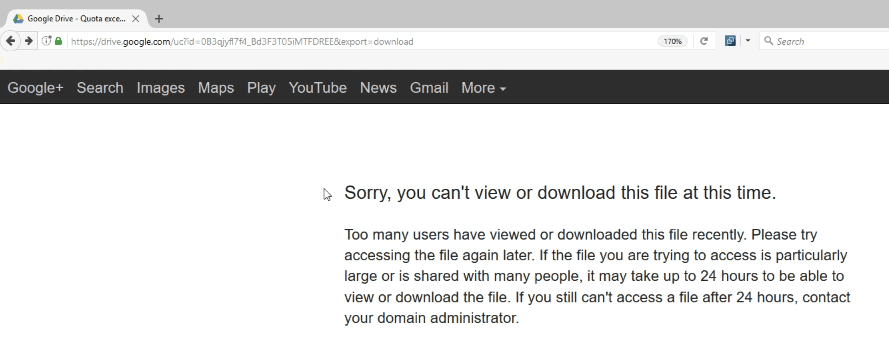
How to download then, ? - What you have to do is copy that quota exceeded file through any drive sharing site like acefile,klop (copy via link) and then download.
related links -
https://acefile.co/upload/remote
https://drive.klop.me/menu.php?s=link
7. How to Download From Verystream (verystream.com)
8. How to Download From Openload (openload.co)
openload.co is banned in any indian IP. (you can use a vpn, but it will slow down your download speed), recommended is to use different official openload proxies i.e you have to change openload.co in the link with,
9. How to Use Extract.me
Extarct.me is used to download files separately from any zip or rar (Suitable for those unable to download large sized zips or rars which we give frequesntly) How ? Check out the video -
10. How to refresh link (start from where the download stopped).
For PC - (while using drive its important to use links through incognito or without login) - In the video the download starts from 2% where its stopped or gave error
For Mobile (IDM+)
11. How to Add Multiple Files at Once in IDM+ (Off Topic)
69. All the basic things while downloading from Thug's Dump are here.
Happy Downloading !
Made by the #King & Alex, for You.
@thugsdump
Join Thugs -