How Pub Workspaces Simplify Flutter Monorepos
FlutterPulseThis article was translated specially for the channel FlutterPulseYou'll find lots of interesting things related to Flutter on this channel. Don't hesitate to subscribe!🚀
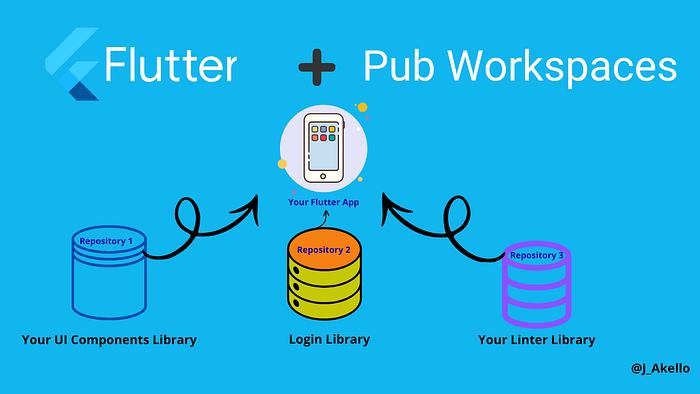
Introduction
If you've ever juggled multiple Flutter apps and shared packages, you've probably dealt with dependency mismatches, duplicate code, and endless pubspec.yaml changes and edits, or being blocked by another dependency upgrade/changes.
In this article, we'll explore why Pub Workspaces matter, how to set them up, and how they make Flutter monorepos simpler and more maintainable.
This article assumes you are already familiar with Flutter, if you are new to Flutter please check this article that shares collective resources to get started with Flutter as well as fundamentals from the Official Flutter Docs😃 .
Learn FlutterResources to help you learn Flutter.
flutter.dev
What's a Monorepo?
A monorepo is a single repository that contains multiple related projects or packages. In the Flutter and Dart ecosystem, this approach is especially popular for apps that share common code across modules or platforms.
What Are Pub Workspaces?
Pub Workspaces, or if you like, Dart Workspaces, are simply a workspace that allows multiple packages to live together under a single root pubspec.yaml, sharing dependencies and being treated as one logical unit.
With Dart 3.6 and newer, the pub tool introduced Pub Workspaces, a first-class way to manage multiple related packages and apps under one roof.
Check the Official Docs:
Pub workspaces (monorepo support)Learn more about pub workspaces, a way to manage package monorepos.
dart.dev
The Problem with Traditional Flutter Repos
Before Dart introduced Pub Workspaces, managing multiple packages inside a Flutter or Dart monorepo could get messy.
- Multiple
pubspec.lockfiles and version drift. - Manual
path:dependencies between local packages, repetitive setup. - Inconsistent builds across different apps.
- Complex CI pipelines to separately run dart pub get in every package.
Step-by-step process of Setting Up a Pub Workspace.
Dart Pub Workspaces make monorepos easier to manage by letting you define all related packages in one root pubspec.yaml.
You don't have to use path: dependencies between them anymore; Dart knows which packages belong to the same workspace.
1. Creating a Workspace
Overall sample project setup structure
dart_workspace/
├── pubspec.yaml
├── apps/
│ └── my_app/
└── packages/
 ├── ui/
 └── utility/
 ├── login/
 └── test/
- Create a root folder (e.g.,
dart_workspace/). Use your preferred naming.
mkdir dart_workspace
cd dart_workspace
mkdir -p packages/ui packages/utility packages/login packages/test
2. Add a top-level pubspec.yaml with a workspace: key listing packages.
Your root pubspec.yaml
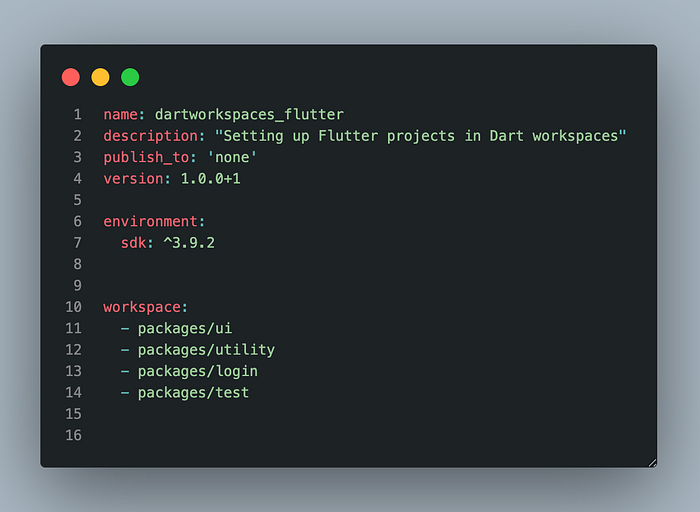
3. You can then create sub-packages (e.g., packages/core, packages/ui, etc.)
cd packages/ui
dart create -t package ui
cd ../core
dart create -t package core
4. Run dart pub get at the root to install dependencies for all packages at once.
Dart automatically recognizes all listed packages as part of one workspace.
2. Inside a sub-package's pubspec.yaml.
Even when you use Dart Workspaces, each subpackage still has its own pubspec.yaml file.
Each subpackage (like core, ui, etc.) still needs its own pubspec.yaml.
That's because every package:
- Defines its own name, description, and version
- Lists its specific dependencies
- Has its own entry point (like
lib/core.dart)
Note: In your sub-package's pubspec, make sure you add a property called resolution. And assign a workspace to it as a value:
resolution: workspace
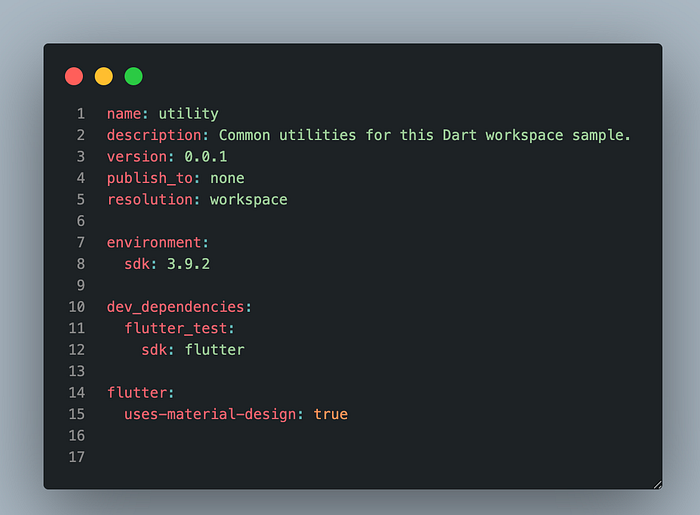
5. Why Choose Pub Workspaces for Flutter?
- No more manual
path:dependencies, you don't have to manually link local packages in eachpubspec.yaml. - Consistent dependencies: All packages share the same dependency versions, avoiding version drift.
- Faster
pub get: Dependencies are resolved once for the whole workspace, not per package. - Simpler CI/CD: Run
dart pub getone test command at the root; no more complex scripts. - Better IDE experience: All packages are analyzed together, so navigation, autocompletion, and refactoring work smoothly.
- Easier scaling: Makes managing multiple Flutter apps or shared Dart packages in a monorepo simpler and cleaner
Useful links and resources:
- Pub Workspaces Presentation by Lukas Klingsbo
- Step-by-step setup explanation on YouTube
- Official Dart Docs
Conclusion.
In this tutorial, you have learned how Dart/ pub workspaces Simplify Monorepo setup, following the recommended guidelines from the official Docs. Find the full GitHub Code here.
Dart/Pub Workspaces make managing multi-package Flutter projects simpler, faster, and more consistent.
By eliminating repetitive setup, unifying dependency management, and improving local development, they bring real structure to monorepos.🚀.
Thank you 😍
Happy Fluttering 🙌.
Should you have any questions, feel free to ping me on X(Formerly Twitter), LinkedIn | Bluesky, or the comment sections below.