How I Created a DevSecOps CI/CD Pipeline for a Flutter App
FlutterPulseThis article was translated specially for the channel FlutterPulseYou'll find lots of interesting things related to Flutter on this channel. Don't hesitate to subscribe!🚀
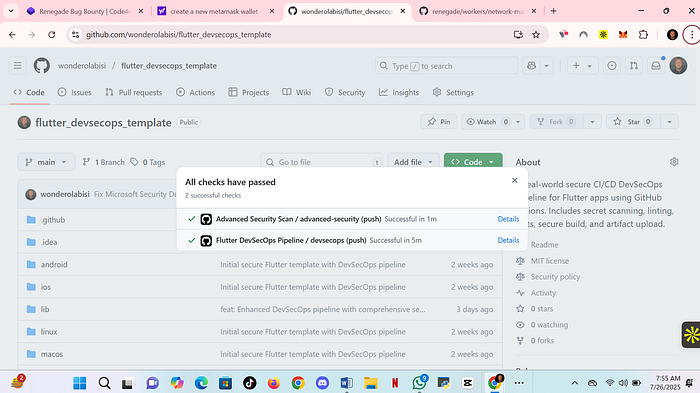
Introduction

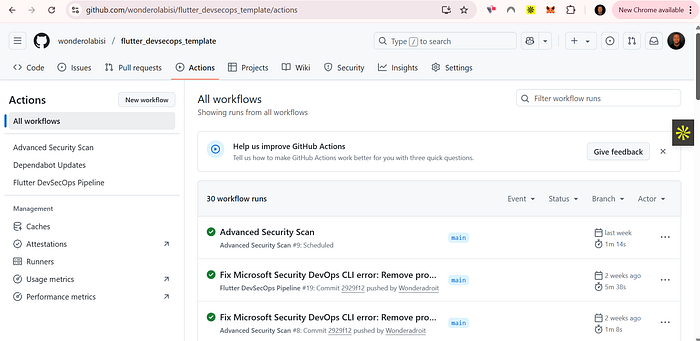
Introduction
As mobile applications become more powerful and security threats grow, integrating DevSecOps into the development lifecycle is no longer optional — it's essential. In this blog post, I'll walk you through how I set up a DevSecOps CI/CD pipeline for a Flutter mobile app, integrating tools for security, automation, testing, and deployment.
By the end, you'll understand:
- How DevSecOps fits into mobile development
- The CI/CD pipeline setup for Flutter
- Tools I used (both DevOps & DevSecOps)
- Practical steps you can follow
— -
🔧 What is DevSecOps?
DevSecOps stands for Development, Security, and Operations. It's a culture and approach that integrates security practices within the DevOps process from the beginning, rather than bolting it on later.
> 🚨 Instead of "shift-left security" as a buzzword, I made it a practical part of my Flutter workflow.
— -
🧱 Stack I Used
| Component | Tool/Platform |
| — — — — — — — — | — — — — — — — — — — — |
| Version Control | Git + GitHub |
| CI/CD Engine | GitHub Actions |
| Flutter Build | Flutter SDK |
| Testing | `flutter test`, `flutter analyze` |
| Static Analysis | `dart_code_metrics`, `flutter_lints` |
| Secrets Mgmt | GitHub Secrets |
| Mobile Security | MobSF (Mobile Security Framework) |
| Code Signing | Keystore + GitHub Secrets |
| Deployment | Firebase App Distribution / Play Store |
— -
📦 Project Structure
Here's how my repo is structured:
```bash
flutter_app/
│
├── .github/workflows/
│ ├── dev.yml
│ └── prod.yml
│
├── lib/
├── test/
├── android/
├── ios/
├── pubspec.yaml
```
— -
🔄 CI/CD Pipeline Overview
1. Trigger
The pipeline is triggered on:
- Push to `main` (development)
- Pull Request to `main` (with security checks)
- Tagging a release (for production deploy)
2. Stages
Development Workflow
- Checkout code
- Run static code analysis
- Run unit & widget tests
- Build APK
- Run MobSF scan (optional in dev)
Production Workflow
- Checkout and setup Flutter
- Build signed APK
- Run static and security tests
- Upload to Firebase App Distribution
- Optional: Submit to Google Play (manual or automated)
— -
🔐 Step-by-Step Guide
✅ Step 1: Setup GitHub Actions
File: `.github/workflows/dev.yml`
```yaml
name: Flutter DevSecOps CI
on: [push, pull_request]
jobs:
build:
runs-on: ubuntu-latest
steps:
- uses: actions/checkout@v3
- name: Set up Flutter
uses: subosito/flutter-action@v2
with:
flutter-version: Ɖ.x'
- name: Install dependencies
run: flutter pub get
- name: Run Static Analysis
run: flutter analyze
- name: Run Unit Tests
run: flutter test
- name: Dart Code Metrics
run: |
dart pub global activate dart_code_metrics
dart pub global run dart_code_metrics:metrics lib
- name: Build APK
run: flutter build apk
```
🔐 Step 2: Add Security Scanning (DevSecOps Integration)
For deeper mobile security, I integrated [MobSF](https://github.com/MobSF/Mobile-Security-Framework-MobSF):
- Build the APK using `flutter build apk`
- Upload to a local/hosted MobSF server via API
- Automate scanning and get vulnerability reports
🔒 Step 3: Secrets Management
Use GitHub Secrets for:
- `KEYSTORE_PASSWORD`
- `KEY_ALIAS`
- `FIREBASE_TOKEN`
- `PLAY_STORE_JSON`
```yaml
- name: Decode Keystore
run: echo "${{ secrets.KEYSTORE_BASE64 }}" | base64 -d > android/app/upload-keystore.jks
```
— -
🧪 Security & Quality Checks
| Tool | Purpose |
| — — — | — — — — -|
| `flutter analyze` | Static analysis |
| `dart_code_metrics` | Linting + Complexity warnings |
| MobSF | Mobile app vulnerability scanner |
| Secret Detection | GitHub secret scanning |
| Dependency Audit | `pubspec.lock` review for vulnerable packages |
— -
📤 Deployment
I used Firebase App Distribution to deploy builds to testers and optionally configured Play Store upload using Fastlane (with manual approval).
```yaml
- name: Deploy to Firebase
uses: wzieba/Firebase-Distribution-Github-Action@v1
with:
appId: ${{ secrets.FIREBASE_APP_ID }}
token: ${{ secrets.FIREBASE_TOKEN }}
groups: beta-testers
file: build/app/outputs/flutter-apk/app-release.apk
```
— -
📊 Results & Benefits
- ✅ Integrated security from day one
- ✅ Prevented secrets leak via automation
- ✅ Delivered faster with fewer manual steps
- ✅ Code quality improved due to enforced linting
- ✅ I could sleep better knowing I had security gates in place
— -
🎯 Final Thoughts
Setting up a DevSecOps CI/CD pipeline in Flutter isn't rocket science, but it requires discipline and the right tools. It helped me ship faster while keeping security at the core of my mobile app development lifecycle.
If you're a Flutter developer or mobile dev looking to shift left on security, start small and evolve your pipeline gradually.
— -
📎 Useful Links
- [Flutter GitHub Actions](https://github.com/marketplace/actions/flutter-action)
- [Dart Code Metrics](https://pub.dev/packages/dart_code_metrics)
- [MobSF GitHub](https://github.com/MobSF/Mobile-Security-Framework-MobSF)
- [Firebase App Distribution](https://firebase.google.com/products/app-distribution)
— -
👥 Connect with Me
Want to collaborate or contribute to open-source projects?
- 💻 GitHub: [wonderolabisi](https://github.com/wonderolabisi)
- 💼 LinkedIn: [Wonder Olabisi](https://www.linkedin.com/in/wonder-olabisi/)
- 🔔 Follow me on GitHub for more CI/CD and DevSecOps projects!
— -
Thanks for reading! Don't forget to share and drop your thoughts in the comments.