🚀 How Exness traders can join BMN Trading HUB
BMN TradingHello Trader,
If you are reading this, you are ready to join a fast-growing community of active traders and access all BMN Trading HUB benefits.
In this guide, we will show you how to join our community by using Exness, one of the world’s leading Forex brokers.
Please follow all steps carefully.
P.S. Read the guide till the end. You will find how to solve any problem.
✅ Step 1 — Create Your Exness Account
Click the link below and register:
👉 SIGN UP LINK: https://one.exnessonelink.com/a/1qf9vyner6/?campaign=38853
Register and save your login details.
✅ Step 2 — Complete KYC Verification
Verify your identity inside Exness:
- Upload ID document
- Upload proof of address (if required)
This is mandatory.
✅ Step 3 — Open a Real Trading Account
Inside Exness:
- Create a Real trading account
- Choose an account type that fits your trading style
(Standard / Raw / Pro — your choice)
✅ Step 4 — Fund Your Trading Account
Deposit money into your trading account.
⚠️ Important:
Access to the BMN Trading HUB is available only for active traders.
This helps us protect the community from spam, scammers, fake accounts, and inactive users — and allows us to provide higher quality support.
✅ Step 5 — Join Our Community via Telegram Bot
If you completed all 4 steps:
- Open Telegram
- Go to 👉 @bmnprivatedoorsbot
- Type:
/start
Follow the simple instructions.
🎉 Welcome to BMN Trading HUB!
❓ FAQ
Bot says: “UID Not Found”
Don’t worry. New accounts usually appear in our system within 3–4 hours (often faster).
Please try again later. If still not working, contact us here:
👉 https://t.me/BMNTrading?direct
We will help you.
I already have an Exness account. Can I join?
Yes — that’s great. If you already trade on Exness, follow these steps:
🔹 Connect your account to BMN
- Login to Exness Personal Area:
https://my.exness.com/pa/trading/accounts
2. Start live chat with Exness support
3. Type:
Connect to partner
4. Click the link they send
5. Fill all required fields
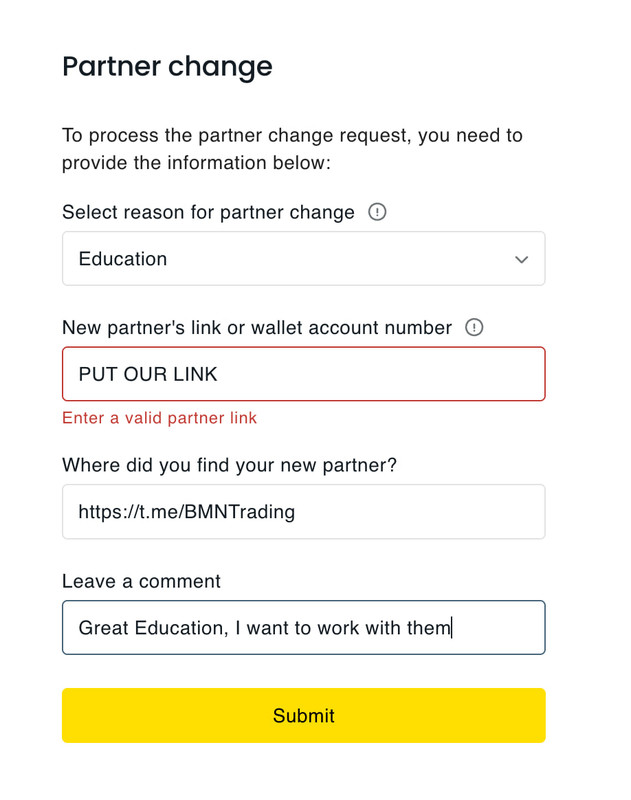
6. Don’t forget to add our partner link:
https://one.exnessonelink.com/a/1qf9vyner6/?campaign=38853
Processing time: from 1 to 48 hours. Please be patient. After approval, you will receive confirmation.
Then:
- Create a new trading account
- Start trading on it
Now use this new account number in:
👉 @bmnprivatedoorsbot
Exness support rejected my request
No problem — this is fixable. You can simply:
- Create a new Exness Personal Area
- Use a different email address
You may use the same KYC documents — this is allowed.
Then follow this guide from the beginning and join the BMN Trading HUB.