Halotel Internet Settings Tanzania
https://www.apnsettings.org/tanzania/halotel-tz/
Halotel Tanzania 4G LTE 3G Internet Settings for iPhone iPad Android HTC Samsung Galaxy WiFi Dongle Blackberry Windows Phone
Halotel APN Settings for Android
In your Android Smart Phone Go to – Settings -> More ->Mobile Network -> Access point Names -> + ( to add)
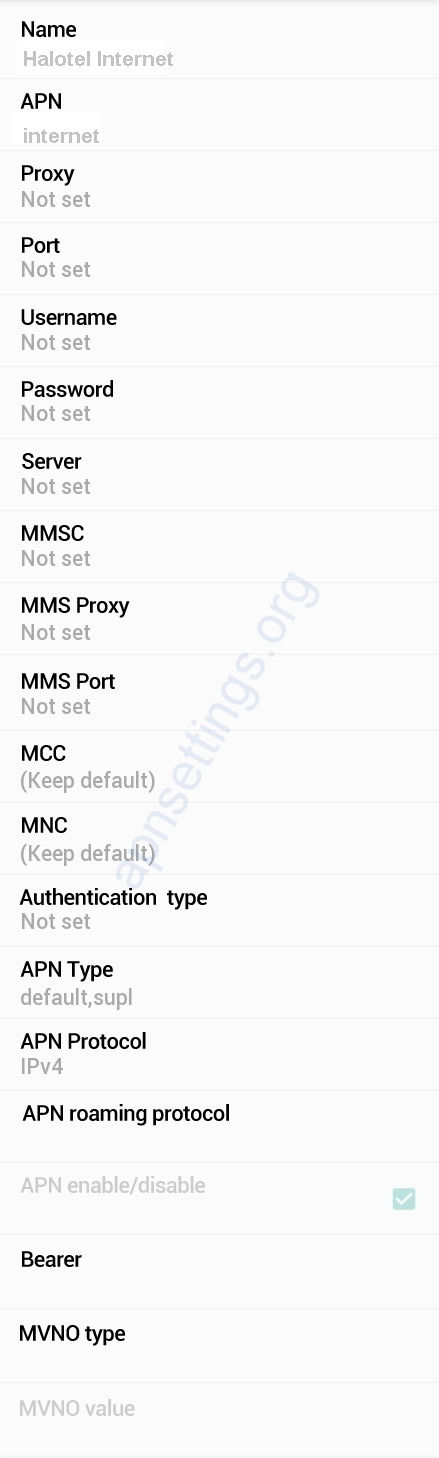
Name : Halotel Internet
APN : internet
Proxy : Not Set
Port : Not Set
Username : Not Set
Password : Not Set
Server : Not Set
MMSC : Not Set
MMS Proxy : Not Set
MMS Port : Not Set
MCC : (Keep default)
MNC : (Keep default)
Authentication Type : Not Set
APN type : default
APN protocol: Ipv4
APN roaming protocol: Ipv4
Enable/disable APN: APN Enabled
Bearer: Unspecified
MVNO type : None
MVNO Value : Not set
Halotel APN Settings for iPhone iPad
In your Apple iPhone go to Settings -> Cellular -> Cellular Data Network -> APN and enter the following details
Cellular Data:
APN: internet
Username: Blank
Password: Blank
LTE Setup(Optional):
APN: Blank
Username: Blank
Password: Blank
MMS:
APN : Blank
Username: blank
Password: blank
MMSC: blank
MMS Proxy: blank
MMS Message Size: 1048576
MMS UA Prof URL: blank
Halotel Blackberry APN
Internet APN:
Tap Settings -> Network Connections -> Mobile Network ->APN
Access Point Name (APN) : internet
Username : Blank
Password : Blank
Windows Phone Settings
In your Windows Phone Go to Settings -> Network & Wireless -> Cellular & SIM Settings -> Add Internet APN
INTERNET APN
Profile Name: Internet
APN: internet
User name: Blank
Password: Blank
Type of Sing-in-info : None
IP Type :Ipv4
Proxy server (URL): Blank
Proxy Port : Blank
WiFi Dongle Settings
Profile Name : Internet
APN: internet
Access number: *99#
User name: Blank
Password: Blank