Google Cloud Planform VM setup for Android building
silent_listenerI tested Google Cloud VM created with a trial account to build custom ROMs. You can simple create a Google Cloud Platform trial account at https://cloud.google.com/.
When it comes to VM instances, there are some restrictions.
CPUs - 8 CPUs
RAM - didn't check (I once crated a VM with 64 GB of RAM)
SSD - 250 GB
HHD - 2048 GB
One other thing to note is that I couldn't bootuserdebugbuilds I built on some regions (engbuilds booted fine). Lately I switched tous-west4 (Las Vegas)and it solved the issue.
Get the full out of it
I have setup VMs with different specs but below is the setup I found most suitable if we are on a free trial. Surprisingly, I found that the performance of T2D is above that C2D machine type, and it is way more cheaper than C2D.
Machine type - t2d-standard-8 (8 vCPU, 32 GB memory)
Storage - 600 GB Standard Disks (HDD)
OS - Ubuntu 22.04 LTS
I choose Ubuntu 22.04 latest LTS release to avoid the hassle of manually updating repos.
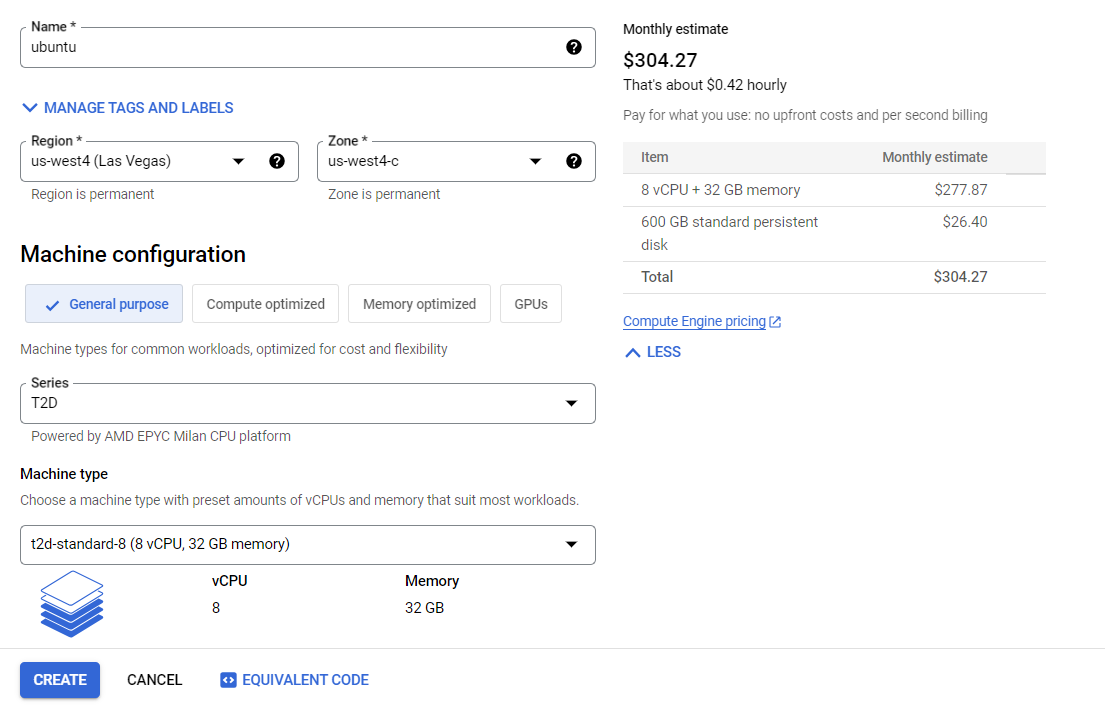
With this setup, I can build LineageOS-20 for sweet clean in less than two hours with ccache enabled. Without ccache, it takes around three hours.
First steps:
Usually, I change the time zone of the VM to my time zone.
sudo timedatectl set-timezone Asia/Colombo
It is also better to update the system before setting up other things.
sudo apt update && sudo apt upgrade
TIP:tmuxandtmateare really great tools if you are working on a VM. Search on web for more information.
Install build essentials
With below commands, we can install build essentials for building a ROM.
Installing required packages
sudo apt install -y \
  bc bison build-essential ccache curl flex g++-multilib gcc-multilib \
  git git-lfs gnupg gperf imagemagick lib32ncurses5-dev \
  lib32readline-dev lib32z1-dev libelf-dev liblz4-tool libncurses5 \
  libncurses5-dev libsdl1.2-dev libssl-dev libxml2 libxml2-utils \
  lzop pngcrush rsync schedtool squashfs-tools xsltproc zip zlib1g-dev
Install the repo command
sudo curl --create-dirs -L -o /usr/local/bin/repo -O -L https://storage.googleapis.com/git-repo-downloads/repo
sudo chmod a+rx /usr/local/bin/repo

# Symlink 'python' to 'python3'
sudo ln -s /usr/bin/python3 /usr/bin/python
Configure Git
We need to configure git with our username and email adress.
git config --global user.name "Your Name"
git config --global user.email "youremail@example.com"
Now we are ready to build a ROM on our newly setup VM. Follow instructions from the specific ROM you are going to build.
For example, visit the below link to see LineageOS build instructions for Redmi Note 10 Pro (sweet).
https://wiki.lineageos.org/devices/sweet/build/variant1
Thanks for reading.