Gdutils Tg Bot
Roshanconnor Yo yo
It is advised to choose Complete Installation
Choose Individual Installation in case of any errors


In this step we are downloading the service accounts from Our Private github repo
That's why its asking for your Username and Password

When nano editor is opened copy Paste whats below to the blank screen
server {
  listen 80;
  server_name your.server.name;

  location / {
    proxy_set_header Host $host;
    proxy_set_header X-Real-IP $remote_addr;
    proxy_set_header X-Forwarded-For $proxy_add_x_forwarded_for;
    proxy_pass http://127.0.0.1:23333/;
  }
}
In the above code you have to replace your.server.namewith your own subdomain
In my case it is test.roshanutils.me
See the image below

After changing that value according to your own
Press ctrl + x and exit the editor
When it asks you to save Press Y and Press Enter
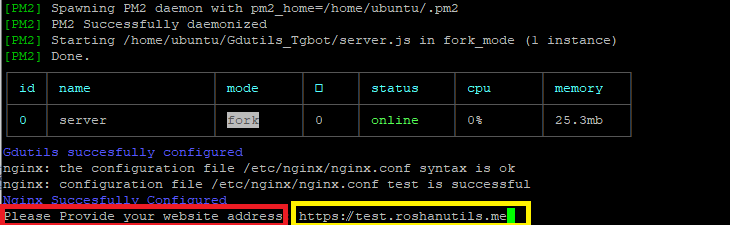
When it asks for your website address..provide the same subdomain adress you filled in nano before..dont forget to add https://
In my case it is https://test.roshanutils.me


When you see such a screen..it means that your setup is succesful "result":true