GUIDE TO SELF-JOINING THE K12 WORKSPACE
Step 1: Use Browser Not the mobile app. Log in using the provided username, password, and 2FA.
Step 2: After successfully logging into your account, open the K12 Workspace link provided above, leave it open without clicking anything, and disregard the content displayed on the screen.
You will see this message when you visit the link, but don't worry, its completely normal and you can just ignore it
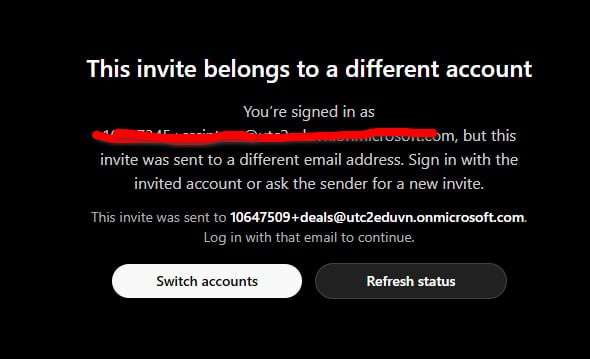
Step 3: Go back to the ChatGPT page, refresh it, and wait 10 seconds—then you're DONE.
You should see something like this when you finish and click on your profile:
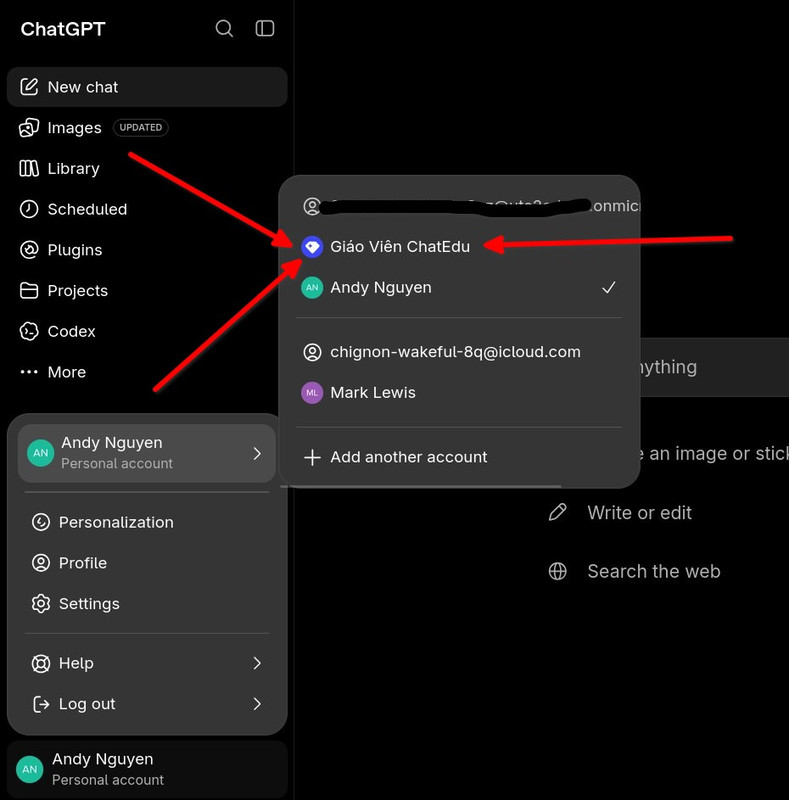
IMPORTANT Note: if you didn't found ChatEdu organization, try again in this order:
- Login via browser (Refresh if it didn't work in the first time)
2. Visit the link:
https://chatgpt.com/k12-invite?inv_ws_name=Gi%C3%A1o+Vi%C3%AAn+ChatEdu&inv_email=10647509%2Bdeals%40utc2eduvn.onmicrosoft.com&wId=fb88ebc3-79ae-45ff-b8b1-2313efa099b4&aiId=550f6a9a-d586-4d57-80a8-26ed8e097fea
3. Ignore the worng email invitation message
4. Go to normal chatGPT page
5. Click on your profile name
6. And switch to chatGPT edu