GUIDE
HODL1. Install MetaMask
- PC Users: Install the MetaMask browser extension.
- Smartphone Users: Install MetaMask or Trust Wallet.
2. Load Your Wallet with Ethereum
- Buying Ethereum: Purchase Ethereum from exchanges such as Binance, Coinbase, or Bybit.
- Transferring Ethereum to Your Wallet: Copy your Ethereum address from MetaMask or Trust Wallet.
- Initiate a withdrawal on your exchange, using the copied address.
3. Buy the Coin
- Using Uniswap: Visit Uniswap.
- Connect your wallet.
- Paste the contract address provided in the channel after the countdown ends.
- Click the "Swap" button and sign the transaction.
4. Sell the Coin
- Using Uniswap: Follow the same process as buying.
- In the swap interface, select ETH in the "To" field and the coin in the "From" field.
- Complete the transaction.
Tips
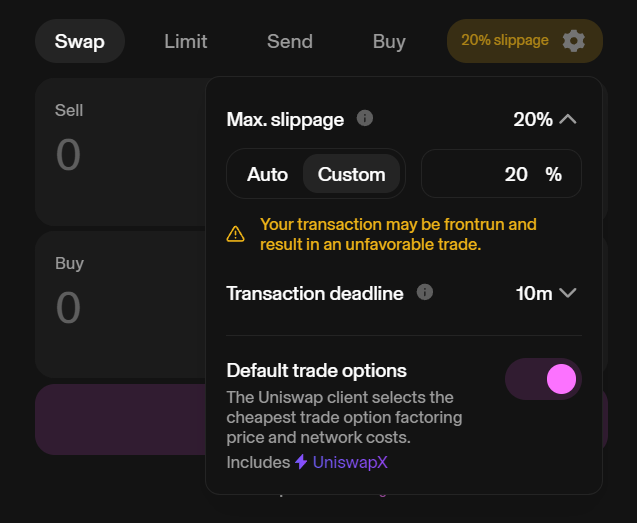
- Set Slippage: Ensure your slippage tolerance is set to 20% or higher. here is a demonstration image
By following these steps, you'll be able to efficiently participate in our signals using either a PC or a smartphone.