GIBcam-CNC Upgrade
GIBcam TeamWith the rollout of the new main release GIBcam v2023, the cross upgrade to GIBcam-CNC is now also available for all users of the previous View.
What is to do?
Users with an existing network floating licence
With an existing network floating licence the new package configuration is entered on the licence key. The procedure required for this is explained in the help documentation under the keyword <Upgrade Floating Licence>.
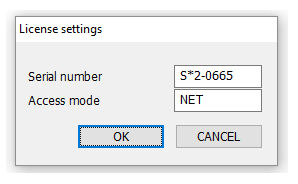
After this procedure has been completed, GIBcam-CNC can be installed on the PC. A full setup kit is provided for this purpose. This contains the driver (HASPDINST.EXE in SENTINEL*.RAR) necessary for accessing the local network licence. If this driver has not yet been installed on the PC, this must be done now. This is also explained in the help documentation in the chapter <First/New Installation>. Variant B is applicable! When starting GIBcam-CNC for the first time, enter the licence number and set NET as the access mode.
Users without an existing network floating licence
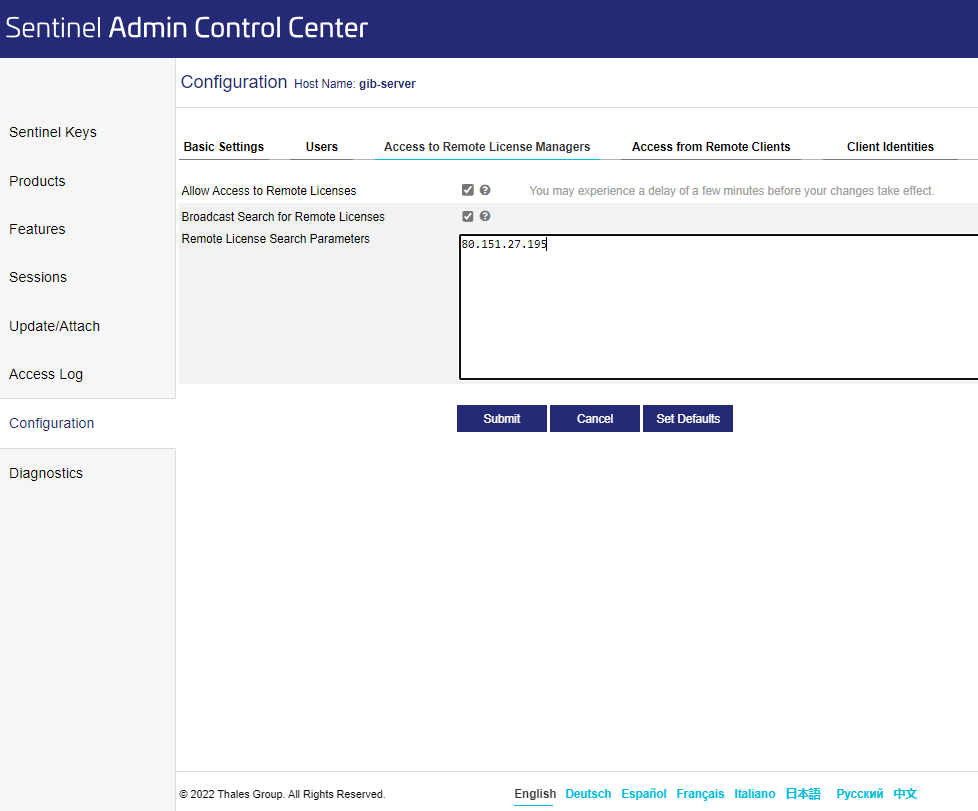
If a separate single licence key is not (yet) available, the licence for GIBcam-CNC is hosted on the GIBcam.licence server. This means that the above-mentioned procedure steps for upgrading the network licence key are not necessary and the installation of GIBcam-CNC can take place immediately on the PC. A full setup kit is also provided for this purpose. This contains the driver (HASPDINST.EXE in SENTINEL*.RAR) required to access the GIBcam licence server. This must now first be installed and configured - specifically, access to the IP address of the GIBcam licence server must be entered using the ACC configuration tool. This is explained in the help documentation in the chapter <Initial/New Installation>. Variant B is applicable! When GIBcam-CNC is started for the first time, the new licence number must be entered and NET must be set as the access mode.
___________________________________________________________________________