Flutter's Hidden Gem: BackdropFilter
FlutterPulseThis article was translated specially for the channel FlutterPulseYou'll find lots of interesting things related to Flutter on this channel. Don't hesitate to subscribe!🚀
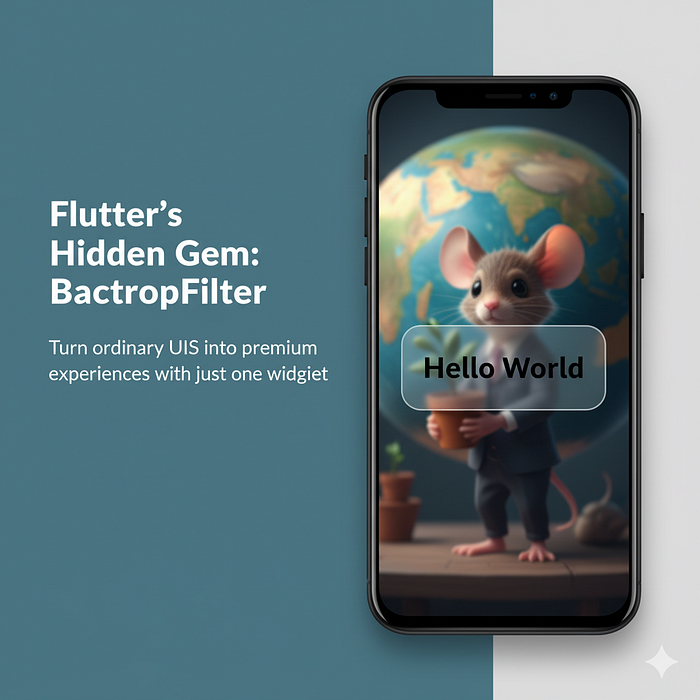
Turn ordinary UIs into premium experiences with just one widget
Unboxing Widgets (Part 1)
What is the BackdropFilter Widget?
Most Flutter developers never use it — but once you try it, you'll wonder why you didn't before.
The BackdropFilter widget does something remarkable.
BackdropFilter lets you apply blur and filter effects to whatever's behind your widget.
Think iOS-style frosted glass… but in Flutter.
✅ Why it's a game changer?
- Adds instant premium & modern feel
- Super lightweight & easy to use
- Works with dialogs, sheets, modals, and more
Creating a Blur Effect
Creating a blur effect using the BackdropFilter widget is one of the most common use cases. You can use an ImageFilter.blur to achieve this. Now, let's see an example where we want to blur a specific part of our Flutter application's background:
return Scaffold(
      body: Stack(
        children: <Widget>[
          Image.network(
            'https://cdn.pixabay.com/photo/2024/08/26/05/20/ai-generated-8998175_640.jpg', // Replace with an actual image URL
            width: MediaQuery.of(context).size.width,
            height: MediaQuery.of(context).size.height,
            fit: BoxFit.cover,
          ),
          Center(
            child: ClipRect(
              // Clip widget to contain the blur to one widget
              child: BackdropFilter(
                filter: ImageFilter.blur(sigmaX: 5, sigmaY: 5), // The filter
                child: Container(
                  width: 200.0, // Width
                  height: 200.0, // Height
                  decoration: BoxDecoration(color: Colors.white.withAlpha(50), borderRadius: BorderRadius.circular(12)),
                  child: Center(child: Text('Hello World', style: TextStyle(fontSize: 24, color: Colors.black))),
                ),
              ),
            ),
          ),
        ],
      ),
    );
In the above example, I am using a network image as a background image and adding a blurry effect container.
Applying Full Screen
For a full-screen blur that affects the entire background while respecting the ancestor widget's clip, the BackdropFilter can be wrapped around a widget that fills the screen.
To create a full-screen blur, it is commonplace to have the BackdropFilter as a sibling to a full-screen element, such as an Image in a Stack. Here's an illustration of this concept:
    return Scaffold(
      body: Stack(
        fit: StackFit.expand, // Ensures the stack fills the full screen
        children: <Widget>[
          /// Background image
          Image.network('https://cdn.pixabay.com/photo/2024/08/26/05/20/ai-generated-8998175_640.jpg', fit: BoxFit.cover),
          BackdropFilter(
            filter: ImageFilter.blur(sigmaX: 5, sigmaY: 5), // Blur filter
            child: SizedBox(),
          ),
        ],
      ),
    );
Conclusion
The BackdropFilter widget is a powerful class in the Flutter framework that can significantly elevate the visual aesthetics of your application. By understanding how to use the BackdropFilter in conjunction with other widgets such as Container, ClipRect, and leveraging properties like ImageFilter.blur, you can create stunning UIs that backdrop filter specific areas or even the full screen. Whether aiming to highlight one widget with a crisp blur or craft captivating full-screen backdrops, Flutter's BackdropFilter offers you a versatile tool to bring your creative visions to life.
Rerely used. Instantly impressive. This is one widget that can make your UI stand out 🤯.