Flutter Widget Lifecycle: From Creation to Destruction
FlutterPulseThis article was translated specially for the channel FlutterPulseYou'll find lots of interesting things related to Flutter on this channel. Don't hesitate to subscribe!🚀
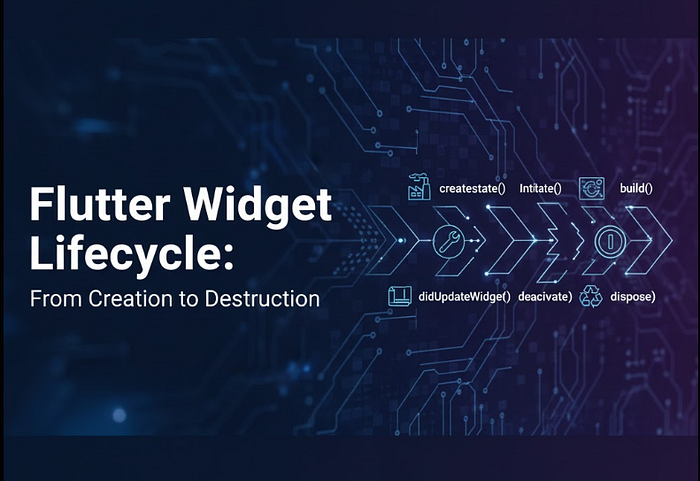
If you've ever wondered, "How does Flutter manage widgets behind the scenes?", you're not alone.
Understanding the Flutter widget…
If you've ever wondered, "How does Flutter manage widgets behind the scenes?", you're not alone.
Understanding the Flutter widget lifecycle is one of the most important concepts for building efficient, bug-free, and performance-optimized apps.
In this guide, we'll break down:
✅ The complete lifecycle flow of Flutter widgets
✅ The difference between StatelessWidget and StatefulWidget lifecycles
✅ Common lifecycle methods like initState(), build(), and dispose()
✅ Best practices for managing state and resources
🧩 What Is a Widget Lifecycle?
In Flutter, everything is a widget — buttons, text, layouts, or even your entire app.
A widget goes through several stages during its existence:
- Creation (Initialization)
- Mounting (Rendering in the widget tree)
- Updating (Rebuilding with new data)
- Disposal (Cleanup before destruction)
Each of these stages triggers specific lifecycle methods in your widget class.
🏗️ StatelessWidget Lifecycle
A StatelessWidget has only one lifecycle method — build().
class MyStatelessWidget extends StatelessWidget {
  @override
  Widget build(BuildContext context) {
    print("StatelessWidget build() called");
    return Scaffold(
      appBar: AppBar(title: Text('Stateless Example')),
      body: Center(child: Text('Hello, Flutter!')),
    );
  }
}
🧩 Key point:
build()is called only once, unless the parent widget rebuilds it.- There's no internal state, so no
initState()ordispose()here.
🔁 StatefulWidget Lifecycle
A StatefulWidget has a dynamic lifecycle because its state can change over time.
Here's the complete flow 👇
🔹 1. createState()
Called once when the widget is first created. It creates the State object.
@override
State<MyStatefulWidget> createState() => _MyStatefulWidgetState();
🔹 2. initState()
Called only once when the State object is inserted into the widget tree.
Use this for one-time initializations, API calls, or setting up controllers.
@override
void initState() {
  super.initState();
  print("initState called");
}
🟡 Best use: Initialize animations, streams, or fetch initial data.
🔹 3. didChangeDependencies()
Called immediately after initState() and whenever dependencies change — like when InheritedWidget updates.
@override
void didChangeDependencies() {
  super.didChangeDependencies();
  print("didChangeDependencies called");
}
🔹 4. build()
The most frequently called method.
It builds and rebuilds the widget tree whenever setState() is triggered.
@override
Widget build(BuildContext context) {
  print("build called");
  return Scaffold(
    appBar: AppBar(title: Text('Stateful Example')),
    body: Center(
      child: Text('Counter: $count'),
    ),
    floatingActionButton: FloatingActionButton(
      onPressed: () {
        setState(() {
          count++;
        });
      },
      child: Icon(Icons.add),
    ),
  );
}
🔹 5. didUpdateWidget()
Called when the parent widget rebuilds and wants to update this widget's configuration.
@override
void didUpdateWidget(covariant MyStatefulWidget oldWidget) {
  super.didUpdateWidget(oldWidget);
  print("didUpdateWidget called");
}
🔹 6. deactivate()
Called when the State object is removed temporarily from the widget tree (e.g., navigating to another screen).
@override
void deactivate() {
  print("deactivate called");
  super.deactivate();
}
🔹 7. dispose()
The final method — called when the State object is permanently removed from the tree.
Use it to release resources like animation controllers, streams, or timers.
@override
void dispose() {
  print("dispose called");
  super.dispose();
}
🔍 Complete Lifecycle Flow
Here's the sequence of lifecycle method calls for a StatefulWidget:
createState()
initState()
didChangeDependencies()
build()
didUpdateWidget() → (on rebuild)
deactivate()
dispose()
⚙️ Real-World Example
Imagine a screen that loads user data from an API.
You'd typically:
- Call the API inside
initState() - Display data in
build() - Cancel API subscriptions in
dispose()
class UserProfile extends StatefulWidget {
  @override
  _UserProfileState createState() => _UserProfileState();
}

class _UserProfileState extends State<UserProfile> {
  late Future<User> userData;

  @override
  void initState() {
    super.initState();
    userData = fetchUserData();
  }

  @override
  Widget build(BuildContext context) {
    return FutureBuilder<User>(
      future: userData,
      builder: (context, snapshot) {
        if (!snapshot.hasData) return CircularProgressIndicator();
        return Text("Hello, ${snapshot.data!.name}");
      },
    );
  }

  @override
  void dispose() {
    print("Cleaning up resources...");
    super.dispose();
  }
}
💡 Best Practices
✅ Use initState() for one-time setup
✅ Avoid heavy work in build()
✅ Always clean up controllers, streams, or focus nodes in dispose()
✅ Use didUpdateWidget() Only when the widget configuration changes dynamically
Understanding Flutter's widget lifecycle helps you write cleaner code, avoid memory leaks, and manage state effectively.
Whether you're initializing data in initState() Or disposing of resources properly, mastering this concept is key to building scalable Flutter apps.
🧩 The more you understand the lifecycle, the smoother your Flutter app will run!