Flutter: Remove ifs from the widget tree with Visibility and without
FlutterPulseThis article was translated specially for the channel FlutterPulseYou'll find lots of interesting things related to Flutter on this channel. Don't hesitate to subscribe!🚀

I chose to be very strict in how I write my widgets. I want no logic in them at all—full Separation of Concerns. View only displays data on…
I chose to be very strict in how I write my widgets. I want no logic in them at all—full Separation of Concerns. View only displays data on the screen. ViewModel contains all presentation logic, including navigation.
That's why I stuck with GetX — I like navigation without context triggered from the ViewModel, among other things.
If you are a member, please continue,otherwise, read the full story here.
Let me show you what I mean. Say you're calling some API to get user data. Most people write something like this:
GetBuilder<UserViewModel>(
  builder: (controller) {
    if (controller.isLoading) {
      return CircularProgressIndicator();
    } else if (controller.error != null) {
      return Text('Error: ${controller.error}');
    } else {
      return Text('User: ${controller.user?.name}');
    }
  },
)
It works fine, but I want to avoidifs whenever possible, especially within the widget tree.
The better way with Visibility
Here's what I try to do instead — use Visibilitywidgets. Each state gets its own widget, and you control visibility with flags.
Let me show you the whole setup.
The model
Nothing fancy here, just your data:
class User {
  final String id;
  final String name;
  final String email;

  User({
    required this.id,
    required this.name,
    required this.email,
  });
}
The service
This is where we pretend to hit the API. Just a simple example.
class UserService {
  Future<User> fetchUser(String userId) async {
    // Simulate network delay
    await Future.delayed(Duration(seconds: 2));

    // Simulate random success/failure
    if (DateTime.now().second % 3 == 0) {
      throw Exception('Failed to load user');
    }

    return User(
      id: userId,
      name: 'John Doe',
      email: 'john@example.com',
    );
  }
}
The ViewModel
We have clear boolean flags for each state:
class UserViewModel extends GetxController {
 final UserService _service = UserService();

  bool isLoading = false;
  User? user;
  String? error;

  bool get hasData => user != null;
  bool get hasError => error != null;
  String get username => user != null ? user!.name : '';
  String get errorMessage => error != null ? error! : '';

  @override
  void onInit() {
    super.onInit();
     loadUser('123');
  }

  Future<void> loadUser(String userId) async {
    isLoading = true;
    error = null;
    user = null;
    update();

    try {
      user = await _service.fetchUser(userId);
    } catch (e) {
      error = e.toString();
    } finally {
      isLoading = false;
      update();
    }
  }
}
The view
And here's where it all comes together. Look at this — no ifs in sight inside GetBuilder. Each state has its own Visibilitywidget with a clear condition:
class UserView extends GetView<UserViewModel> {
  const UserView({Key? key}) : super(key: key);
  @override
  Widget build(BuildContext context) {
    return Scaffold(
      appBar: AppBar(title: Text('User Details')),
      body: Padding(
        padding: const EdgeInsets.all(18.0),
        child: Center(
          child: Column(
            mainAxisAlignment: MainAxisAlignment.center,
            spacing: 50,
            children: [
              GetBuilder<VisibilityExampleController>(
                builder: (controller) {
                  return Stack(
                    children: [
                      //loading state
                      Visibility(
                        visible: controller.isLoading,
                        child: Center(
                          child: CircularProgressIndicator(),
                        ),
                      ),

                      // Success state
                      Visibility(
                        visible: controller.hasData,
                        child: Text(
                          controller.username,
                          style: TextStyle(fontSize: 24, fontWeight: FontWeight.bold),
                        ),
                      ),

                      // Error state
                      Visibility(
                        visible: controller.hasError,
                        child: Text(
                          controller.errorMessage,
                          style: TextStyle(
                            fontSize: 18,
                            fontWeight: FontWeight.bold,
                            color: Get.theme.colorScheme.error,
                          ),
                        ),
                      ),
                    ],
                  );
                },
              ),
              ElevatedButton(
                  onPressed: () {
                    controller.loadUser('234');
                  },
                  child: Text('Load again'))
            ],
          ),
        ),
      ),
    );
  }
}
Here is the resulting screen, by the way:
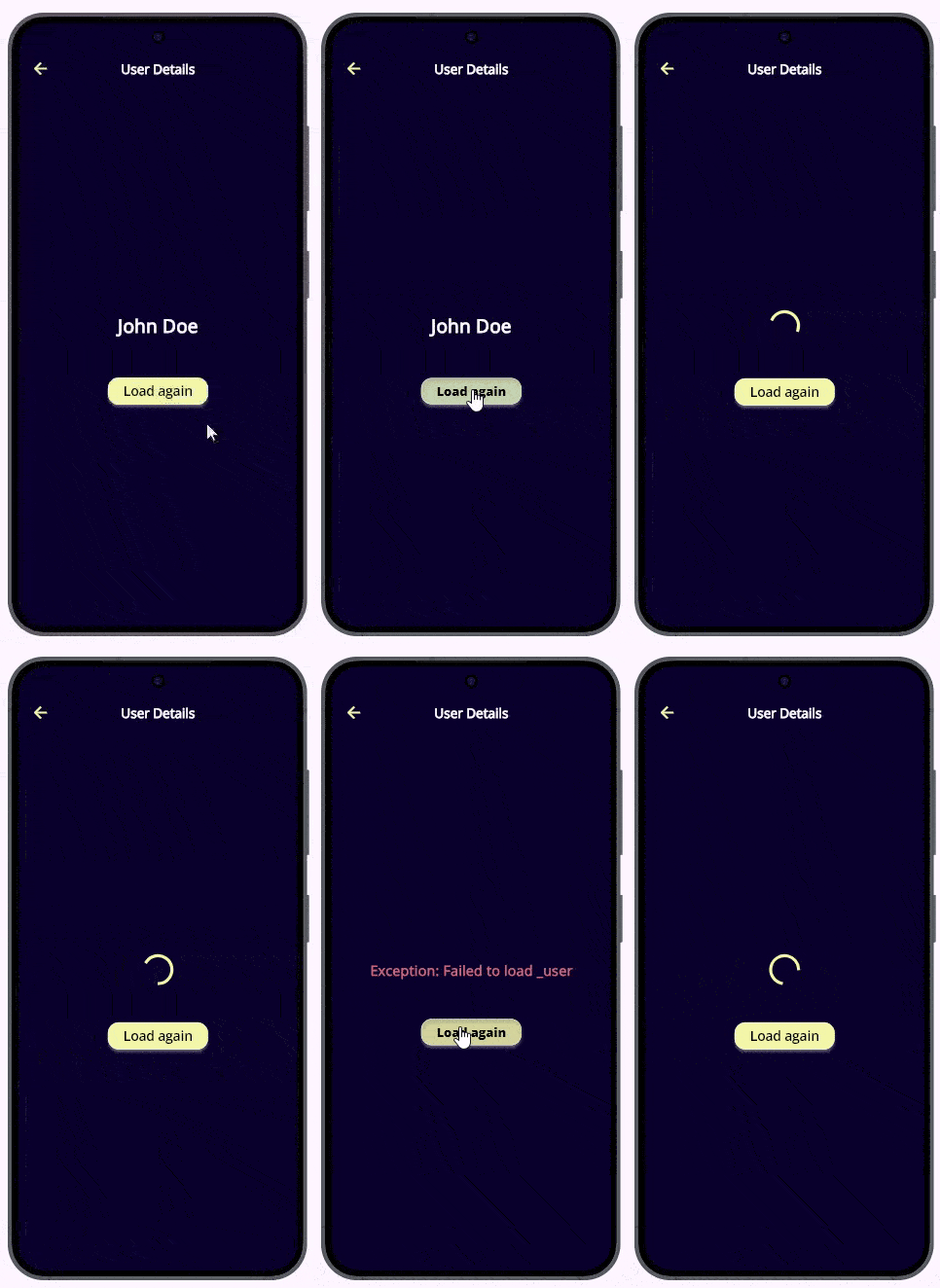
The approach has two problems, though:
- The View became a bit verbose.
- We render 7 widgets instead of one. (Instead of one
CircularProgressIndicator, we render aStack, threeVisibilitywidgets, twoSizedBoxs, and oneCircularProgressIndicator).
Is it an adequate price to pay for better separation of concerns? I don't know. Probably. I recently learned that Flutter is able to paint 250 thousand bunny images, so rendering 6 more simple widgets is nothing.
Anyway, let's try another approach.
Without Visibility
Model and Service did not change.
ViewModel:
class UserViewModelextends GetxController {
  final UserService _service = UserService();

  Widget _widget = CircularProgressIndicator();
  Widget get widget => _widget;

  @override
  void onInit() {
    super.onInit();
    loadUser('123');
  }

  Future<void> loadUser(String userId) async {
    _widget = CircularProgressIndicator();
    update();

    try {
      var user = await _service.fetchUser(userId);
      _widget = Text(
        user.name,
        style: TextStyle(fontSize: 24, fontWeight: FontWeight.bold),
      );
    } catch (e) {
      var error = e.toString();
      _widget = Text(error,
          style: TextStyle(
            fontSize: 18,
            fontWeight: FontWeight.bold,
            color: Get.theme.colorScheme.error,
          ));
    } finally {
      update();
    }
  }
}
View:
class UserView extends GetView<UserViewModel> {
  const UserView({super.key});
  @override
  Widget build(BuildContext context) {
   return Scaffold(
      appBar: AppBar(title: Text('User Details')),
      body: Padding(
        padding: const EdgeInsets.all(18.0),
        child: Center(
          child: Column(
            mainAxisAlignment: MainAxisAlignment.center,
            spacing: 50,
            children: [
              GetBuilder<UserViewModel>(
                builder: (controller) {
                  return controller.widget;
                },
              ),
              ElevatedButton(
                  onPressed: () {
                    controller.loadUser('234');
                  },
                  child: Text('Load again'))
            ],
          ),
        ),
      ),
    );
  }
}
The View became extremely concise. We get rid of some class variables in the ViewModel. But we construct widgets in the ViewModel. I don't think that it is philosophically wrong. The ViewModel is part of the presentation, and having some widgets there is OK. GetX users are used to calling navigation methods and showing dialogs from there.
Summary
We have three not-perfect approaches:
- Having logic (ifs) inside the View. That is what everybody is doing, but that doesn't mean the approach is right.
- Using
Visibilitywidgets. Brings extra verbosity and extra rendering. - Constructing widgets inside the ViewModel. Feels a bit awkward. (Update: This approach can be mixed with
StateWidgetFactoryfrom Part 2, which will remove the UI code from the ViewModel.)
I am leaning toward the third one, but I will try to do it in a real project to get more feelings.
Thank you for reading!