🚀 Flutter Global Drawer Access: Open the Parent Drawer from Any Screen
FlutterPulseThis article was translated specially for the channel FlutterPulseYou'll find lots of interesting things related to Flutter on this channel. Don't hesitate to subscribe!🚀

💡 "Good architecture in Flutter isn't just about widgets — it's about clean access to shared UI controls."
💡 Why This Learning Matters
Without a proper navigation architecture, even a beautiful Flutter app can have issues:
❌ Repeated code for AppBars and Drawers across screens
❌ Bottom navigation bar disappearing or misbehaving
❌ State inconsistencies when switching tabs
❌ Hard-to-manage screen transitions
By building a single Main Screen shell, you can:
✅ Centralize common UI (Drawer, BottomBar, AppBar)
✅ Switch between multiple screens easily
✅ Keep state intact while navigating
✅ Reduce code duplication and future bugs
Think of it as a house: the Main Screen is the home, the different screens are the rooms, and shared UI elements are the furniture that stays in place.
⚡ The Flutter Way: Main Screen Shell
The key idea:
- MainScreen holds the scaffold, drawer, and bottom navigation.
- Body changes dynamically based on the selected tab.
- All screens share the same AppBar and Drawer.
This approach ensures smooth transitions and consistent UX without rebuilding the UI for each screen.
🖥 Conceptual Code Example
Create a global scaffold key:
class AppConstants {
  static final GlobalKey<ScaffoldState> mainScaffoldKey = GlobalKey<ScaffoldState>();
}
MainScreen:
class MainScreen extends StatefulWidget {
  const MainScreen({super.key});

  @override
  State<MainScreen> createState() => _MainScreenState();
}

class _MainScreenState extends State<MainScreen> {
  int _selectedIndex = 0;
  final List<Widget> _screens = [
    const HomeScreenOne(),
    const HomeScreenTwo(),
    const HomeScreenThree(),
  ];

  void _onTabSelected(int index) {
    setState(() => _selectedIndex = index);
  }

  @override
  Widget build(BuildContext context) {
    return Scaffold(
      key: AppConstants.mainScaffoldKey, // ✅ GlobalKey assigned here
      drawer: const AppDrawer(),
      body: _screens[_selectedIndex],
      bottomNavigationBar: BottomNavBar(
        selectedIndex: _selectedIndex,
        onTabSelected: _onTabSelected,
      ),
    );
  }
}
Home Screens and Open Drawer Widget:
class HomeScreenOne extends StatelessWidget {
  const HomeScreenOne({super.key});

  @override
  Widget build(BuildContext context) {
    return Scaffold(
      // ❌ Adding Scaffold here creates a **nested scaffold**
      // leading: SizedBox prevents default back button
      appBar: AppBar(title: const Text("Home Screen One"), leading: const SizedBox()),
      body: const Center(child: OpenDrawerWidget()),
    );
  }
}

class HomeScreenTwo extends StatelessWidget {
  const HomeScreenTwo({super.key});

  @override
  Widget build(BuildContext context) {
    return Scaffold(
      appBar: AppBar(title: const Text("Home Screen Two"), leading: const SizedBox()),
      body: const Center(child: OpenDrawerWidget()),
    );
  }
}

class HomeScreenThree extends StatelessWidget {
  const HomeScreenThree({super.key});

  @override
  Widget build(BuildContext context) {
    return Scaffold(
      appBar: AppBar(title: const Text("Home Screen Three"), leading: const SizedBox()),
      body: Center(
        child: ElevatedButton(
          onPressed: () {
            // ❌ PROBLEM: This calls the nearest Scaffold in the widget tree
            // Scaffold.of(context).openDrawer();
            // In this case, it would try to open the drawer of THIS nested scaffold,
            // not the MainScreen scaffold, and may fail or hide the BottomNavigationBar.

            // ✅ WORKAROUND: Using GlobalKey to access **parent Scaffold**
            AppConstants.mainScaffoldKey.currentState?.openDrawer();
          },
          child: const Text("Open Drawer"),
        ),
      ),
    );
  }
}

class OpenDrawerWidget extends StatelessWidget {
  const OpenDrawerWidget({super.key});

  @override
  Widget build(BuildContext context) {
    return ElevatedButton(
      onPressed: () {
        // ❌ PROBLEM: Calls the **immediate Scaffold** in the widget tree
        // This is why nested Scaffold prevents drawer opening properly
        // Scaffold.of(context).openDrawer();

        // ✅ WORKAROUND: Using GlobalKey to open the MainScreen's drawer
        AppConstants.mainScaffoldKey.currentState?.openDrawer();
      },
      child: const Text("Open Drawer"),
    );
  }
}
Common Bottom Navigation & Drawer:
class BottomNavBar extends StatelessWidget {
  final int selectedIndex;
  final Function(int) onTabSelected;

  BottomNavBar({required this.selectedIndex, required this.onTabSelected});

  @override
  Widget build(BuildContext context) {
    return BottomNavigationBar(
      currentIndex: selectedIndex,
      onTap: onTabSelected,
      items: const [
        BottomNavigationBarItem(icon: Icon(Icons.home), label: "Home"),
        BottomNavigationBarItem(icon: Icon(Icons.insights), label: "AI"),
        BottomNavigationBarItem(icon: Icon(Icons.dashboard), label: "Options"),
      ],
    );
  }
}

class AppDrawer extends StatelessWidget {
  @override
  Widget build(BuildContext context) {
    return Drawer(
      child: ListView(
        children: [
          DrawerHeader(child: Text("User Profile")),
          ListTile(title: Text("Home")),
          ListTile(title: Text("Insights")),
          ListTile(title: Text("Dashboard")),
        ],
      ),
    );
  }
}
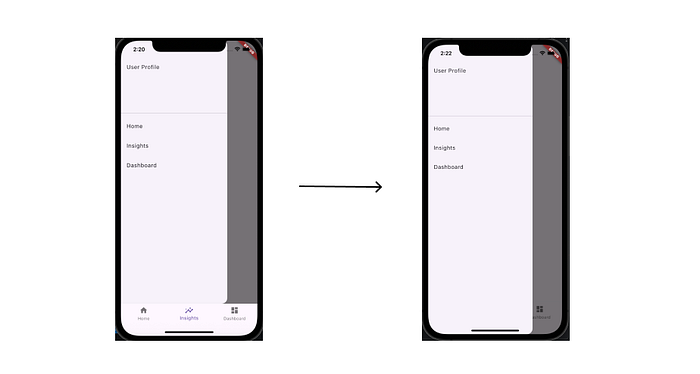
✅ The GlobalKey Solution
AppConstants.mainScaffoldKey.currentState?.openDrawer(); // ✅ WORKAROUND
- Targets the MainScreen scaffold directly.
- Works from any child screen without breaking the layout.
- Keeps the BottomNavigationBar visible and state intact.
💬 Final Thought
Building this taught me a valuable Flutter architecture lesson:
Good navigation isn't about more screens, it's about how all screens work together seamlessly.
Once the foundation is right, adding features and screens becomes effortless.
🔗 GitHub Repository
📂 https://github.com/abhi-staark/globalkey-drawer