Flashing Custom Recovery on Stock and Custom ROMs
Emaad AhmedIf you haven't unlocked your bootloader yet, then first learn to unlock bootloader from HERE.
📌 STEPS -
For Stock ROM (the first time) -
1. Reboot to fastboot mode
(Switch off your device and then hold power + volume down button till you see fastboot logo)

2. Connect your device with pc and open adb command prompt (you must have already set it up).
3. Copy the twrp image( or extract the recovery image from other custom recovery zips. Find recoveries HERE) to your ADB directory on your PC.
4. Flash the recovery image using the following command.
Fastboot flash recovery (recovery name.img)
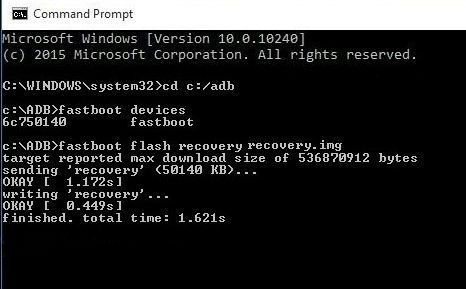
5. Then flash vbmeta using the given ADB commands HERE
6. To make recovery permanent follow this HERE.
📌FOR BEGINNERS -
You can use this package to flash twrp recovery on rui.
For Custom ROM or on Stock ROM(if you are already using a custom recovery) -
1. Reboot to your existing custom recovery.
2. Flash the new recovery zip on your old recovery or Flash recovery img in recovery partition on your old recovery.
3. Reboot to recovery to check if it is flashed.