Flare Coston 2 Testnet
Test Network for Marketplace Testing
In the test network, there is no need for mining or storing NFTs, as it is solely intended for testing the marketplace.
Upon completion of testing, all data and progress will be reset.
Test network main menu
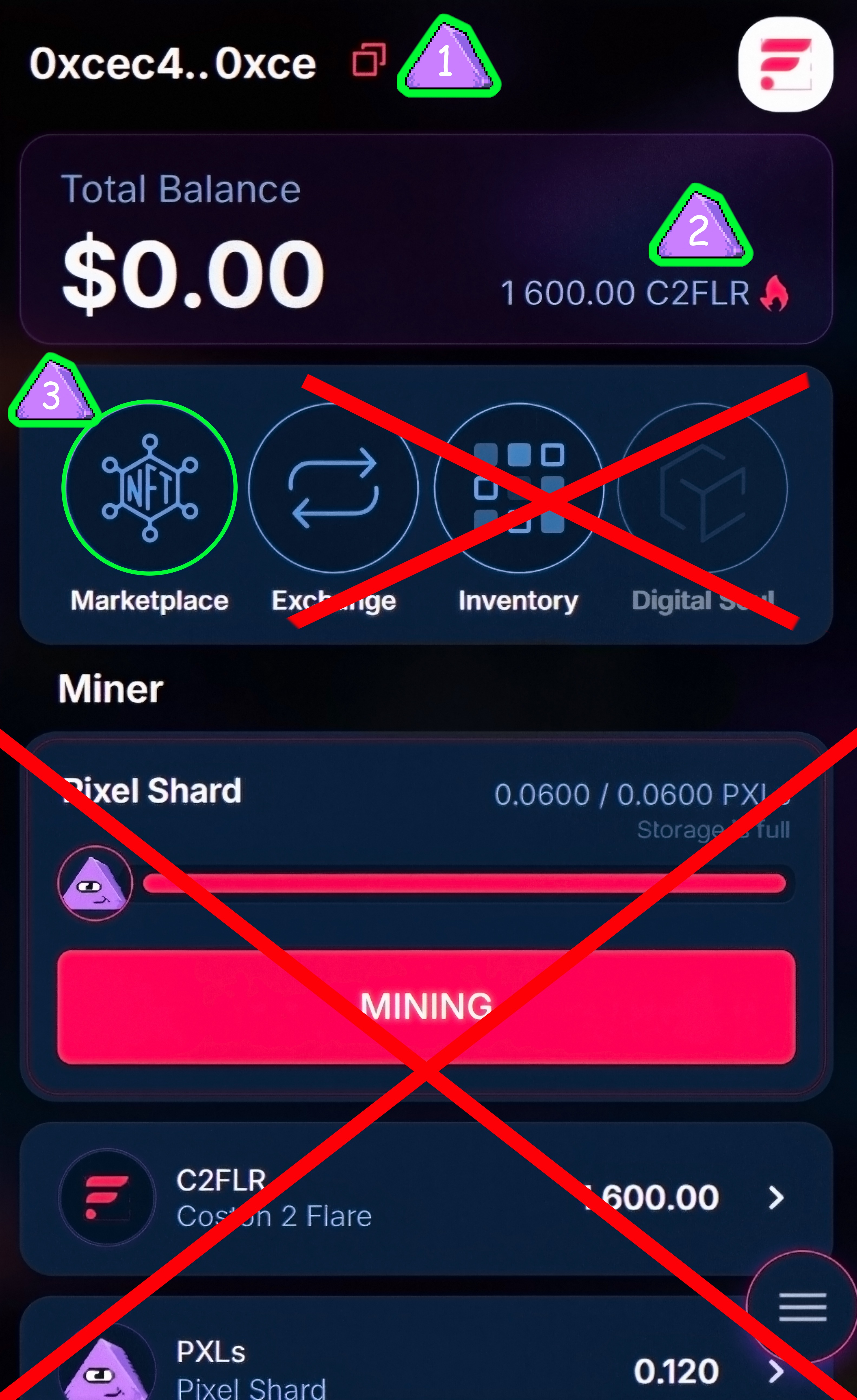
- Your wallet address – Displays a shortened version of your current wallet address. By clicking on it, you can copy the full address to the clipboard.
- C2FLR balance – Shows the amount of C2FLR in your wallet.
- "Marketplace" button – Leads to the section where you can buy and sell NFTs.
You can get test tokens here - https://faucet.flare.network/coston2
Select Coston 2 and enter your Pixel wallet address at the bottom, then press the "Request C2FLR" button.
You can receive 100 tokens every 24 hours!
Marketplace menu

- Balance – Displays your current balance of the test token C2FLR.
- Search NFT – A search bar for finding specific NFTs by name.
- Favorite – A button to view your favorite NFTs.
- Sort – A button with two arrows pointing up and down that sorts NFTs by price, from lowest to highest and vice versa.
- General – A tab for viewing all available NFT offers on the marketplace.
- My Offers – A tab for viewing your own NFTs listed for sale.
- Add item for sale – A button to add your NFT for sale.
- Filters – A button to set filters to narrow down the search for NFTs by various criteria.
How do you sell the NFT ?

- Click on the "Add item for sale" button – It is located on the marketplace screen, highlighted with a green plus sign.
- Select an NFT from your inventory – A window will appear showing your inventory, where you can choose the NFT you want to sell.
- Click on the "Sell Item" button – A window will open where you can set the price and confirm the listing of your NFT for sale.
Next step

- Enter the price – In the "Price" field, specify how much C2FLR you want to sell your NFT for. For example, 200 C2FLR.
- Sales commission – Below, the fixed commission is displayed (in this example, it’s 10%, which equals 20 C2FLR)
- Confirm the sale – Click the "Apply For 200 C2FLR" button to confirm listing your NFT for sale at the specified price.
How to buy NFT ?

You should select the desired NFT in the General section and click on it.
Next, scroll down to see the current listings and prices.
Choose the one you want and click on the cart icon.
Canceling an Order (Your Sale)

To cancel the sale of your NFT, go to the My Offers tab and select the NFT you want to remove from sale. Click on it, and a cancellation window will appear. Here, you need to click the Cancel Order button.
Happy shopping!