Fetching Location on Wear OS Using Flutter + Native Android (Complete Guide)
FlutterPulseThis article was translated specially for the channel FlutterPulseYou'll find lots of interesting things related to Flutter on this channel. Don't hesitate to subscribe!🚀
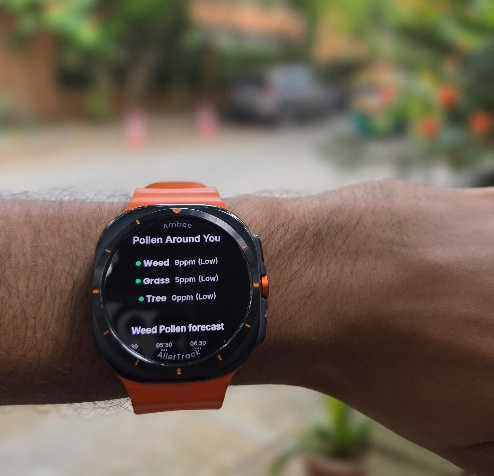
Streaming live GPS coordinates from Wear OS to Flutter + permission
Continuous GPS Updates on Wear OS Using Flutter + Native Android (Complete Guide)
Need real-time location streaming directly from the Wear OS with Flutter?
here's how.
Wear OS watches today are fully capable standalone devices — they come with built-in GPS, Wi-Fi, and LTE. Many apps need location directly from the watch, especially fitness, weather, navigation, safety, and outdoor-focused apps.
However, Flutter does not provide out-of-the-box GPS support for Wear OS. Popular plugins like geolocator and location currently do not support Wear OS.
So you must bridge Flutter ↔ Native Android using:
- MethodChannel → one-time calls (permission, start/stop)
- EventChannel → continuous streaming (lat/lon updates)
This post walks through everything you need:
- Requesting location permission on Wear OS (MethodChannel)
- Streaming live GPS coordinates from Android (Kotlin)
- Receiving coordinates in Flutter
- Building a simple UI (with ambient mode)
- Battery optimization
And in Part 2, we'll extend it to phone ↔ watch communication using watch_connectivity.
Overview
Wear OS GPS → Native Kotlin → EventChannel → Flutter → UI
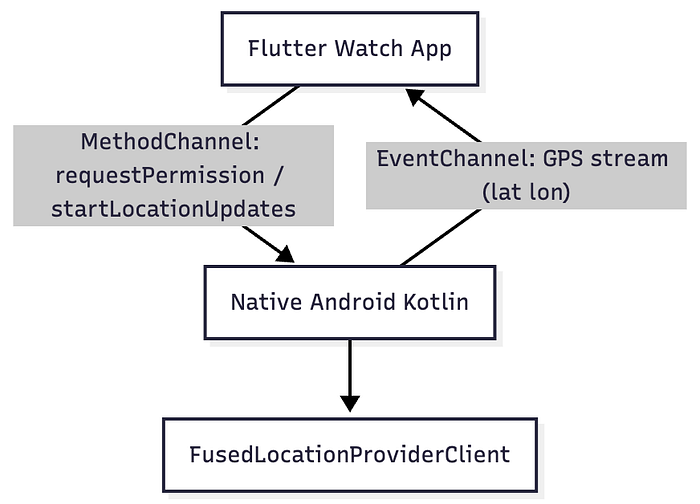
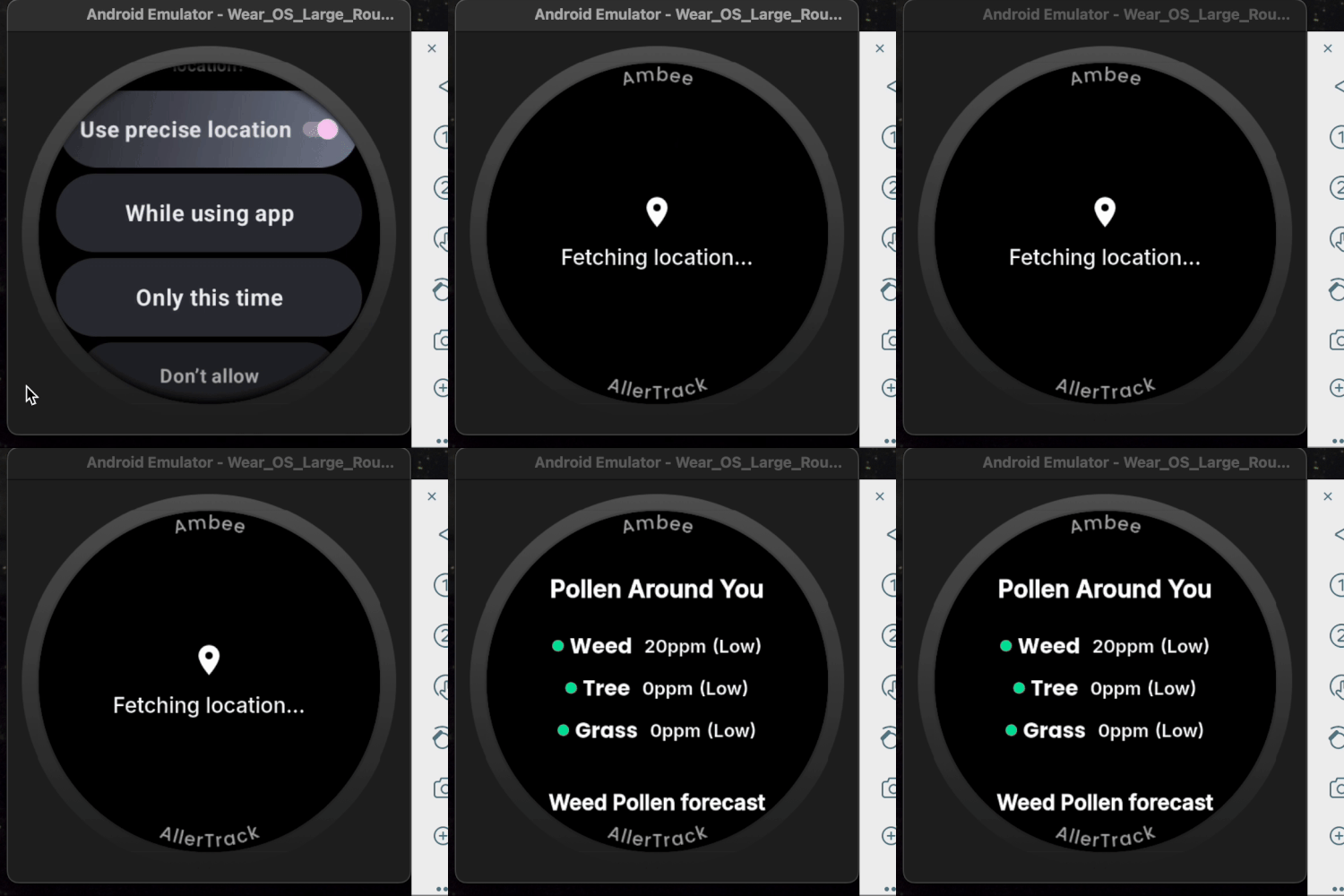
Flutter calls requestPermission → Watch shows native dialog
Flutter calls startLocationUpdates → Watch streams GPS
Android streams lat lon every second using EventChannel
Step-by-Step implementation
1) Setup
dependencies:
  is_wear: ^0.0.2+3
  wear_plus: ^1.2.3
  watch_connectivity: ^0.2.1+1   # (Used in Part 2)
If you are creating a standalone watch app, add the following to your manifest:
<application>
  <meta-data
    android:name="com.google.android.wearable.standalone"
    android:value="true"
    />
</application>
For location:
<uses-feature android:name="android.hardware.type.watch" />
<uses-feature android:name="android.hardware.location.gps" />

<uses-permission android:name="android.permission.ACCESS_FINE_LOCATION" />
<uses-permission android:name="android.permission.ACCESS_COARSE_LOCATION" />

<uses-permission android:name="android.permission.ACCESS_BACKGROUND_LOCATION" />
2) MainActivity.kt
This is the core engine.
The MainActivity serves as the bridge between Flutter and native Android location services. It handles:
- Permission Management: Requests and checks location permissions
- Location Streaming: Uses FusedLocationProviderClient for efficient location updates
- Method Channel: Communicates with Flutter for permission status and control
- Event Channel: Streams real-time location data to Flutter
Key Components:
MethodChannel: For permission requests and service controlEventChannel: For continuous location updatesFusedLocationProviderClient: Google's optimized location APILocationCallback: Handles new location data
import io.flutter.embedding.android.FlutterActivity
import io.flutter.embedding.engine.FlutterEngine
import io.flutter.plugin.common.MethodCall
import io.flutter.plugin.common.MethodChannel
import io.flutter.plugins.GeneratedPluginRegistrant
import android.location.Location
import android.os.Bundle
import com.google.android.gms.location.FusedLocationProviderClient
import com.google.android.gms.location.LocationServices
import io.flutter.plugin.common.EventChannel
import com.google.android.gms.location.LocationCallback
import com.google.android.gms.location.LocationResult
import com.google.android.gms.location.LocationRequest
import java.util.concurrent.TimeUnit

class MainActivity : FlutterActivity() {
    private val CHANNEL = "location_permission"
    private val LOCATION_CHANNEL = "location_updates"
    private val PERMISSION_REQUEST_CODE = 123
    private lateinit var fusedLocationClient: FusedLocationProviderClient
    private var eventSink: EventChannel.EventSink? = null
    private var locationCallback: LocationCallback? = null // Declare locationCallback as a class property

    override fun onCreate(savedInstanceState: Bundle?) {
        super.onCreate(savedInstanceState)
        fusedLocationClient = LocationServices.getFusedLocationProviderClient(this)
        println("MainActivity started")
    }

    override fun configureFlutterEngine(@NonNull flutterEngine: FlutterEngine) {
        super.configureFlutterEngine(flutterEngine)
        GeneratedPluginRegistrant.registerWith(flutterEngine)

        MethodChannel(flutterEngine.dartExecutor.binaryMessenger, CHANNEL)
            .setMethodCallHandler { call, result ->
                when (call.method) {
                    "requestPermission" -> {
                        requestLocationPermission(result)
                    }
                    "checkPermission" -> {
                        result.success(checkLocationPermission())
                    }
                    "startLocationUpdates" -> {
                        if (checkLocationPermission()) {
                            startLocationUpdates()
                            result.success(true)
                        } else {
                            result.success(false)
                        }
                    }
                    "stopLocationUpdates" -> {
                        stopLocationUpdates()
                        result.success(true)
                    }
                    else -> result.notImplemented()
                }
            }

        EventChannel(flutterEngine.dartExecutor.binaryMessenger, LOCATION_CHANNEL)
            .setStreamHandler(object : EventChannel.StreamHandler {
                override fun onListen(arguments: Any?, sink: EventChannel.EventSink?) {
                    println("onListen called")
                    this@MainActivity.eventSink = sink
                    // Don't start updates here - wait for explicit call
                }

                override fun onCancel(arguments: Any?) {
                    println("onCancel called")
                    stopLocationUpdates()
                    eventSink = null
                }
            })
    }

    private fun requestLocationPermission(result: MethodChannel.Result) {
        println("requestLocationPermission called")
        if (checkLocationPermission()) {
            result.success(true)
            return
        }

        ActivityCompat.requestPermissions(
            this,
            arrayOf(Manifest.permission.ACCESS_FINE_LOCATION),
            PERMISSION_REQUEST_CODE
        )
        // Don't complete the result here - wait for onRequestPermissionsResult
    }

    private fun checkLocationPermission(): Boolean {
        return ActivityCompat.checkSelfPermission(
            this,
            Manifest.permission.ACCESS_FINE_LOCATION
        ) == PackageManager.PERMISSION_GRANTED
    }

    private fun startLocationUpdates() {
        if (checkLocationPermission()) {
            val locationRequest = getLocationRequest()
            locationCallback = object : LocationCallback() {
                override fun onLocationResult(locationResult: LocationResult) {
                    for (location in locationResult.locations) {
                        eventSink?.success("${location.latitude} ${location.longitude}")
                    }
                }
            }
            locationCallback?.let { callback ->
                fusedLocationClient.requestLocationUpdates(locationRequest, callback, null)
            }
        }
    }

    private fun stopLocationUpdates() {
        locationCallback?.let {
            fusedLocationClient.removeLocationUpdates(it)
        }
        locationCallback = null
    }

    private fun getLocationRequest(): LocationRequest {
        return LocationRequest.create().apply {
            interval = TimeUnit.SECONDS.toMillis(1)
            fastestInterval = TimeUnit.SECONDS.toMillis(1)
            priority = LocationRequest.PRIORITY_HIGH_ACCURACY
        }
    }

    override fun onRequestPermissionsResult(
        requestCode: Int,
        permissions: Array<out String>,
        grantResults: IntArray
    ) {
        super.onRequestPermissionsResult(requestCode, permissions, grantResults)
        if (requestCode == PERMISSION_REQUEST_CODE) {
            val granted = grantResults.isNotEmpty() &&
                    grantResults[0] == PackageManager.PERMISSION_GRANTED

            // Find the Flutter engine to send result back
            flutterEngine?.dartExecutor?.let { executor ->
                MethodChannel(executor.binaryMessenger, CHANNEL)
                    .invokeMethod("onPermissionResult", granted)
            }

            if (granted && eventSink != null) {
                startLocationUpdates()
            }
        }
    }
}
FusedLocationProviderClientis Google's modern, battery-efficient, and sensor-fused way to get location on Android and Wear OS.
3) Flutter WatchLocationService: Listening to Native GPS
Now that watch is sending GPS data, Flutter needs a "service" that:
a. Sends commands to native Android:
- requestPermission
- startLocationUpdates
- stopLocationUpdates
b. Listens to the EventChannel stream for live lat/lon
c. Converts data into clean double values
d. Passes coordinates to your Flutter UI using a callback
This keeps your Flutter code clean: the UI doesn't touch channels directly.
Just a wrapper that talks to native code and receives real-time locations
import 'dart:async';
import 'package:flutter/services.dart';
import 'package:geolocator/geolocator.dart';

class WatchLocationService {
  static const _methodChannel = MethodChannel('location_permission');
  static const _eventChannel = EventChannel('location_updates');
  StreamSubscription? _locationSubscription;
  Function(List<double>)? _onCoordinates;
  final _minDistanceMeters = 500;
  double? _lastLatitude;
  double? _lastLongitude;

  final _debounceDuration = const Duration(minutes: 15); // Adjust to match your app's specific needs
  DateTime? _lastUpdateTime;

  void setCoordinateCallback(Function(List<double>) callback) {
    _onCoordinates = (coords) {
      final now = DateTime.now();

      final distance = _lastLatitude != null && _lastLongitude != null
          ? Geolocator.distanceBetween(
          _lastLatitude!, _lastLongitude!, coords[0], coords[1])
          : double.infinity;

      final timeElapsed = _lastUpdateTime == null
          ? const Duration(hours: 1)
          : now.difference(_lastUpdateTime!);

      final shouldUpdate = distance >= _minDistanceMeters ||
          timeElapsed >= _debounceDuration;

      if (!shouldUpdate) {
        return;
      }

      _lastUpdateTime = now;
      _lastLatitude = coords[0];
      _lastLongitude = coords[1];
      callback(coords);
    };
  }

  Future<bool> requestAndStart() async {
    try {
      print("Requesting location permission");

      // Set up listener first
      _locationSubscription =
          _eventChannel.receiveBroadcastStream().listen((event) {
            try {
              final coords = _parseCoordinates(event);
              print("Received coordinates: $coords");
              _onCoordinates?.call(coords);
            } catch (e) {
              print("Coordinate processing error: $e");
            }
          }, onError: (e) {
            print("Location stream error: $e");
          });

      // Check current permission state
      final bool alreadyGranted =
      await _methodChannel.invokeMethod('checkPermission');
      print("Current permission state: $alreadyGranted");

      if (alreadyGranted) {
        await _methodChannel.invokeMethod('startLocationUpdates');
        return true;
      }

      // Request permission if not granted
      final completer = Completer<bool>();
      _methodChannel.setMethodCallHandler((call) async {
        if (call.method == "onPermissionResult") {
          final granted = call.arguments as bool;
          print("Permission result: $granted");
          if (granted) {
            await _methodChannel.invokeMethod('startLocationUpdates');
          }
          completer.complete(granted);
          _methodChannel.setMethodCallHandler(null); // Clean up
        }
      });

      await _methodChannel.invokeMethod('requestPermission');
      return await completer.future;
    } catch (e, s) {
      print("Error in requestAndStart: $e");
      print(s);
      return false;
    }
  }

  Future<void> stop() async {
    try {
      await _methodChannel.invokeMethod('stopLocationUpdates');
    } catch (e) {
      print('Stop error: $e');
    }
    await _locationSubscription?.cancel();
    _locationSubscription = null;
  }

  void dispose() {
    _methodChannel.setMethodCallHandler(null);
    stop();
    _locationSubscription?.cancel();
    _onCoordinates = null;
  }

  List<double> _parseCoordinates(String raw) {
    final parts = raw.split(" ");
    if (parts.length == 2) {
      return [double.parse(parts[0]), double.parse(parts[1])];
    }
    throw FormatException("Invalid coordinate format: $raw");
  }
}
Memory Leak Prevention: Ensure the method handler is always cleaned up.
4. Wear OS UI Implementation
Now that we have connected the watch's hardware GPS → Flutter through channels, we can now use the location coordinates on WearOS UI.
The UI leverages Wear OS specific widgets (from wear_plus) for optimal watch experience:
- WatchShape: Adapts layout for round/square screens
- AmbientMode: Implements battery-efficient ambient display
Key Features:
- Automatic ambient/active mode switching
- Shape-aware layout adaptation
- Minimal battery usage in ambient mode
- Simple API integration demonstration
import 'package:flutter/material.dart';
import 'package:wear_plus/wear_plus.dart';
import 'watch_location_service.dart';

class LocationDemoScreen extends StatefulWidget {
  const LocationDemoScreen({super.key});

  @override
  State<LocationDemoScreen> createState() => _LocationDemoScreenState();
}

class _LocationDemoScreenState extends State<LocationDemoScreen> {
  final WatchLocationService _locationService = WatchLocationService();
  String _coordinates = 'Getting location...';
  String _apiData = 'No data';
  bool _isActive = true;

  @override
  void initState() {
    super.initState();
    _startLocation();
  }

  @override
  void dispose() {
    _locationService.dispose();
    super.dispose();
  }

  void _handleCoordinates(List<double> coords) {
    setState(() {
      _coordinates = '${coords[0].toStringAsFixed(2)}\n${coords[1].toStringAsFixed(2)}';
    });
    _fetchApiData(coords[0], coords[1]);
  }

  Future<void> _fetchApiData(double lat, double lon) async {
    // Simulate API call
    await Future.delayed(const Duration(seconds: 1));
    setState(() {
      _apiData = 'API: ${lat.toStringAsFixed(2)}, ${lon.toStringAsFixed(2)}';
    });
  }

  Future<void> _startLocation() async {
    _locationService.setCoordinateCallback(_handleCoordinates);
    await _locationService.requestAndStart();
  }

  @override
  Widget build(BuildContext context) {
    return WatchShape(
      builder: (context, shape, child) {
        return AmbientMode(
          builder: (context, mode, child) {
            _isActive = mode == WearMode.active;

            return Scaffold(
              backgroundColor: Colors.black,
              body: _isActive
                  ? _buildActiveScreen(shape == WearShape.round)
                  : _buildAmbientScreen(shape == WearShape.round),
            );
          },
        );
      },
    );
  }

  Widget _buildActiveScreen(bool isRound) {
    return Center(
      child: Column(
        mainAxisAlignment: MainAxisAlignment.center,
        children: [
          const Icon(Icons.location_on, size: 30, color: Colors.blue),
          const SizedBox(height: 8),
          Text(
            _coordinates,
            style: const TextStyle(fontSize: 16, color: Colors.white),
            textAlign: TextAlign.center,
          ),
          const SizedBox(height: 16),
          Text(
            _apiData,
            style: const TextStyle(fontSize: 14, color: Colors.green),
          ),
          const SizedBox(height: 16),
          ElevatedButton(
            onPressed: _startLocation,
            child: const Text('Refresh'),
          ),
        ],
      ),
    );
  }

  Widget _buildAmbientScreen(bool isRound) {
    return Center(
      child: Text(
        _coordinates,
        style: const TextStyle(fontSize: 16, color: Colors.white),
        textAlign: TextAlign.center,
      ),
    );
  }
}
main.dart:
import 'package:flutter/material.dart';
import 'package:is_wear/is_wear.dart';
import 'location_demo_screen.dart';
import 'home_screen.dart'; // Your regular phone screen

void main() async {
  WidgetsFlutterBinding.ensureInitialized();
  final bool isWear = await IsWear().check() ?? false;

  runApp(MyApp(isWear: isWear));
}

class MyApp extends StatelessWidget {
  final bool isWear;

  const MyApp({super.key, required this.isWear});

  @override
  Widget build(BuildContext context) {
    return MaterialApp(
      title: 'Location Demo App',
      theme: ThemeData.dark(),
      home: isWear ? const LocationDemoScreen() : const HomeScreen(),
    );
  }
}
This completes your Wear OS location tracking implementation! The system efficiently handles permissions, streams location data, and provides a battery-optimized UI perfect for wearable devices.
Battery & Performance Notes
Use responsible intervals
A GPS fix every 1 second is great for testing, but in production:
- Running / navigation: 1–3 seconds
- Weather / pollen / AQI: 15–60 seconds
- Background widget updates: 15–30 minutes
Adjust intervals to match your app's specific needs.
private fun getLocationRequest(): LocationRequest {
    return LocationRequest.create().apply {
        // Adjust based on your use case:
        interval = TimeUnit.SECONDS.toMillis(15) // For weather/pollen apps
        fastestInterval = TimeUnit.SECONDS.toMillis(10)
        priority = LocationRequest.PRIORITY_HIGH_ACCURACY
    }
}
Final Words
This guide gives you a clean, production-ready foundation to:
- Request location permission on Wear OS
- Stream continuous GPS updates
- Consume them in Flutter
- Build any UI or experience on top
Once you have this working, adding data dashboards, activity features, widgets, or complications becomes much easier.