Fetching Data with GraphQL in Flutter
FlutterPulseThis article was translated specially for the channel FlutterPulseYou'll find lots of interesting things related to Flutter on this channel. Don't hesitate to subscribe!🚀
Flutter's flexibility in handling data makes it an excellent choice for modern app development. While most developers are familiar with…
Flutter's flexibility in handling data makes it an excellent choice for modern app development. While most developers are familiar with REST APIs, GraphQL offers a powerful alternative that can significantly improve your app's performance and development experience.
Whether you're building a simple app or a complex enterprise solution, choosing the right data fetching strategy is crucial for performance and maintainability.
Not a member? Read it here.
Data Fetching: Two Main Approaches
When it comes to fetching data in Flutter, you have two primary options:
REST API: The traditional approach using multiple endpoints for different data requirements. Each endpoint returns a fixed data structure, often leading to over-fetching or under-fetching of data.
GraphQL: A query language that allows you to request exactly the data you need from a single endpoint. Instead of multiple REST calls, you write a single query specifying your exact requirements.
In this guide, we'll focus on GraphQL and demonstrate why it can becoming the preferred choice for many developers.
Understanding GraphQL
GraphQL is a query language and runtime for APIs that gives clients the power to ask for exactly what they need. Unlike REST, where you're limited to the data structure the endpoint provides, GraphQL lets you specify exactly which fields you want.
Instead of calling multiple REST endpoints like:
/api/users/1/api/users/1/posts/api/users/1/profile
You can make a single GraphQL query:
query {
  user(id: 1) {
    name
    posts {
      title
    }
    profile {
      avatar
    }
  }
}
GraphQL Advantages Over REST
1. Precise Data Fetching
With GraphQL, you request exactly what you need. No more receiving entire user objects when you only need a name and email. This reduces bandwidth usage and improves app performance, especially on mobile networks.
2. Frontend Independence
Need to add a new field to your UI? With REST, you might need to create a new endpoint or modify existing ones. With GraphQL, you simply update your query. This eliminates the need for backend changes for many frontend requirements, leading to faster development cycles.
3. Single Network Request
Complex UIs often require data from multiple sources. REST might require several API calls, while GraphQL can fetch all required data in a single request, reducing network overhead.
What We're Going to Build
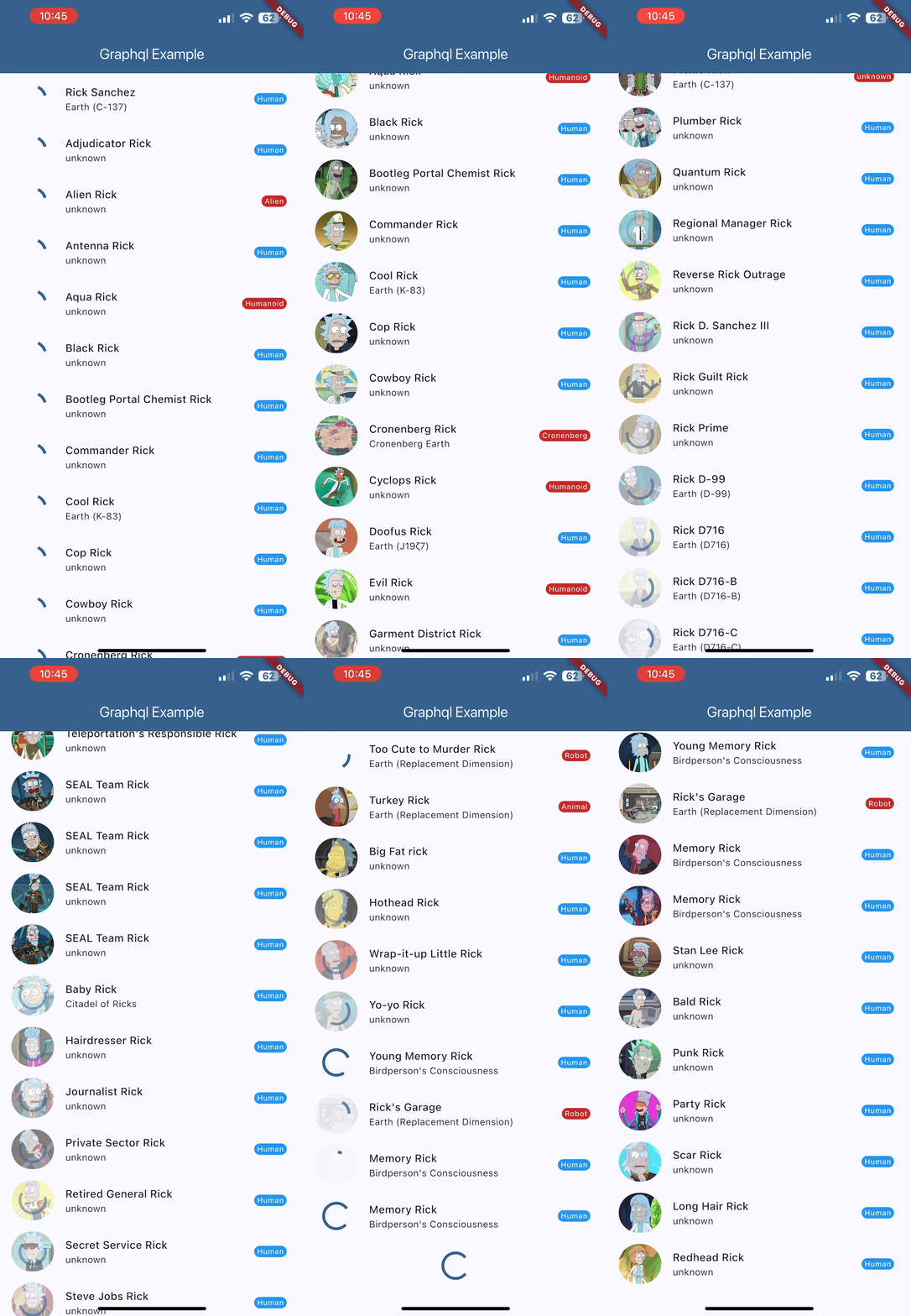
We'll create a Flutter app that demonstrates GraphQL's power through a practical example:

App Features:
- Character List: Fetch Rick and Morty characters using GraphQL queries
- Response Caching: Cache GraphQL responses for better performance
- Infinite Pagination: Load more characters as user scrolls
- Image Caching: Cache character images to reduce network calls
- Loading States: Show progress indicators for both API calls and image loading
- Error Handling: Gracefully handle network failures
For development purposewe will bypass certificate checking for emulator/development environment
This implementation showcases GraphQL's efficiency — we fetch exactly the data we need (name, image, species, origin) in a single query, rather than multiple REST calls.
Demo API: Rick and Morty GraphQL
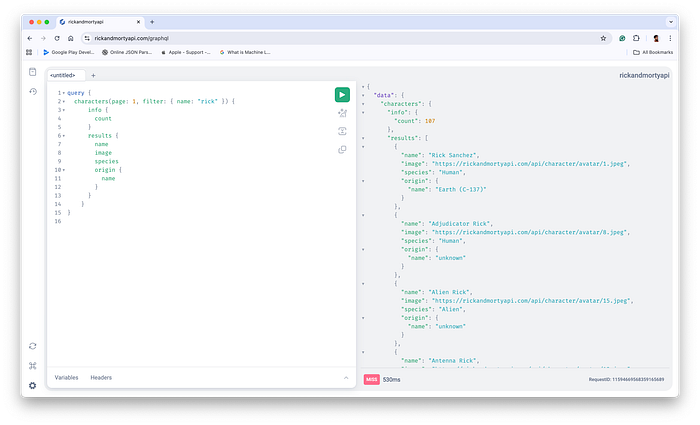
For this tutorial, we'll use the Rick and Morty GraphQL API, which provides a perfect playground for learning GraphQL concepts.
API Endpoint: https://rickandmortyapi.com/graphql
This API includes a GraphQL playground where you can test queries interactively. The playground shows you the schema, available queries, and lets you experiment with different data requests before implementing them in your Flutter app.
Required Dependencies
Add these packages to your pubspec.yaml:
graphql: ^5.2.1
cached_network_image: ^3.4.1
http: ^1.5.0
Package purposes:
graphql: Provides the GraphQL client and query functionalitycached_network_image: Handles image caching and loading with placeholder supporthttp: HTTP client for network requests (required by the GraphQL package)
Implementation Guide
Step 1: Development Setup
First, we'll set up HTTP overrides to handle self-signed certificates in development environments:
import 'package:flutter/material.dart';
import 'package:graphql/client.dart';
import 'package:http/io_client.dart';
import 'dart:io';

void main() {
  HttpOverrides.global = MyHttpOverrides();
  runApp(const MyApp());
}

class MyHttpOverrides extends HttpOverrides {
  @override
  HttpClient createHttpClient(SecurityContext? context) {
    return super.createHttpClient(context)
      ..badCertificateCallback =
          (X509Certificate cert, String host, int port) => true;
  }
}
This setup is particularly useful when working with emulators or development environments that might have certificate issues.
Step 2: GraphQL Client Configuration
Next, we'll configure the GraphQL client:
final httpLink = HttpLink(
      'https://rickandmortyapi.com/graphql',
      httpClient: httpClient,
    );

// Initialize GraphQL client with caching
final client = GraphQLClient(
      cache: GraphQLCache(),
      link: httpLink,
    );
The GraphQLCache() automatically handles response caching, improving performance by avoiding redundant network requests.
Step 3: GraphQL Query Implementation
Now, let's implement the core GraphQL query logic and pagination logic:
class _ItemListScreenState extends State<ItemListScreen> {
  final ScrollController _scrollController = ScrollController();

  List<Map<String, dynamic>> items = [];
  bool isLoading = false;
  bool hasMore = true;
  int currentPage = 1;
  final int pageSize = 20;

  Future<void> _fetchItems() async {
    setState(() => isLoading = true);

    // Define the GraphQL query
    final query = gql("""query {
      characters(page: $currentPage, filter: { name: "rick" }) {
        info {
          count
        }
        results {
          name
          image
          species
          origin {
            name
          }
        }
      }
    }""");

    // Execute the query
    final result = await widget.client.query(
      QueryOptions(document: query),
    );

    // Handle errors
    if (result.hasException) {
      debugPrint(result.exception.toString());
      setState(() => isLoading = false);
      return;
    }

    // Process results
    final fetched = List<Map<String, dynamic>>.from(
      result.data?['characters']['results'] ?? [],
    );

    setState(() {
      currentPage++;
      items.addAll(fetched);
      isLoading = false;
      if (fetched.length < pageSize) {
        hasMore = false;
      }
    });
  }
}
Notice how the GraphQL query specifies exactly what data we need: name, image, species, and origin.name. We don't fetch unnecessary data, making our app more efficient.
Step 4: Infinite Scroll Implementation
Add pagination through scroll detection:
@override
void initState() {
  super.initState();
  _fetchItems();

  // Listen for scroll events
  _scrollController.addListener(() {
    if (_scrollController.position.pixels >=
            _scrollController.position.maxScrollExtent - 200 &&
        !isLoading &&
        hasMore) {
      _fetchItems(); // Load next page
    }
  });
}
This creates a smooth infinite scroll experience, loading new data when the user approaches the bottom of the list.
Step 5: UI Implementation with Cached Images
Finally, let's build the UI components:
@override
Widget build(BuildContext context) {
  return Scaffold(
    appBar: AppBar(
      title: const Text(
        "GraphQL Example",
        style: TextStyle(color: Colors.white)
      ),
      backgroundColor: Theme.of(context).primaryColor
    ),
    body: ListView.builder(
      controller: _scrollController,
      itemCount: items.length + (hasMore ? 1 : 0),
      itemBuilder: (context, index) {
        // Show loading indicator at bottom
        if (index >= items.length) {
          return const Padding(
            padding: EdgeInsets.all(16.0),
            child: Center(child: CircularProgressIndicator()),
          );
        }

        final item = items[index];
        return ItemTile(item: item);
      },
    ),
  );
}
And the custom item tile with cached images:
class ItemTile extends StatelessWidget {
  final Map<String, dynamic> item;

  const ItemTile({super.key, required this.item});

  @override
  Widget build(BuildContext context) {
    return ListTile(
      leading: ClipRRect(
        borderRadius: BorderRadius.circular(36),
        child: CachedNetworkImage(
          imageUrl: item['image'],
          width: 60,
          height: 60,
          fit: BoxFit.cover,
          placeholder: (context, url) => const SizedBox(
            width: 60,
            height: 60,
            child: Center(child: CircularProgressIndicator()),
          ),
          errorWidget: (context, url, error) => const Icon(Icons.error),
        ),
      ),
      title: Text(
        item['name'] ?? '',
        style: Theme.of(context).textTheme.titleMedium,
      ),
      subtitle: Text(
        item['origin']['name'] ?? '',
        style: Theme.of(context).textTheme.bodyMedium,
      ),
      trailing: Badge(
        label: Text(item['species'] ?? ''),
        backgroundColor: item['species'] == 'Human'
          ? Colors.blue
          : Colors.red.shade800,
      ),
    );
  }
}
The CachedNetworkImage widget automatically handles image caching, placeholder display during loading, and error states.
App Demo
GraphQL Limitations to Consider
While GraphQL offers significant advantages, it's important to understand why it's not universally adopted:
1. Maintenance Complexity
GraphQL requires a deeper understanding of query optimization and schema design. Poorly written queries can impact performance, and developers need to learn GraphQL-specific concepts like query depth limiting and complexity analysis.
2. Learning Curve
Moving from REST to GraphQL requires a mindset shift. Developers need to think in terms of graphs and relationships rather than simple request-response patterns.
3. Caching Complexity
While GraphQL offers powerful caching capabilities, implementing effective caching strategies can be more complex than traditional REST endpoint caching.
Despite these considerations, GraphQL's benefits often outweigh the learning curve, especially for complex applications with diverse data requirements.
Github Link
https://github.com/qureshiayaz29/GraphQL-sample
Conclusion
GraphQL provides a powerful and efficient way to fetch data in Flutter applications. Through our Rick and Morty character list example, we've demonstrated how to:
- Set up a GraphQL client with caching
- Write efficient queries that fetch only required data
- Implement infinite scrolling pagination
- Handle loading states and errors
- Cache images for better performance
The key advantages — precise data fetching, reduced network overhead, and frontend independence — make GraphQL particularly valuable for complex Flutter applications with diverse data requirements.
While GraphQL has a learning curve, the investment pays off through improved app performance and more efficient development workflows. Consider adopting GraphQL when your app requires flexible data fetching and you want to minimize unnecessary network traffic.
Start with simple queries like we've shown here, and gradually explore more advanced GraphQL features as your application grows in complexity.