Datacenter Proxies: How They Work and What to Check Before Buying
buy datacenter proxiesDatacenter proxies for scrapers and multi-account software: a pool of private datacenter proxies with HTTP, HTTPS and SOCKS5 on one access.
Datacenter proxies are IP addresses owned by hosting companies and server networks. Your software sends each request through one of them, and the target site sees the server address in place of yours. They are fast, cheap per thread and easy to buy in volume, which is why scrapers and account farms push most of their traffic through them.
Buyers usually run into the same questions after paying: how many addresses the plan really gives, how they rotate, what the seller counts against the limit, and what to do when one IP starts getting captchas.
How a datacenter proxy server works
A datacenter proxy server is a machine in a hosting network that accepts your connection on a port, checks your login or your IP and opens the connection to the target site from its own address. The site never talks to your computer directly. For HTTPS the proxy only builds a tunnel, so the page content stays encrypted between your program and the site.
One server can carry many addresses, and a provider with a large pool spreads them across thousands of subnets. Sites that limit traffic often count requests per subnet, so the spread matters more than the raw count: 10,000 addresses packed into a few ranges behave like a much smaller pool.
Access is checked in one of two ways. A login and password in the proxy line works from any network. A whitelist binds access to the IP of your own server, so the proxy accepts its connections without credentials and nothing secret sits in the config.
Speed comes from the network itself. Hosting networks have wide channels and short routes to large sites, so a datacenter address holds hundreds of parallel threads without dropping connections.
Rotating datacenter proxies
Rotation means each request, or each session, goes out through a different address. Some sellers rotate on their side behind one entry point. Others hand you the whole list behind a link, and your software picks addresses itself. The list approach gives you more control: you decide how long a session keeps its IP, where a retry goes and which addresses to drop after an error.
Sessions need a different rule. A scraper that logs in, or walks through pagination with cookies, should keep one address for the whole session and switch only when the session ends. Many jobs mix both modes in one tool: catalog pages rotate on every request, while account actions stay on one IP until logout.
Most scraping tools accept a list link directly. In your own Python code a few lines are enough:
import itertools, requests

LIST_URL = "your list link from the dashboard"
proxies = requests.get(LIST_URL, timeout=20).text.split()
pool = itertools.cycle(proxies)

for url in urls:
    p = next(pool)
    try:
        r = requests.get(url, proxies={"http": "http://" + p, "https": "http://" + p}, timeout=15)
    except requests.RequestException:
        continue
The list behind the link refreshes on the provider side, so a script that reloads it every 15 minutes always works with live addresses. Keep the timeout short and send a failed request to the next address in the cycle, since a retry on the same IP only wastes a thread.
Datacenter proxies with unlimited bandwidth
Pricing usually follows one of two models. Per-gigabyte plans charge for traffic, so the bill grows with every heavy page, image and retry. Unlimited plans charge for threads, meaning how many connections you keep open at once, and the traffic inside them is not counted.
For scraping, the thread model is easier to plan. A product catalog with images can weigh several megabytes per page, and a crawl of a few hundred thousand pages turns into hundreds of gigabytes. With unlimited datacenter proxies the cost stays the same whether the job downloads 50 GB or 2 TB, and you size the plan by the number of threads your software opens.
Shared datacenter proxies and private ones
A shared plan gives the same addresses to several buyers at once, which lowers the price per IP. A private pool goes to a limited group of clients and stays out of public lists, so far fewer people shape the history of each address.
You feel that history in the first minutes of a run: on logins, search result scraping and other jobs that meet captchas early, a private pool means fewer retries before the job settles into its normal pace.
Free datacenter proxies
Free lists collect open proxies found by port scanners and post them for anyone to download. Thousands of people use the same addresses, a large share stops responding within hours, and the operator of an open relay can read unencrypted traffic and see every site you connect to.
Under a scraper running a few hundred threads such a list falls apart fast, and any login made through it puts the account at risk. Time spent filtering dead lines usually costs more than a paid plan.
Best datacenter proxies: what to check
Before paying, look at the number of addresses online at a time, how many subnets they come from, which protocols work on one access, whether traffic is capped and how the list reaches your software. Ask for a trial, because a pool that looks big on a sales page may hold only a few hundred live IPs at any moment.
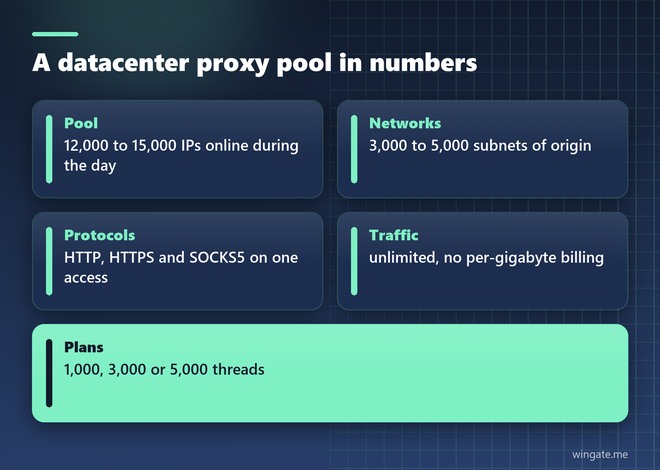
WinGate sells a private IPv4 pool with 12,000 to 15,000 addresses online during the day, spread over 3,000 to 5,000 networks. The list behind your link updates every 15 minutes. HTTP, HTTPS and SOCKS5 share one access, traffic has no limit, and plans come in 1,000, 3,000 and 5,000 threads. You can connect with a login and password or add up to two IPs to the whitelist, and crypto payment is accepted.
The free test runs for up to 2 hours. Paste the list link into your scraper, start at a third of the planned thread count and watch the log for timeouts and captchas. When the error rate stays flat, raise the threads and launch the full job.