Curl HTTP Proxy: The -x Flag, Login, Variables and Error Codes
buy socks5 proxy serversCurl HTTP proxy setup takes one flag, and the same command checks data center rotating proxies from a list before you load them into real software.
Curl HTTP proxy support is built into every curl build: the -x option, or its long form --proxy, takes the proxy address, and curl sends the request through it. The same option accepts SOCKS4 and SOCKS5 addresses, so one tool is enough to test any proxy you buy before it goes into a scraper or a browser.
Most failures come from small details: a missing scheme, a password with special characters, or a variable set in the shell that curl picks up without saying so.
The -x option and proxy schemes
The value of -x has the form scheme://host:port. The scheme tells curl how to talk to the proxy, and it has nothing to do with the site you request. With http:// curl speaks plain HTTP to the proxy and still fetches https:// pages, because it asks the proxy to open a tunnel with the CONNECT method and runs TLS through that tunnel to the site.
Leave the scheme out and curl assumes http://. Use https:// when the proxy itself expects a TLS connection, which curl supports since version 7.52. Use socks5:// for SOCKS5 with name lookups on your machine, or socks5h:// to let the proxy resolve the site name, so your local DNS server never sees which hosts you visit.
curl -x http://IP:PORT -U LOGIN:PASS https://api.ipify.org
curl -x socks5h://LOGIN:PASS@IP:PORT https://api.ipify.org
curl -x https://IP:PORT -U LOGIN:PASS https://api.ipify.org
curl -v -x http://IP:PORT -U LOGIN:PASS https://example.com -o /dev/null
The first three lines print the IP that the site sees, so a working proxy shows its own address. The last line prints the whole conversation, which is the fastest way to see where a setup breaks.
Login and password for the proxy
Credentials go in -U login:password, or its long form --proxy-user, or straight into the proxy URL as login:password@host. The separate flag is easier to read and keeps the password out of the address. Lowercase -u is a different option: it sends credentials to the site itself.
Passwords with symbols need care inside a URL. An @ must be written as %40, a colon as %3A and a slash as %2F, otherwise curl splits the address in the wrong place. With -U the encoding is not needed, which is one more reason to use it.
Linux HTTP proxy for the whole shell
On Linux and macOS curl reads proxy settings from environment variables. http_proxy covers plain HTTP requests and must be written in lower case: curl ignores the upper case HTTP_PROXY on purpose, to stop a web request header from setting a proxy through CGI. https_proxy or HTTPS_PROXY covers HTTPS, ALL_PROXY covers everything, and NO_PROXY lists hosts that should go direct.
A line such as proxy = "http://IP:PORT" in the ~/.curlrc file makes the setting permanent for your user. When a request suddenly goes through a proxy you did not expect, check these places first, and use --noproxy "*" to skip all of them for one command.
Reading curl -v output and error codes
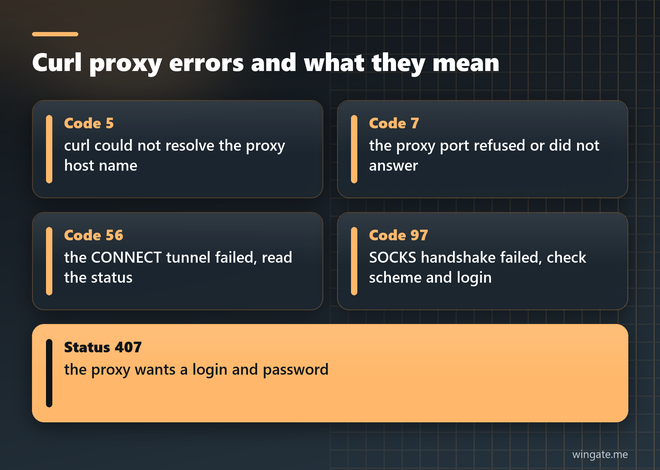
With -v curl reports whether it took the proxy from a variable, the CONNECT request it sends for an HTTPS site and the status the proxy returns. A 200 there means the tunnel is open and everything after it is between you and the site. A 407 means the proxy wants credentials, or the ones you sent are wrong.
The return code tells the rest. Code 5 means curl could not resolve the proxy host name. Code 7 means the proxy port did not accept the connection, so check the address, the port and whether your current IP is on the whitelist. Code 56 often comes with the text CONNECT tunnel failed, and the status after it shows why. Code 97, added in curl 7.73, points to a failed SOCKS handshake, usually a wrong scheme or wrong credentials.
HTTP proxy vs SOCKS proxy in curl
For HTTPS sites the two behave almost the same: an HTTP proxy opens a tunnel and a SOCKS proxy relays the connection, and in both cases the page stays encrypted end to end. The difference shows with plain HTTP. An HTTP proxy receives the full URL and forwards the request itself, while a SOCKS proxy only moves bytes. Add -p, the long form being --proxytunnel, to make curl use a CONNECT tunnel through an HTTP proxy for plain HTTP as well.
Speed is about the same for both on the same server. Many sellers open HTTP and SOCKS5 on one access, so the choice becomes a scheme in the command.
Checking a whole list in parallel
A private proxies list usually holds hundreds or thousands of lines, and testing them one by one takes too long. xargs runs 20 checks at once and prints the status code, the total time and the address for every line:
xargs -P 20 -I{} curl -s -m 10 -x http://{} -o /dev/null \
  -w "%{http_code} %{time_total} {}\n" https://example.com < list.txt | sort
Lines with 200 and a time under a second or two are ready for work. A code of 000 means curl got no answer at all within ten seconds. When most of a fresh list shows 000, the format is usually wrong, for example a list with logins checked as plain IP:PORT, or your IP is missing from the whitelist.
Free http proxy list or a private pool
Free lists are collected by scanners and shared with everyone who downloads them. A large share of the lines stops answering within hours, the rest carry traffic from strangers, and the owner of an open relay sees every plain HTTP request that goes through it. They are good enough to practise the flags above, and daily jobs on them stall on dead lines.
WinGate sells a private IPv4 pool with 12,000 to 15,000 addresses online during the day across 3,000 to 5,000 networks, and the list behind your link updates every 15 minutes. HTTP, HTTPS and SOCKS5 share one access, traffic is unlimited, and plans start at 1,000 threads. The free test lasts up to 2 hours, enough to run the list check above against your own targets.