Creating multiple PayPal accounts
Tirlu Ambasador1.Preparations:
1.1. Buy 1-5 SIM cards with mobile internet. Depending on how many PP accounts you plan to work on at once. We need SIM cards with Internet to change the IP, as well as to distribute Internet to a computer or tablet.
1.2. Download any browsers to your computer (Google Chrome/Mozilla Firefox/Opera/Brave Browser, etc.). You need just use one PayPal account per browser. You have to download one browser for each PayPal account you create.
Here are the download links for the browsers I can suggest. https://www.google.com/chrome
https://www.mozilla.org/en-US/firefox/new/
You can also find some more internet browsers here: https://www.techradar.com/best/browser
1.3. Make sure to use a mobile phone (an iPhone or an Android phone). Insert a new SIM card into the phone. We will use it as a WiFi hotspot. Take note that to change your IP address, turn the flight mode on and then wait for about 3-5 minute before turning it back off and then turn the mobile data on, that will always change your IP address. Note that turning on flight mode turns off both mobile data and mobile hotspot, meaning, your computer gets disconnected to the WiFi hotspot on your phone.
2. Creating email accounts:
2.1. Go to https://accounts.google.com/SignUp?hl=en on your browser (I suggest you use only one browser for this one, we don’t need to switch IPs or MAC addresses to access our email).
2.2. You can proceed to create an account there. You can create as many accounts as you want. Just make sure to go to https://accounts.google.com/SignUp?hl=en everytime you want to sign in. Also, you can just use your real name here many times and phone number is not required.
3. Creating PayPal accounts:
Go to https://www.paypal.com go to signup:

Then select Personal Account. If you’re going to create multiple accounts, it is better that they are personal. Because oftentimes, PayPal will ask for identity verifications (your ID) and if you’re on a business account, they will also ask for a proof of business registration. When entering your name, change just one letter from your name. Example, my name is “Juan dela Cruz”. In my next account, I will name it “Juan de la Cruz” (I added a space), Juan La Cruz and so on. Use the email account we created on the previous step.


3.1 . After entering your mobile number, you will have to fill up your details.
You will receive a confirmation email. Be sure to click on that link they will give you via email:

For a successful trade the minimum condition is that your PayPal account has to be:
- exist;
- fully verified (by email address, phone number, credit card, bank account and so on);
- able to receive international payments.
Well, if you have done everything your PP account is created and ready to work.
Next, you know what to do.
Find a service where you can buy LTC and you can start trading. I recommend you to trade in LTC, because the profit in it is much higher than in BTC.
Bind a service to withdraw funds from Paypal. In the Philippines you can withdraw funds from Paypal via Gcash, Paymaya or directly to your bank account, but it will take 1-3 days.
4. Creating multiple PayPal accounts:
4.1. So you’ve created your first PayPal account.
4.2 Go to your phone and turn flight mode on (this will always change the IP address and will disconnect your computer from WiFi mobile hotspot).
4.3. Prepare your new SIM cards. Note that you don’t have to use mobile data on these SIM cards. You only need them during registration for receiving the code from PayPal. Nothing else is needed of these SIM cards other than registration and when you need to call customer service.
4.4. Wait for about a 1-3 minutes and turn off the flight mode. Turn on your mobile data and mobile hotspot and connect your computer to your phone’s WiFi hotspot again.
4.5. Open another browser. For example, you’ve created your first PayPal account using Google Chrome, then you have to use, say, Firefox for your next PayPal account.
4.6. Repeat the steps on creating a second PayPal account.
4.7. You can buy one sim card for each PayPal account because phone number is required in signing up.
5. Working with holds:
- PayPal can put funds on hold balance if your account is fresh and without transaction history as seller or it hasn't been active in a long time. In some countries, this hold is automatic.
- If that happens, you just have to wait until PayPal releases your money. Asking for confirmation of payment for quick release makes no sense, because Tirlu does not confirm payments, and to correspond by email with the senders threatens to get a ban on Tirlu and not closed trades.
- Start with just $20 transactions, and then skip a day. Do this pattern for about 2-3 weeks. Then you could start increasing your transaction amounts to about $35 for 2-3 weeks. This is a slow process and oftentimes, PayPal will hold your money. Just wait for them to release it.
- It is also important not to have transactions if you have a hold. That will just increase the chance of PayPal permanently limiting your account sooner.
6. How to speed up the process of getting money out of the hold:
If you have a money on hold, you can get your funds sooner.
Just select that the product is a service or virtual product (piano lessons, videos, course on nutrition, marketing tips etc.). This will make PayPal think that you’re selling digital goods and not tangible products. Please note that even though PayPal says you can get your funds sooner, it’s still gonna end up getting on hold for 21 days.


After you have done this you just have to wait.
7. Working with PayPal temporary limitation (Proof of receipt from your supplier, Provide shipment information, Proof of fulfillment, Provide information about account activity):
From time to time, PayPal will ask you to verify your identity. That’s why you need to change just one letter in your name so that you can re-use 1 ID multiple times. Don’t worry, as long as your account name is close to your real name, you will successfully be verified.
If you have the opportunity to solve the problem and do not write to the support - use it. Sometimes Paypal gives you the opportunity to fill out a form or just answer questions - take advantage of this opportunity first.
They may also ask you for some kind of document with all the payments and services you provided - I recommend you to keep a record of all the payments. Make Google Docs or Excel, where you will keep a record of all the payments you received. It may contain the following information: 1) date, 2) full name of the sender, 3) the amount, 4) service you provided (remember your "Legend". Describe in your own words the service you provided) 5) Invoice ID. You use it if Paypal asks you to
7.1. Proof of fulfillment.
When Paypal asks you for Proof of fullfillment you get the following message.
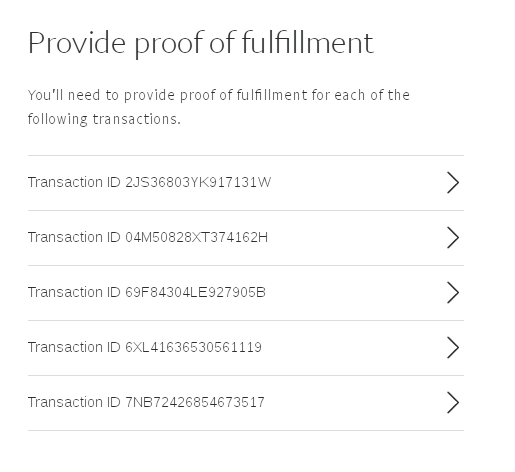
Then you select each individual order and see what Paypal gives you. For example, it could be like this.
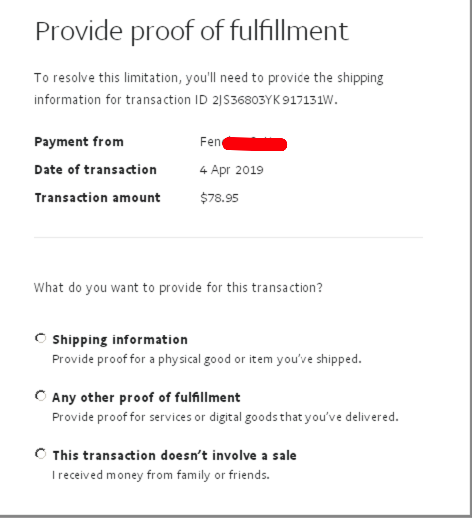
Since Tirlu sends payments as "Goods and Services", we can only confirm through the method - "Any Other Proof of Fulfillment". You choose it and describe your legend that you have chosen.
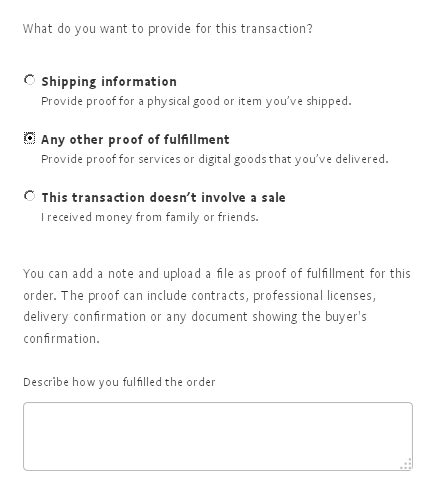
For example, that you are a marketer and have prepared a competitor analysis. Or you are a fitness trainer and have sent a client a training program for a month. You can use any "legend" that you can describe and somehow prove. For each Paypal account, there should be a different "legend" and it is very desirable that they are all different.
7.2. Provide information about account activity.
You may also be asked by Paypal to Provide information about account activity. You will get a blank field next to each transaction like this.
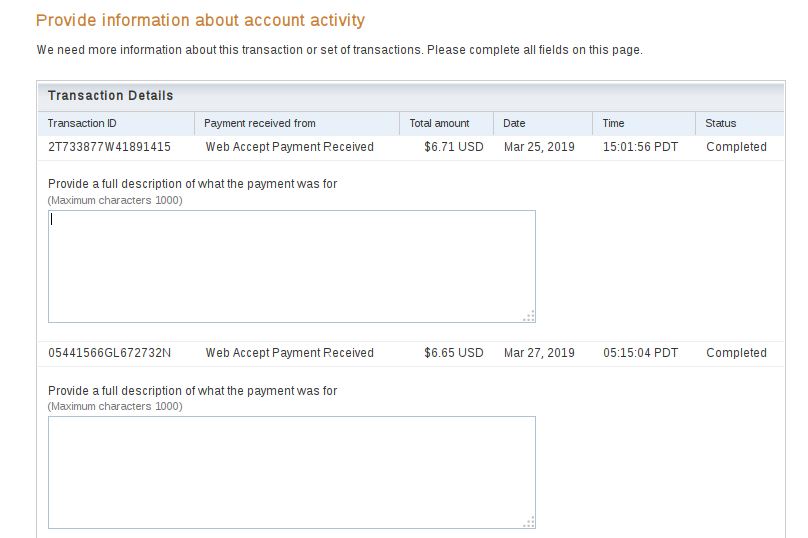
You need to do the same thing as last time. Describe, according to your legend, exactly what you provided to the buyer and what you received payment for.
I recommend that you keep a record of all payments in a separate document to make it easier to respond to each transaction, and that you have your answer prepared in advance.
7.3. If PayPal asks you to provide Proof of receipt from your supplier(or Provide shipment information etc). First, try filling out the form like I provided above. If that doesn't work - you can chat with the customer service or call them. You can tell them that you can’t provide proof of receipt from your supplier because you sell digital goods/services and not tangible items (Remember that each account must have its own legend).
- Also remember that you cannot be told that you are doing crypto-trading with Tirlu, as it contradicts both Paypal and Tirlu policies. Disclosure of this information, for Paypal can be a reason to freeze your payment to Tirlu (this is mentioned in Tirlu's TOS).
- To have a chat with a customer service representative, just click on this icon:

Then it will take you to message center:

If chatting with them doesn’t help, you can call them using the SIM card you used for registration in your account. To do that, click contact us:

Then scroll through the bottom, and you can find this button:

Then follow the instructions below:

Take note of the time when calling. Due to pandemic, most of the time, it will tell you that a customer service agent is not available, then you have to call again some other time.
8. Important notes:
- Use only one PayPal account for each browser. If you have logged in one PP account to, let’s say, Google Chrome, do not log in other PP accounts into that browser.
- It is important to remember that you don’t need to have a “fixed IP and MAC addresses” for each account. As long as you don’t use the same IP and MAC address and browser when logging in different accounts, you’ll be fine. You can use one SIM card for mobile data as long as you turn flight mode on and off when you need to switch PayPal accounts.
- Do not login multiple PayPal accounts simultaneously. Even if you use different browsers, do not ever open your accounts simultaneously. If you need to login to another PayPal account, close the browser that is currently logged in to one account, turn flight mode on and off on your mobile, change the SIM card, and then open the browser associated to that PayPal account you want to login to.
- Wait for about 7 days for your new accounts to receive payments.
- Take note also that it takes 60 days for PayPal to trust your account. Why? Because PayPal thinks you are now a seller. So it is good to start consistently.
- After you have built your trust on PayPal like verified seller, you can do $50-60 per transaction.
- We recommend you to write down in a file all the data that you are using for each PayPal account (Email, password, name, surname, address, city, province, telephone, etc., and also the first IP you use when registering). Absolutely everything. We never know where PayPal is going to get us with its checks. So better be prepared.
- ALWAYS check your IP before entering PayPal, email or browser.
- If we follow the guidelines for creating accounts and mastering the recommendations for IPs and Cookies, we can have as many accounts as we want. Each account will generate a unique history in the eyes of PayPal, and PayPal will believe that each account belongs to completely different users. So the risk that our accounts are linked and that they all limit them at the same time will be considerably reduced.
- IP & Cookies. If there is an important issue, it is undoubtedly something, the IP and cookies. This is where most of the errors appear. It's easy to get confused and "mix up" the accounts. PayPal will list all “mixed” accounts and all will be permanently limited.
9. Withdrawing funds from PayPal using multiple accounts at the same time:
In the Philippines you can withdraw funds from Paypal via Gcash, Paymaya or directly to your bank account, but it will take 1-3 days.
You can do as you see fit. If Gcash allows you to make 3 accounts with the same ID data - do so. Or for each PP account, you can use a separate service for the withdrawal. Or you can do Gcash for a friend, relative, girlfriend, boyfriend, mom or dad. The message I think is clear.
Most likely the same is possible for Paymaya.
Withdraw after, as a MINIMUM, 7 hours since you have received the last payment. If you try to withdraw earlier, you have a higher probability of blocking your PayPal account in the next trades.
Do not withdraw 100% of the PayPal balance. Leave a percentage! (2-5%).
Sometimes PayPal shows a "security error" when trying to withdraw money.
If this happens, make a small purchase on Ebay or Amazon and wait AT LEAST 48 hours before trying again. PayPal has confirmed to us that, if we try before 48 hours, the error will appear again and the time starts again from 0!