Create your own userbot the easy way.
Smooth CriminalCopyright - @iam_vegeta
So you saw some cool stuff on a Telegram chat that you are incapable of doing so. Later you found it's a userbot and you too want this. Then follow this guide step by step to make one for yourself. Again do follow steps carefully.
Prerequisites :-
These are the requirements u need to proceed without this it's not possible.
1)termux app from play store.
Link - https://play.google.com/store/apps/details?id=com.termux
2) A heroku account. Its free.
Link - https://www.heroku.com/
3) A github account. Its free too.
Link - https://www.github.com/
4) API_HASH and API_KEY from my.telegram.org
5) Need patience to read all this.
Now i am assuming you have done all this thing that has been mentioned above.
Steps :-
(Always use desktop mode for below guide in chrome browser)
>> Open termux then copy paste the below commands one by one.
A) pkg install curl git clang python
1)pkg install clang python sqlite python-dev libcrypt-dev libffi-dev openssl-dev libxml2-dev libxslt-dev
2) pip install --upgrade pip
3) pkg install postgresql
4) pip3 install --upgrade telethon
5) pkg install clang python sqlite python-dev libcrypt-dev libffi-dev openssl-dev libxml2-dev libxslt-dev
6) pkg install libjpeg-turbo-dev
7) Pkg install postgresql-dev python-dev make clang
8) pip install psycopg2-binary
9) pip install async_generator
10) pkg upgate
Now open your chrome browser and follow below steps.
1) go to github create a new repo and give repo name. Thts it.
2) now open termux and do this.
git clone --bare https://github.com/baalajimaestro/Telegram-UserBot.git
3) now copy your repo link from github and do
cd Telegram-UserBot.git
git push --mirror your repo link
4) cd
git clone your repo link
cd your repo name
5) pip3 install -r requirements.txt
Now wait it will download some packages. Don't close termux.
6) export API_HASH=your-api-hash
export API_KEY=your-api-id
7) python3 -m userbot
Now it will ask for your mobile number give it with your country code like
+911234567891
Then type OTP and done.
Now you have successfully created your own userbot test it by typing .alive
Deploy to heroku
8)after successfull login it will generete a session. Do this
curl --upload-file ./userbot.session https://transfer.sh/userbot.session
This will give you a link open it and download userbot.session
9) now open your github upload that userbot.session file in your github repo and make sure it's a private repo. Else RIP.
10) open heroku create a new app. Use desktop mode.
11) now open the app go to setting tab. Now see the below pic and make same for you too.
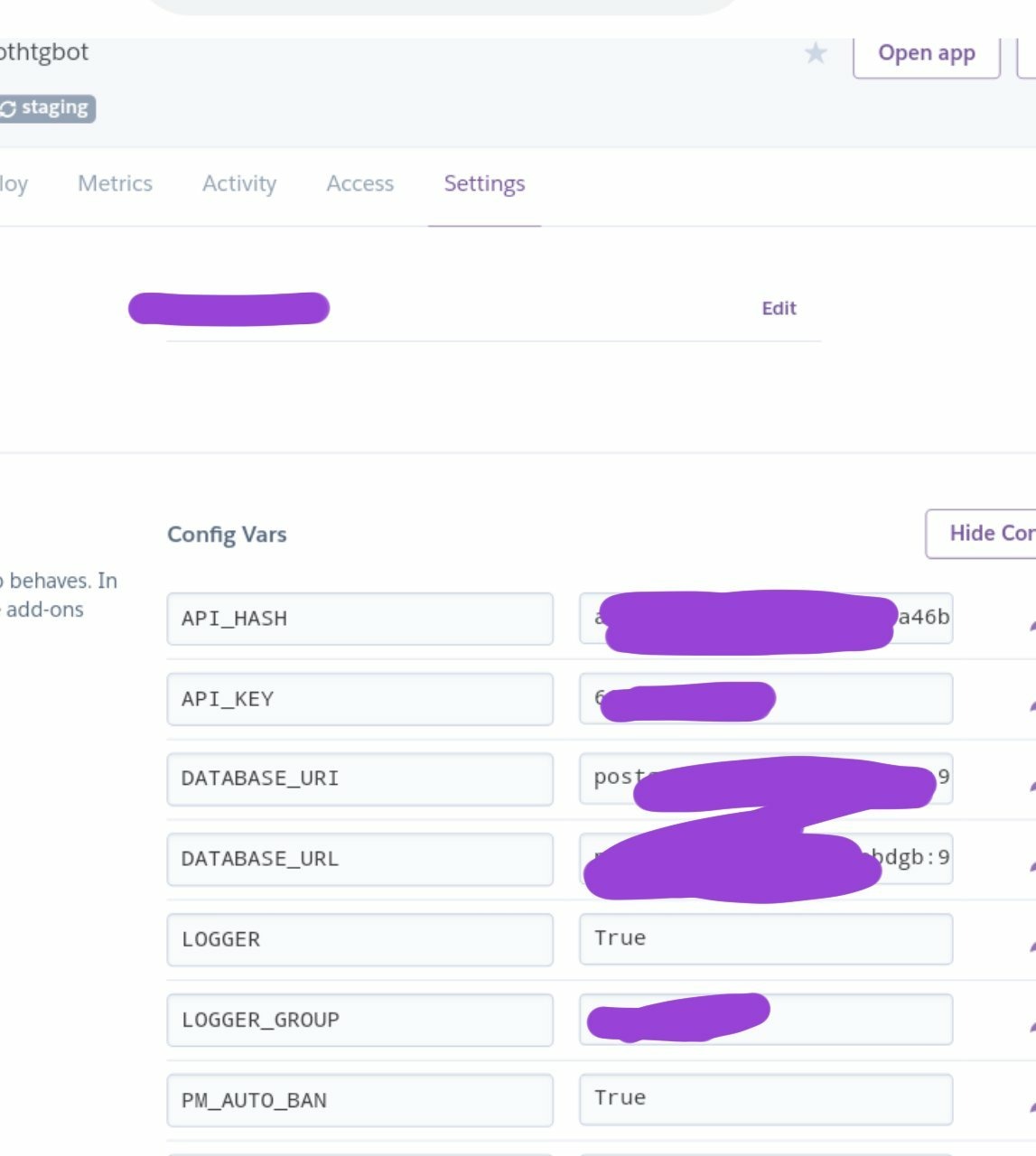
12)now come to deploy tab connect your github account then click on deploy button.
13) that's it. Send .alive to test.