Counter Trading: A Smarter Way to Exit Large Positions
Art @quadraziDA large market sell can push a token’s price down while your order is filling. If your position is large relative to the available liquidity, that move can take a noticeable bite out of your proceeds.
What is Counter Strategy?
Counter Strategy lets you exit differently. It watches for other traders buying your token and sells smaller portions of your position after qualifying buys arrive. Instead of selling your entire holding at once, you can spread the exit across moments of incoming demand.
That can mean less price impact from your own selling and a better average exit, especially on a thin pool. The benefit can be substantial when buyers keep coming, but the final result still depends on market conditions and execution.
How it works
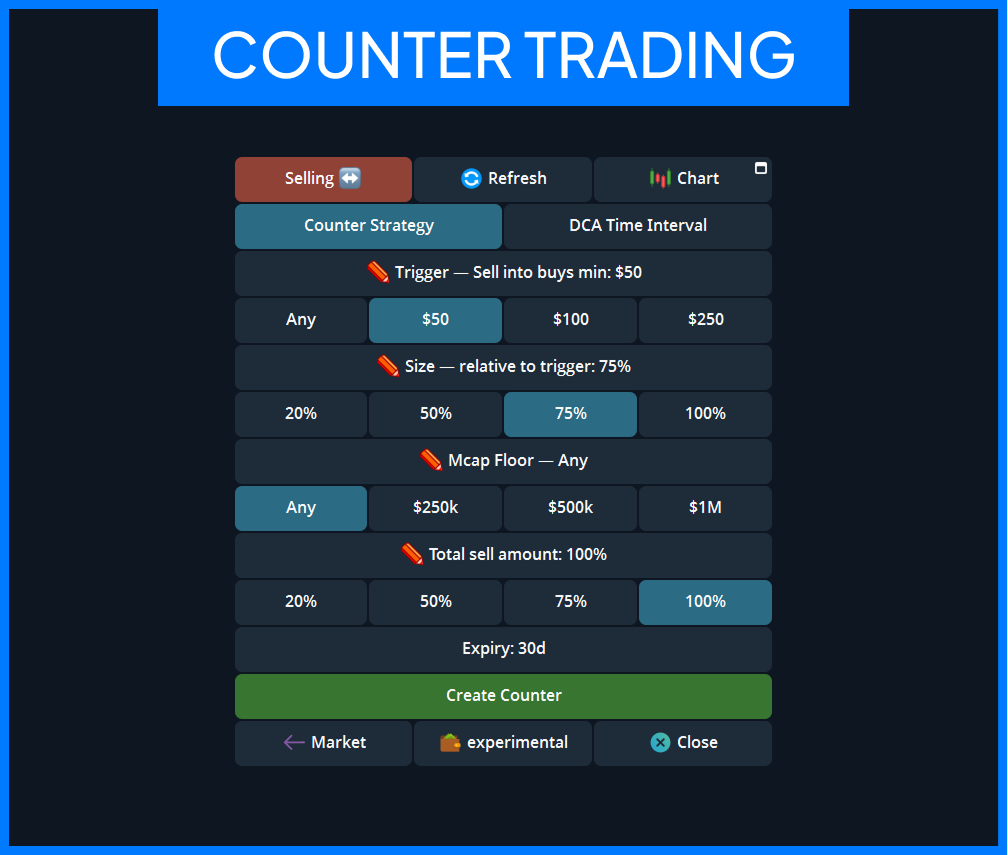
Counter Strategy is a standing sell strategy. You decide which buys it should respond to, how much to sell after each one, and how much of your position to sell overall.
For example, suppose your settings are:
- Trigger: $50 minimum buy
- Size: 75% of each qualifying buy
- Mcap Floor: $250k
- Total sell amount: 50% of your selected position
If another trader buys $200 of the token while its market cap is above $250k, Cove aims to sell $150 worth of your tokens. It can respond to later qualifying buys until the selected share of your position has been sold, the strategy expires, or you cancel it.
The sell is a separate market order after the buyer’s transaction. One qualifying buy can produce one sell from one selected wallet. If you selected several wallets, they take turns.
Set up Counter Strategy
- Open the panel for a token you hold and switch to Sell.
- Check which wallets are selected. These are the wallets the strategy will use.
- Tap Strategy, then Counter Strategy.
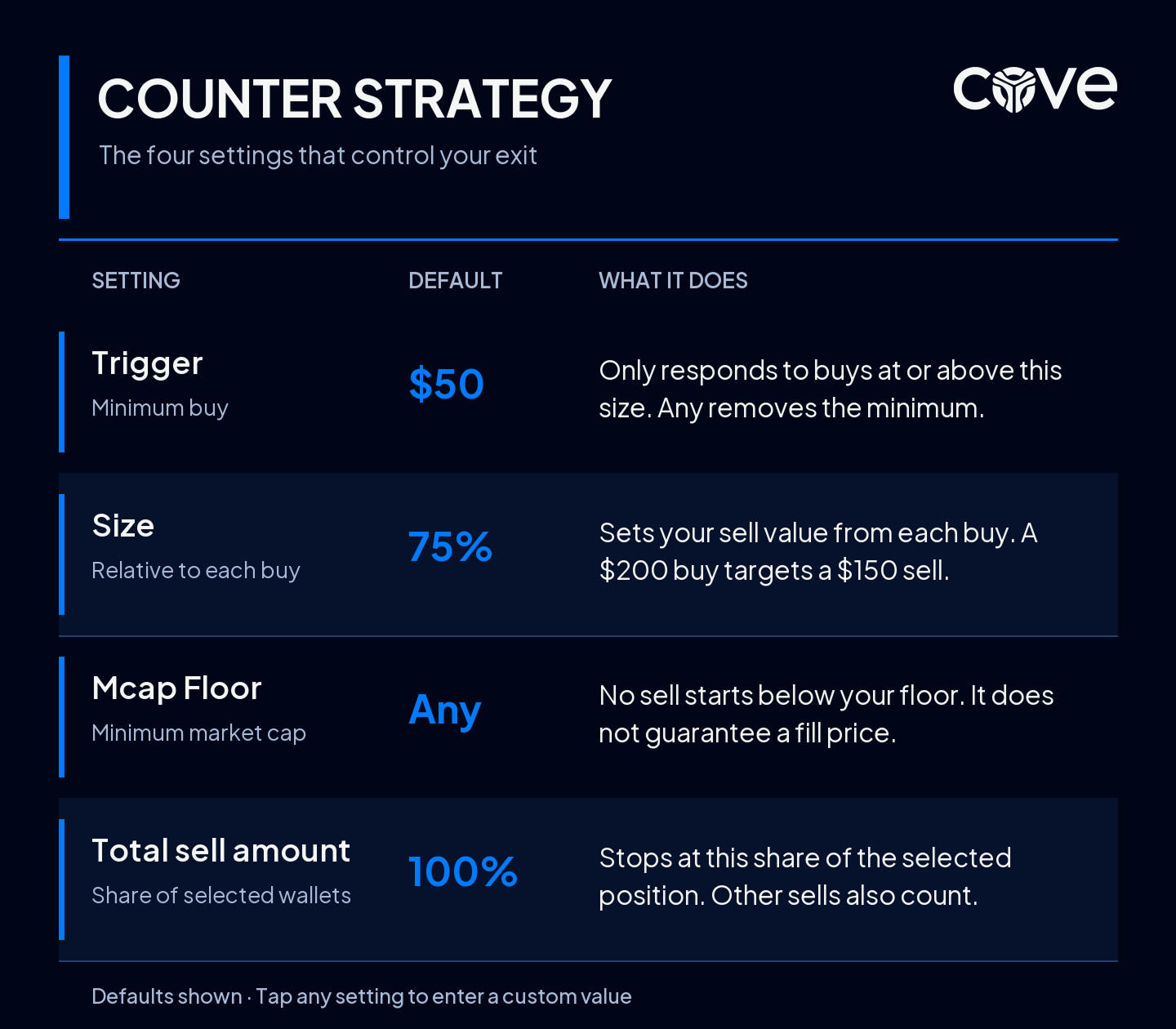
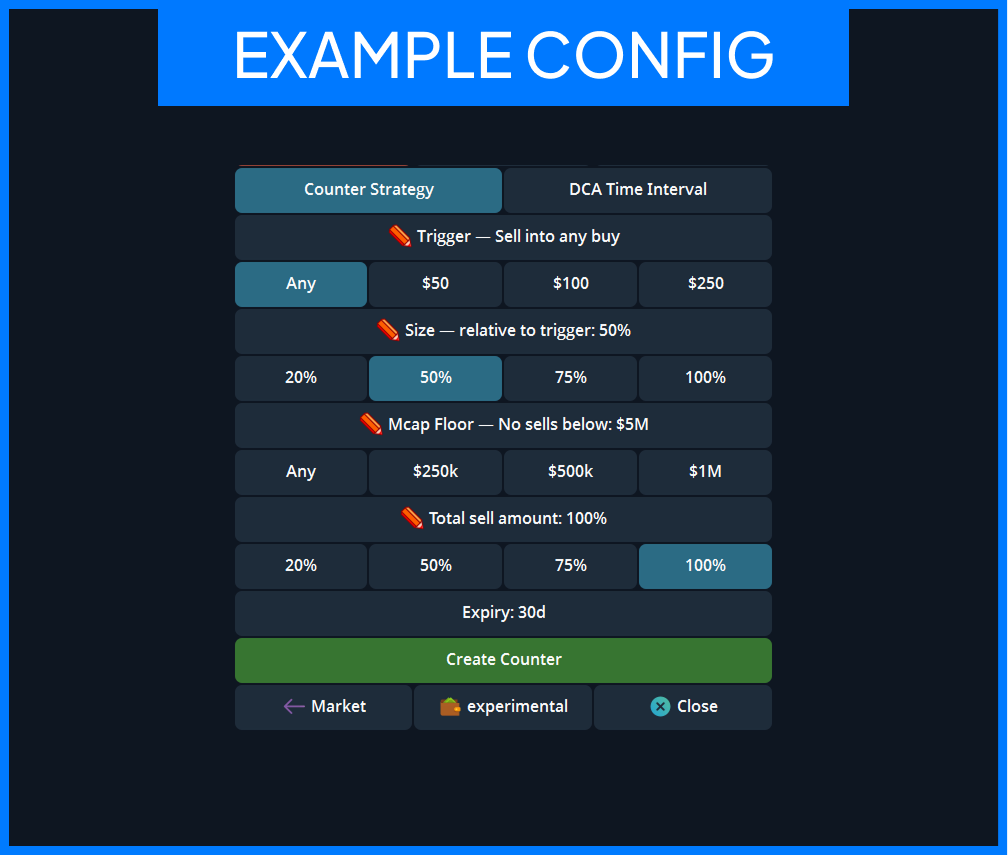
- Set the four values shown below. Tap a preset, or tap a setting’s own row to enter a custom value.
- Check the expiry on the screen. The default is 30 days.
- Read the preview and tap Create Counter.
Choosing your values
Trigger is the smallest buy you want Cove to respond to. It starts at $50. You can choose Any, $50, $100, or $250, or enter your own USD amount. Any considers buys of every size, although a resulting sell that is too small to execute will be skipped.
Size determines the intended value of each sell as a percentage of the actual buy. It starts at 75%. The quick picks are 20%, 50%, 75%, and 100%; a custom whole percentage can be between 10% and 500%. At 75%, a $200 buy targets a $150 sell.
Mcap Floor starts at Any, meaning there is no market cap threshold. You can select $250k, $500k, or $1M, or enter your own value. Cove will not start a sell while the token’s market cap is below your floor. The floor is a condition for triggering the order; it is not a guaranteed fill price.
Total sell amount starts at 100%. Select 20%, 50%, 75%, or 100%, or enter a custom whole percentage from 1% to 100%. This is a share of the combined token position in the selected wallets, rather than a fixed USD amount. Sales you make yourself, or through another order, count toward that share. Buying more tokens into those wallets increases the position the share is calculated from.
Why use it for a large exit?
A single large sell can move the market against you. Counter Strategy gives you a way to work through that position in smaller sells as new buy activity appears. You can set a higher Trigger to wait for larger buyers, use a lower Size to sell less against each buy, and set a Total sell amount if you only want a partial exit.
For a large holding in a thin pool, the difference between one immediate sell and a series of sells during sustained buying can be meaningful. Counter Strategy is designed to give you that opportunity while keeping control over the size and limit of the exit.
It does need buyers to arrive. Creating the strategy alone does not sell anything, and waiting for future buys may mean missing a price you could have taken immediately.
Follow and manage your strategy
After creation, Cove sends a “Counter Sell is Live” message describing the strategy. Tap Open Counter stats to see its status.
When a sell executes, the order message updates with the buy it responded to, what you sold, and the total received from Counter Strategy.
You can also find the strategy under Active Orders on the token panel and tap View details. The stats screen shows the selected wallets, progress, expiry, and available figures such as average Counter exit, Counter PnL, attempted transactions, completed sells, and total received. Tap Refresh to load the latest figures; the open stats screen does not update itself.
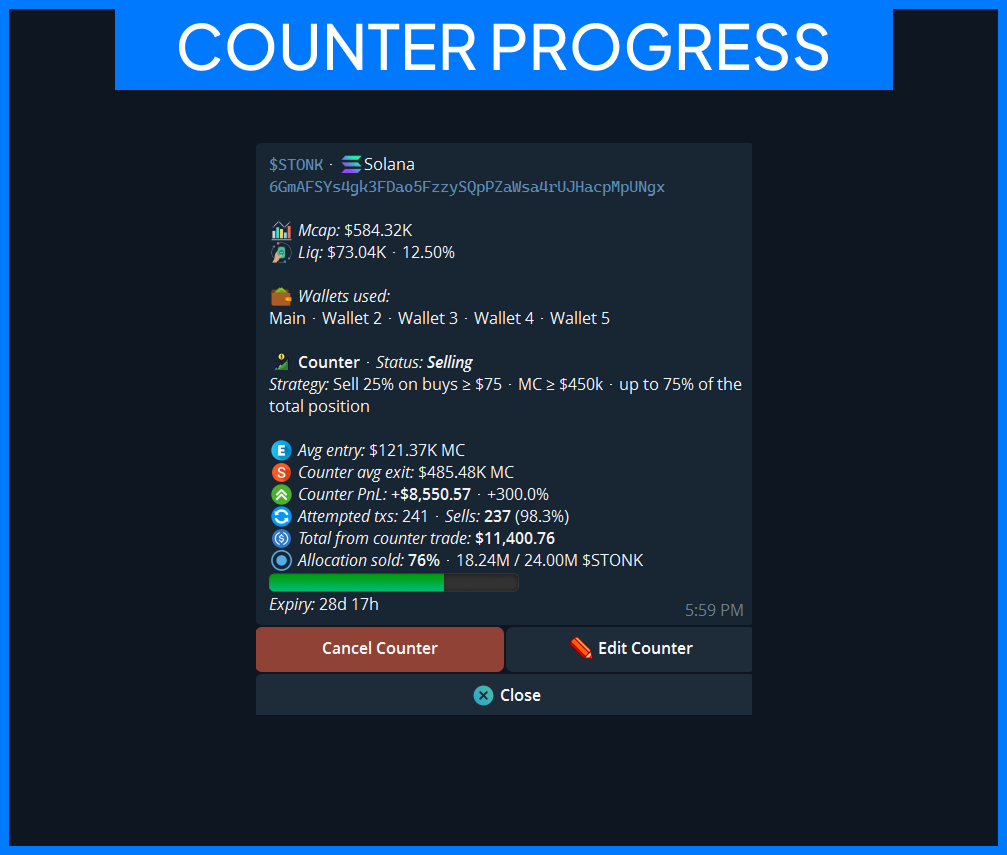
Tap Edit Counter to change Trigger, Size, Mcap Floor, or Total sell amount. On the Edit screen, a preset only changes the values shown there. Tap Confirm changes to save them. The selected wallets are fixed while the strategy runs; changing wallets requires cancelling it and creating a new one.
Cancel Counter stops future sells. Once a strategy finishes or expires, its summary can remain under Active Orders until you tap Dismiss.
Before you start
- The strategy responds to other traders’ buys, not your own.
- It handles one sell at a time. A buy arriving while a sell is executing is not queued.
- It can only respond to buys Cove observes in time. A missed buy does not trigger a later catch-up sale.
- An individual sell may be skipped if it is too small or cannot pass the usual trading checks.
- The actual fill follows the market and your wallet’s slippage settings. A qualifying buy or Mcap Floor does not guarantee a particular execution price.
In short: Counter Strategy helps you sell a large position in controlled pieces as other traders buy, which can make the exit smoother and improve the amount you receive when demand and liquidity cooperate.